Copy a prompt, open ChatGPT (Gemini works too), attach one clear, front-facing photo, paste and generate. What makes a result read as the 1980s rather than a sepia filter is five cues: period hair and clothes, a period setting, period lighting, faded colour and film grain. Start with prompt 1, the all-purpose version, then pick a look. We ran all 16 in ChatGPT: it landed almost every period detail we asked for, spelled a magazine masthead correctly, and kept the face in 17 of the 19 faces across the set — both misses were the woman, in the family-album photo and one couple portrait. For couples, try Gemini too: it kept both faces more often in our earlier face test.
The 1980s photo trend is an AI photo edit, usually done in ChatGPT or Gemini, that restyles a modern selfie as a photograph from the 1980s — period hair and clothes, a studio or family-album setting, faded colour and film grain — while keeping the person’s face. It spread on Instagram in India in September 2026. In our test of 16 such prompts, ChatGPT kept the face in 17 of 19 faces and followed nearly every period cue.
Pipgen hands-on test, 16 prompts in ChatGPT, September 2026; search data from AhrefsWhat the 1980s photo trend is
Updated 25 September 2026. The trend is still moving; we add looks as they appear.
Take an ordinary photo of yourself, ask an AI image editor to turn it into a photograph from the 1980s, post the result. That is the whole trend. It took off on Instagram in India in early September 2026, and news sites were covering it by the 9th. Searches for “1980s photo prompt chatgpt” in India went from effectively zero in August to about 224,000 in September, according to Ahrefs, and “80s look prompt” jumped by almost as much. The trend carries ChatGPT’s name because that is where most people make these edits, but Gemini makes them too. People search for it a dozen ways — “80s trend prompt”, “prompt for 80s photo”, “chatgpt 80s prompt”, “1980s AI photo prompt” — and they all mean this same edit.
Two versions run side by side. The Indian 80s version leans on Bollywood glamour, the family album, weddings and college days. The classic American 80s version is the school photo with a laser backdrop, the mall portrait studio, neon and aerobics. Both are below, along with couple edits, which make up a big share of what gets posted.
What separates a good 80s edit from a bad one is not the prompt’s length but whether it names what a 1980s camera would actually have recorded. “Make it 80s” tends to return a modern photo with a warm tint. The cues that work are in build your own 80s prompt.
What we did and did not test
All 16 prompts are ours, written for this trend — we are not republishing any creator’s prompt. We ran every one of them in ChatGPT on 25 September 2026, pasted verbatim with one of the two reference photos below, in a new chat each time, and kept the first output with no re-rolls. All 16 results are published under their prompts, with a note on whether the face survived. We ran this set in ChatGPT only, the app the trend is named after. The Gemini comparison further down comes from our earlier trend-edit test, which included two retro looks, and from our 90-image benchmark.
How to use these prompts
Selfie to 1985 in under a minute
- Choose a look below and tap Copy.
- Open ChatGPT or Gemini and start a new chat.
- Attach one photo: face clearly visible, front-facing, decent light, no sunglasses or beauty filter. For couple prompts, use one photo with both of you in it.
- Paste the prompt and send. No need to add “make it 80s” on top; the prompt already spells out what 80s means.
- Check the face first. If it no longer looks like you, regenerate or switch apps; rewording the prompt rarely fixes a face.
- New look, new chat. Chat apps carry details from one image into the next.
These are the two reference photos we used — AI-generated test personas, not real people, the same pair as on our prompt seen page. Couple prompts got both photos attached together.
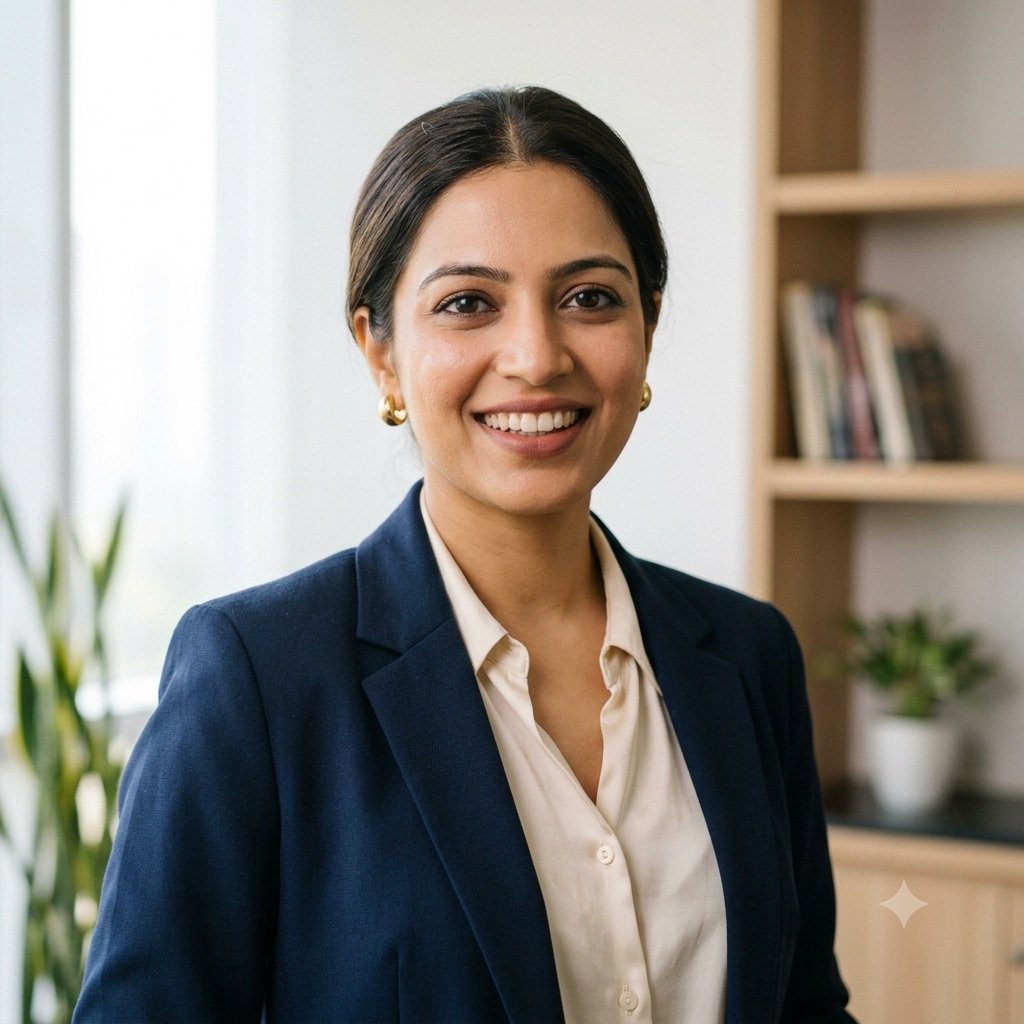

Free plan limits: ChatGPT’s free plan allows only a few images a day, and OpenAI adjusts that number with demand instead of publishing it, so pick your look before you spend one. When it runs out, every prompt here also runs in Gemini. What each free tool allows is in our free generators guide.
The all-purpose 1980s AI photo prompt for ChatGPT
If you want one prompt that works on any photo, use this. It names the five things that make a picture read as the 1980s without forcing a particular look, so the app picks a setting that suits your photo.
1. The all-purpose 80s photo
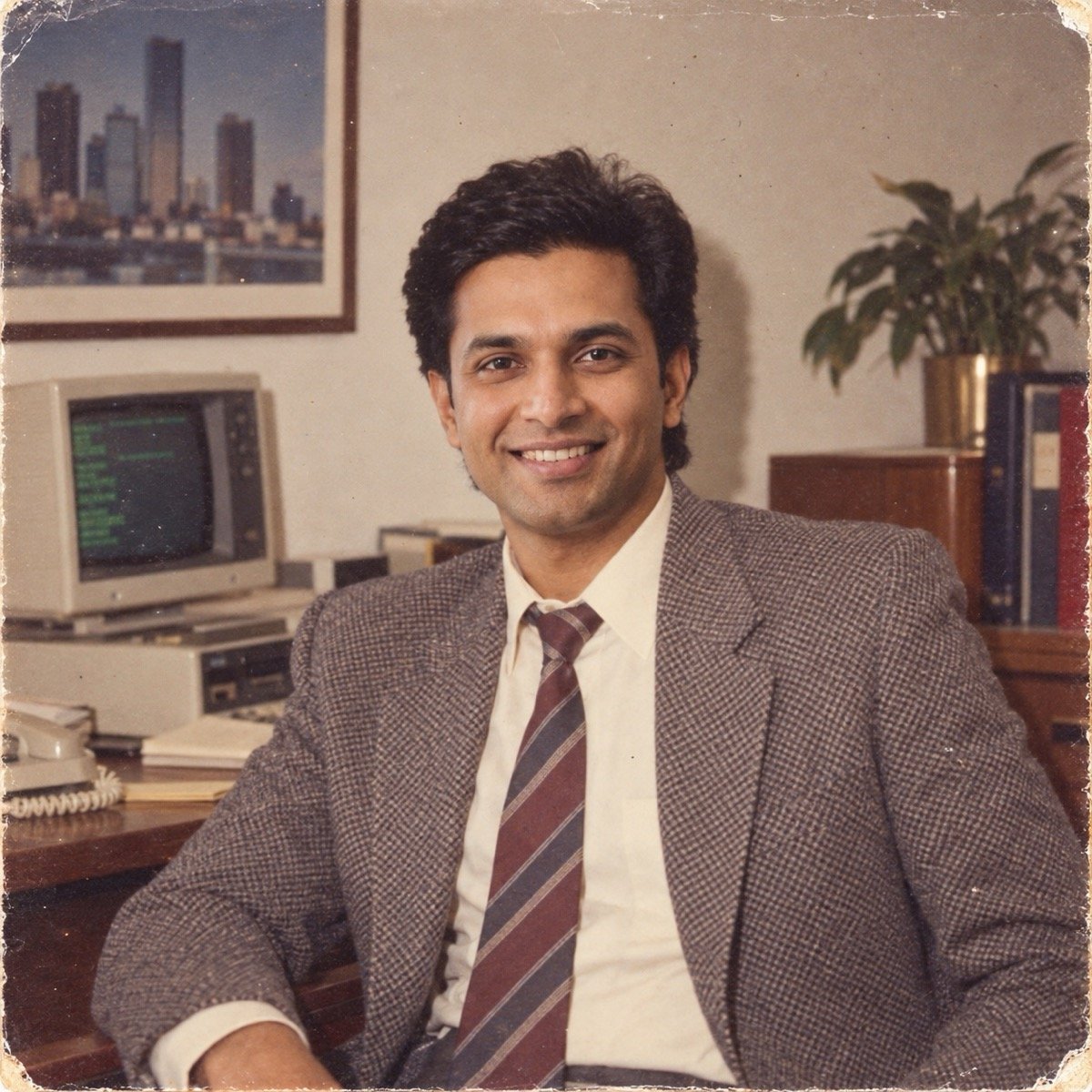
Turn the uploaded photo into an authentic photograph from the 1980s: a 1980s hairstyle and clothes, a setting typical of the decade, lit the way a 1980s camera would light it, a slightly faded colour print with soft focus and visible film grain, so it looks like a real photo from 1985 and not a filter. Keep my face exactly the same as the uploaded photo — do not alter my facial features.
Too generic for your taste? Every prompt below is this one with the decade pinned to a specific place and moment.
↑ All looksIndian 80s looks: Bollywood, family album, wedding
These are the looks filling Indian Instagram. They lean on what the decade looked like in India rather than on a Western retro filter: studio glamour from the film magazines, the family album, the formal wedding portrait and college days.
2. 80s Bollywood heroine portrait
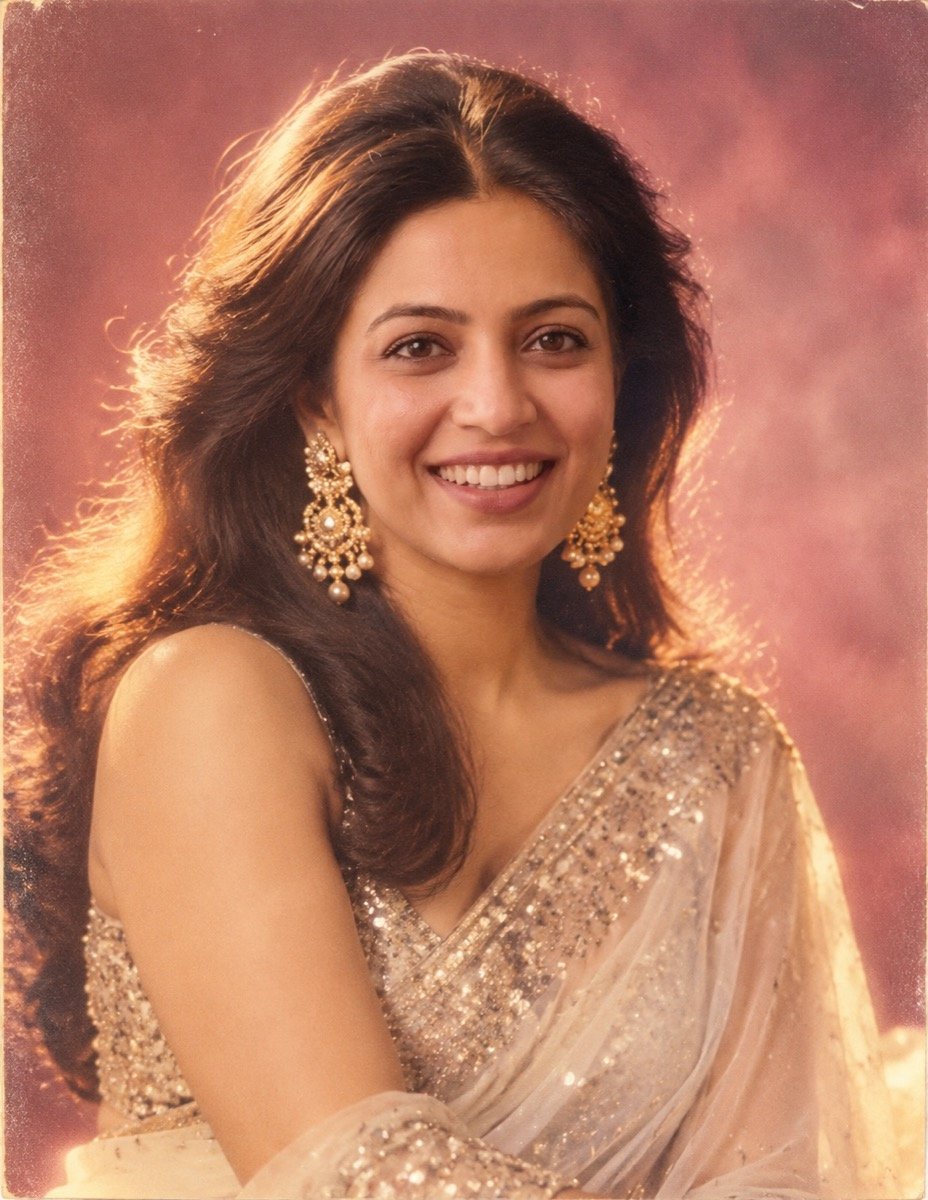
Turn the uploaded photo into a 1980s Bollywood film-magazine portrait of me: big, glossy blow-dried hair with volume at the crown, a shimmering chiffon saree with a sequinned border, large gold statement earrings, a soft-focus glow around the edges, a painted studio backdrop in dusky pink, warm tungsten studio light, a slightly faded colour print with fine film grain. Keep my face exactly the same as the uploaded photo — do not alter my facial features.
The most-shared Indian version of the trend. Swap the saree colour or the backdrop colour to make it yours; keep the glow and the grain.
↑ All looks3. 80s Bollywood hero publicity still
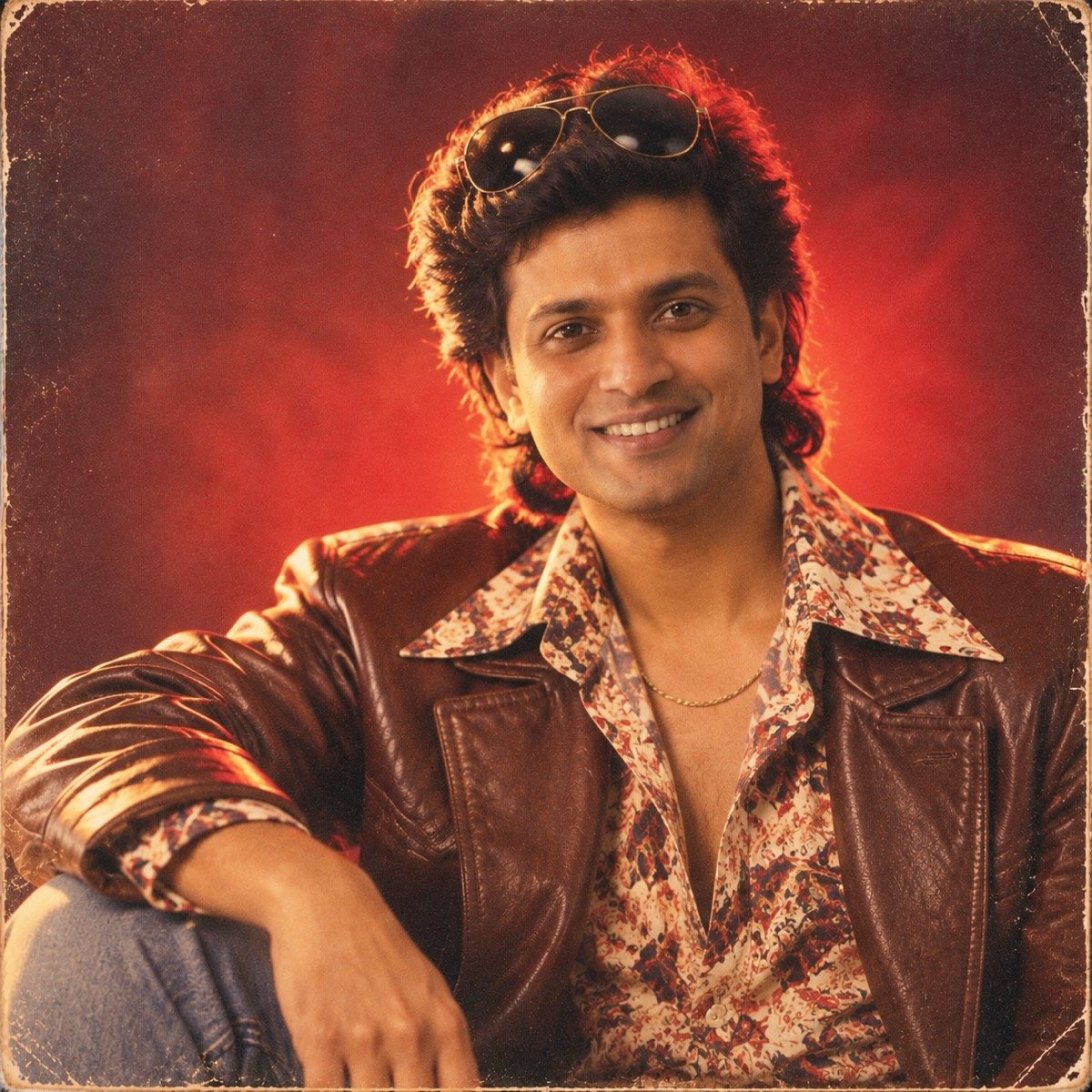
Turn the uploaded photo into a 1980s Bollywood hero publicity still of me: thick feathered hair, a wide-collar printed shirt under a brown leather jacket, a thin gold chain, aviator sunglasses pushed up on my head, dramatic low-key studio light with a red glow behind me, grainy film-poster colours. Keep my face and facial hair exactly the same as the uploaded photo — do not alter my facial features.
This prompt locks your facial hair as well as your face, and ChatGPT kept him clean-shaven. The glam rock prompt (12) locks only the face, and there it added stubble — so if your beard, or lack of one, matters, say so.
↑ All looks4. The family-album photo
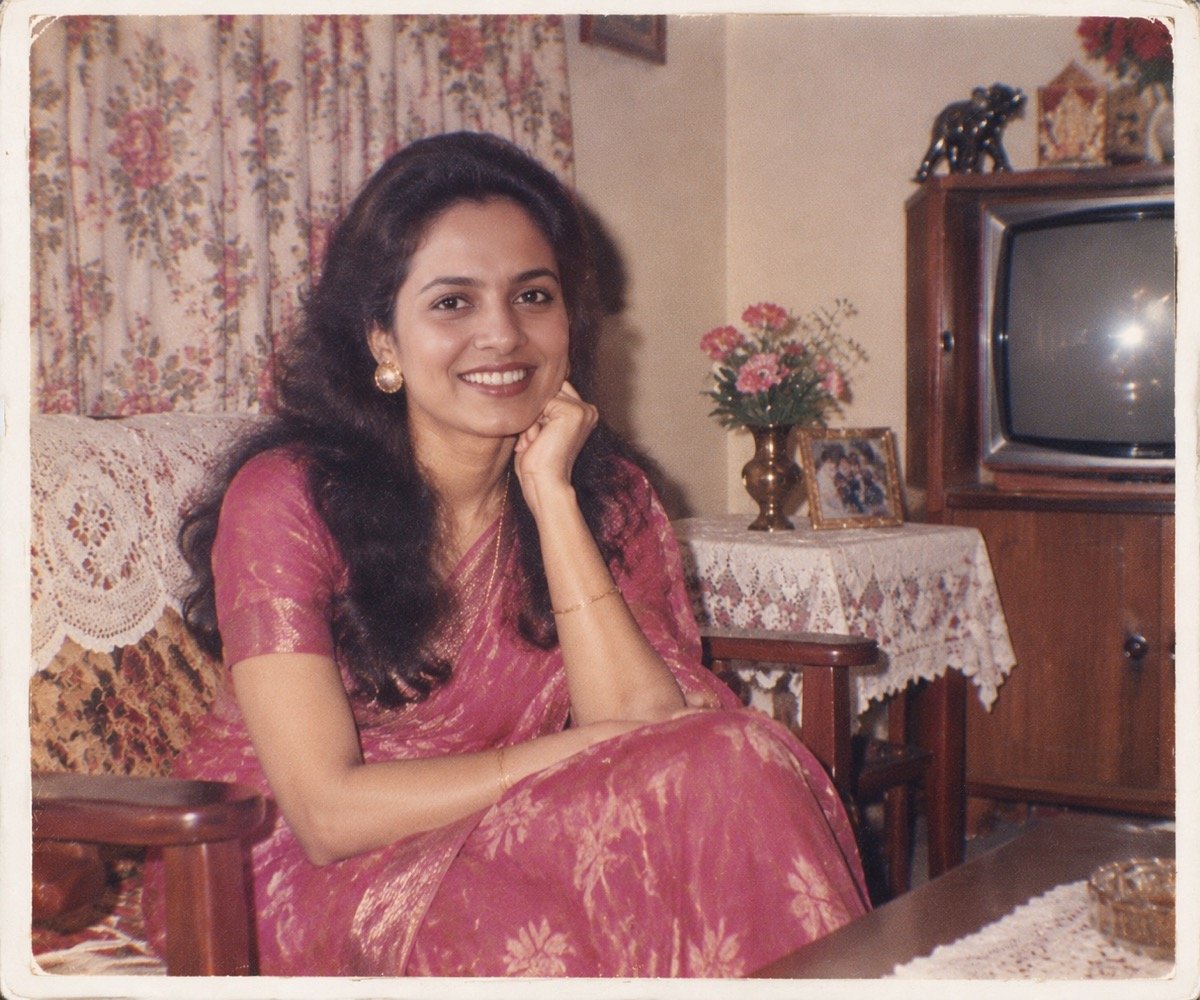
Turn the uploaded photo into a real 1980s Indian family-album photograph: me sitting on a wooden sofa in a middle-class living room with floral curtains, a lace cloth on the side table and an old wooden-cabinet television in the corner, 1980s clothes, taken on a cheap point-and-shoot camera with on-camera flash, slightly faded colours, soft focus, a thin white print border. Keep my face exactly the same as the uploaded photo — do not alter my facial features.
For the whole family, attach one photo with everyone in it, change “me sitting” to “our family sitting together” and the last line to “Keep all of our faces exactly the same”. More faces means more chances for one to drift, so check each person.
↑ All looks5. 80s wedding studio portrait
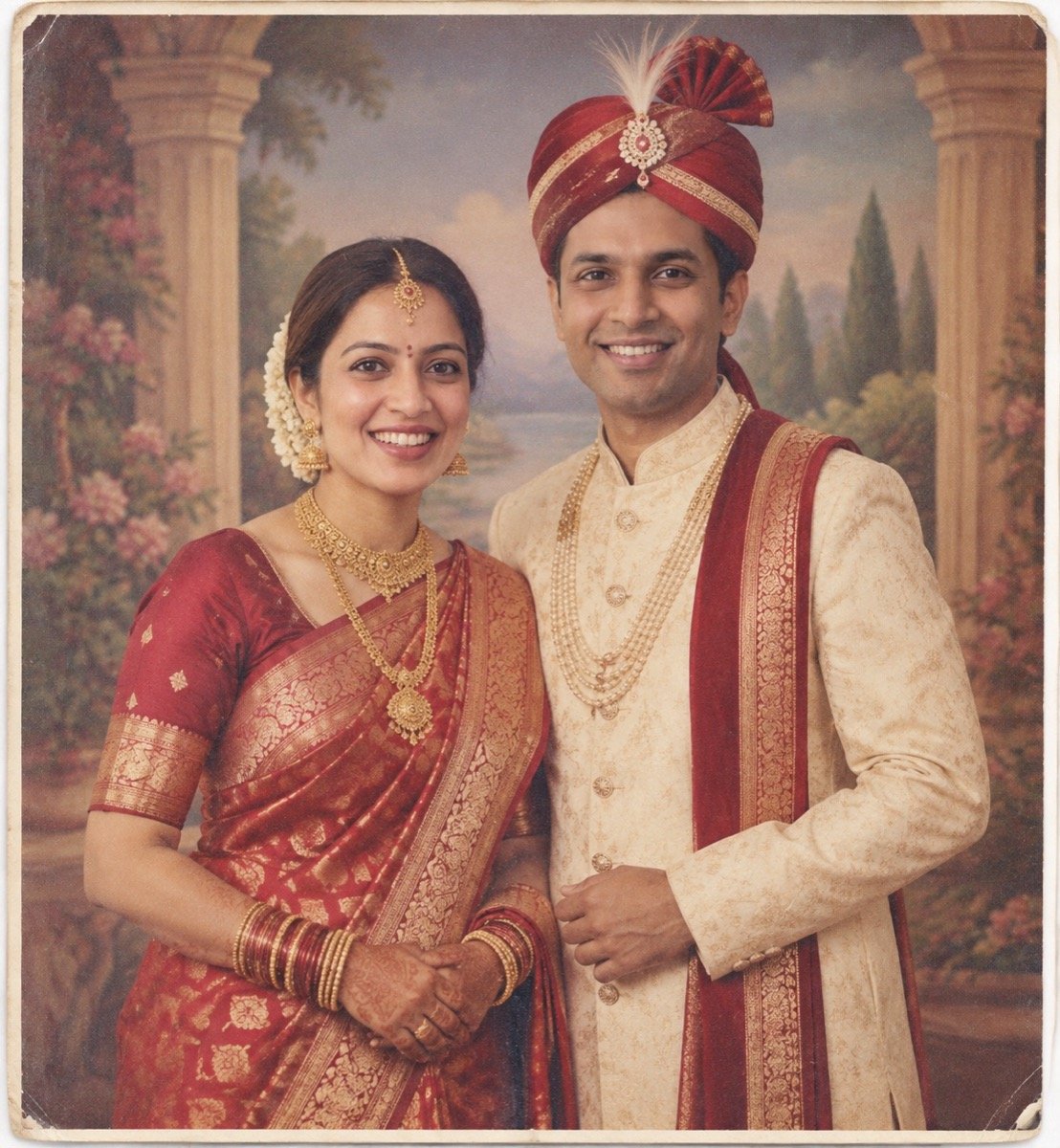
Transform the uploaded photo into a 1980s Indian wedding studio portrait of the two of us: I wear a red Banarasi silk saree with heavy gold jewellery and a maang tikka, my partner wears a cream sherwani with a red safa, we stand side by side in front of a painted backdrop of pillars and a garden, a stiff formal pose, flat studio flash, the warm faded colours and grain of a 40-year-old print. Keep both of our faces exactly the same as the uploaded photo — do not alter our facial features.
6. Retro college look
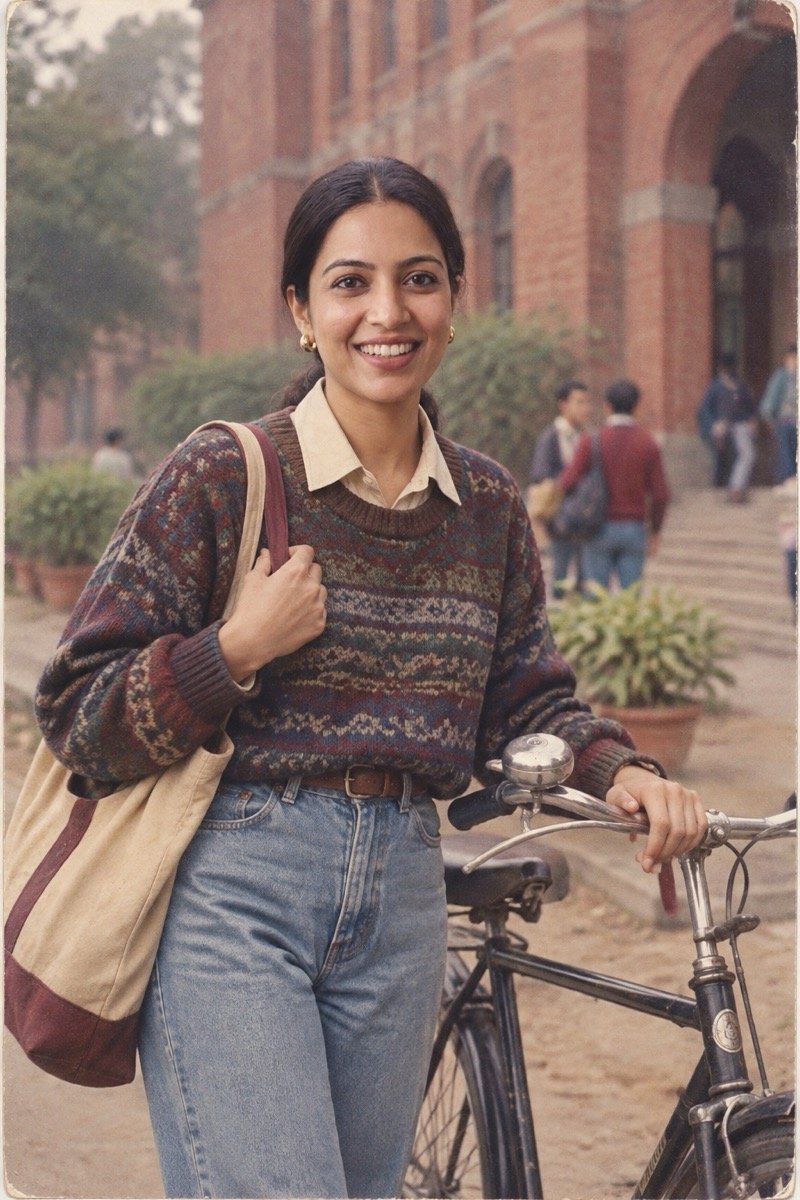
Turn the uploaded photo into a 1980s college campus photo of me: high-waisted jeans, an oversized knit sweater over a collared shirt, a cloth bag on my shoulder, standing next to an old black bicycle outside a red-brick college building, overcast daylight, muted colours, the grain of 35mm film. Keep my face exactly the same as the uploaded photo — do not alter my facial features.
7. Bombay street, 1985
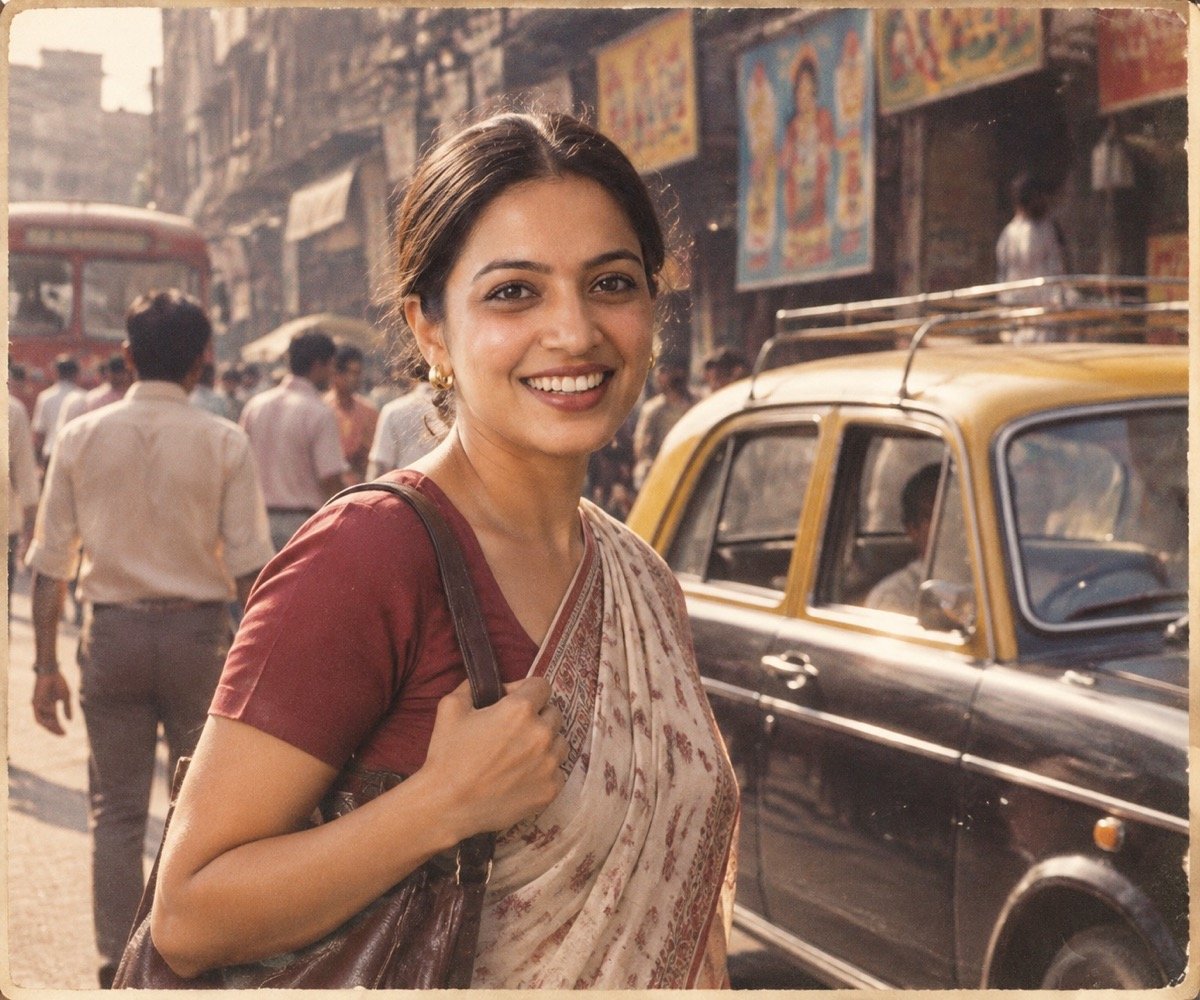
Transform the uploaded photo into a candid 1985 street photograph of me in Bombay: a black-and-yellow vintage taxi and hand-painted shop signs behind me with no readable text, 1980s clothes, afternoon sun and dust in the air, muted warm film colours, documentary street-photography framing, visible film grain. Keep my face exactly the same as the uploaded photo — do not alter my facial features.
“With no readable text” is there on purpose: AI shop signs are usually misspelled, and one garbled sign is enough to break the illusion. How each tool handles lettering is in our text-in-images guide.
↑ All looksClassic 80s looks: laser yearbook, mall studio, neon
The American side of the trend borrows from the photos an 80s teenager actually had taken — the school portrait and the mall studio session — and from the decade’s pop culture.
8. Laser-background school portrait
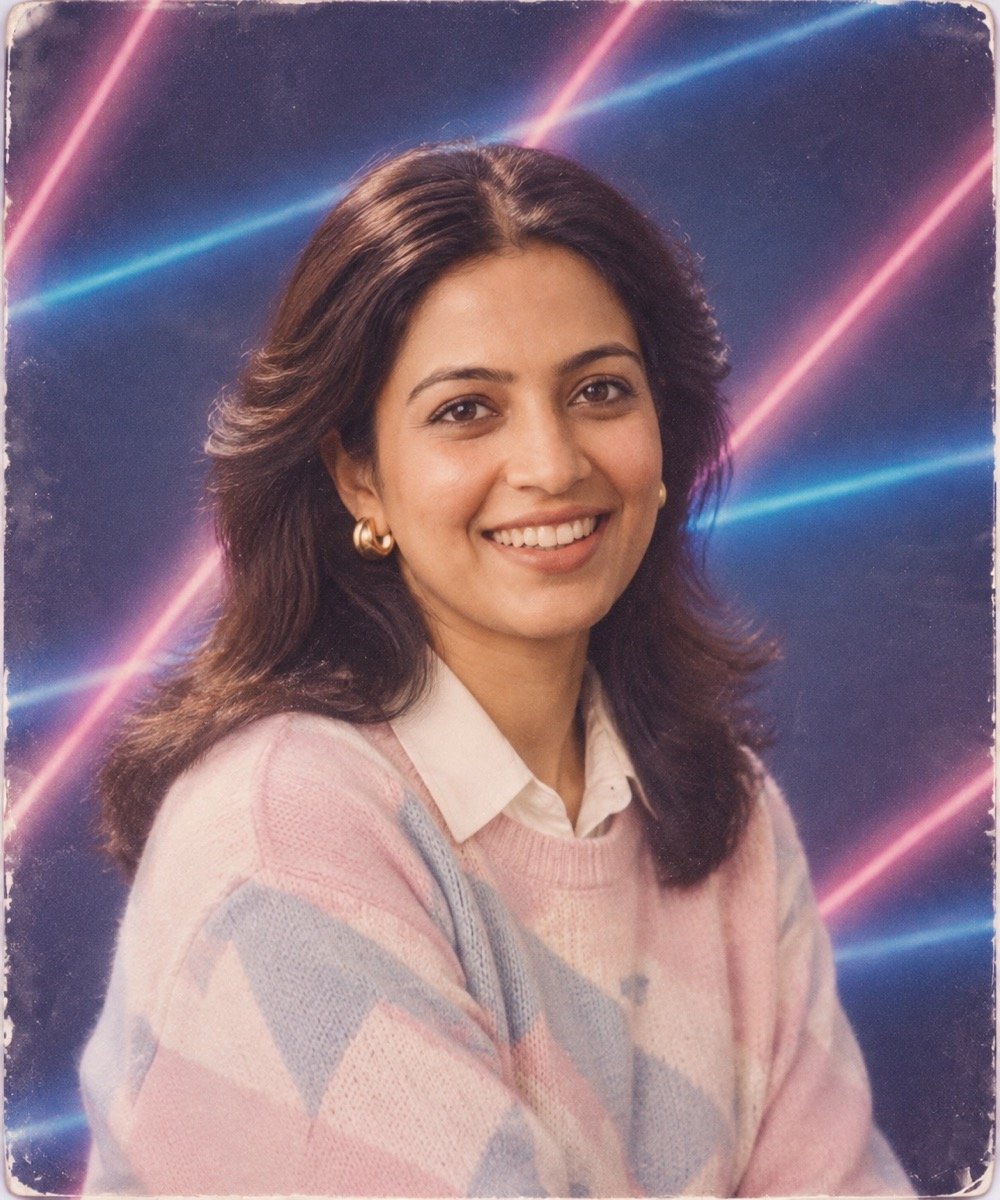
Turn the uploaded photo into a 1980s school yearbook portrait of me: a blue studio backdrop crossed by bright pink and blue laser beams, soft diffused studio light, feathered hair, a pastel sweater over a collared shirt, head tilted slightly, a soft-focus glow, the colours and grain of an old printed photo. Keep my face exactly the same as the uploaded photo — do not alter my facial features.
The single most recognisable 80s portrait. The head tilt matters more than you would think; school photographers of the era posed everyone the same way.
↑ All looks9. Mall portrait studio
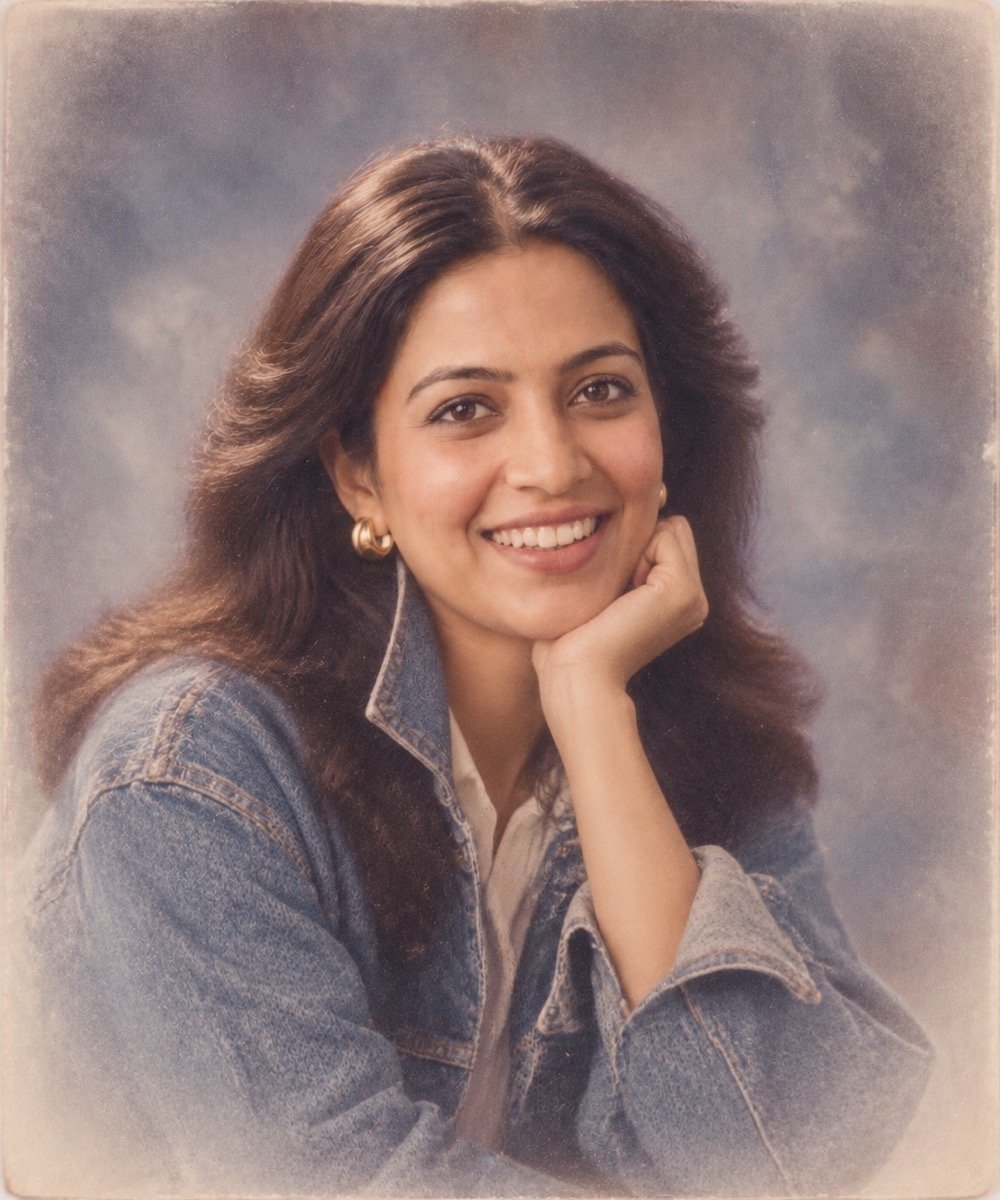
Turn the uploaded photo into a 1980s mall portrait-studio photograph of me: a mottled grey-blue canvas backdrop, big softbox lighting, a soft white vignette around the edges, a denim jacket with the collar turned up, posed with my chin resting on my hand, slightly soft focus, faded colour and fine grain. Keep my face exactly the same as the uploaded photo — do not alter my facial features.
10. Neon synthwave portrait

Create a 1980s neon synthwave portrait of me from the uploaded photo: a pastel blazer with the sleeves pushed up over a white T-shirt, a magenta and cyan neon grid floor, a glowing orange sunset and palm silhouettes behind me, chrome reflections, VHS scan lines and a soft glow. Keep my face exactly the same as the uploaded photo — do not alter my facial features.
This is the one look on the page that is not a photograph of the era but the era’s style remembered, so it tolerates the most exaggeration.
↑ All looks11. Aerobics class
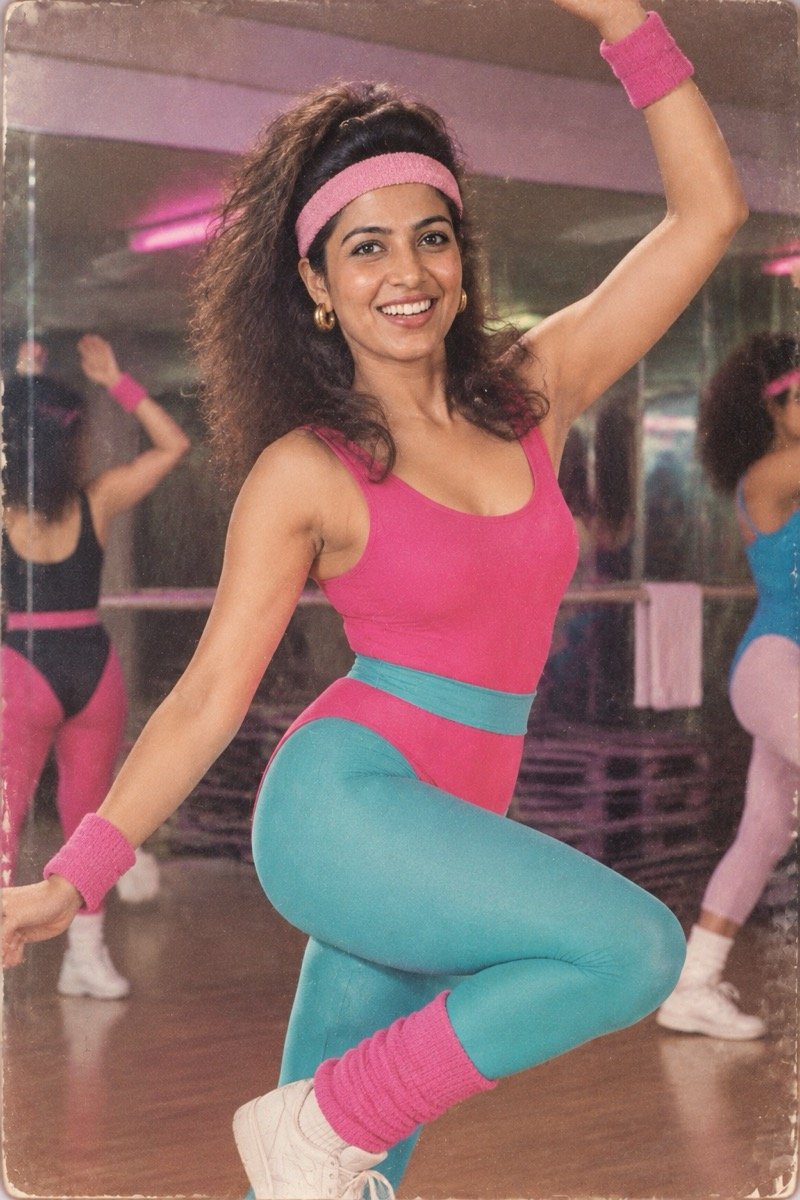
Turn the uploaded photo into a 1980s aerobics-class photograph of me: a bright leotard with leg warmers and a terry-cloth headband, mid-move in a mirrored studio, big hair, fluorescent pink and teal colours, on-camera flash, the grain of a glossy magazine print. Keep my face exactly the same as the uploaded photo — do not alter my facial features.
For men, replace “a bright leotard with leg warmers” with “a shiny zip-up tracksuit with a sweatband”.
↑ All looks12. Glam rock band promo shot
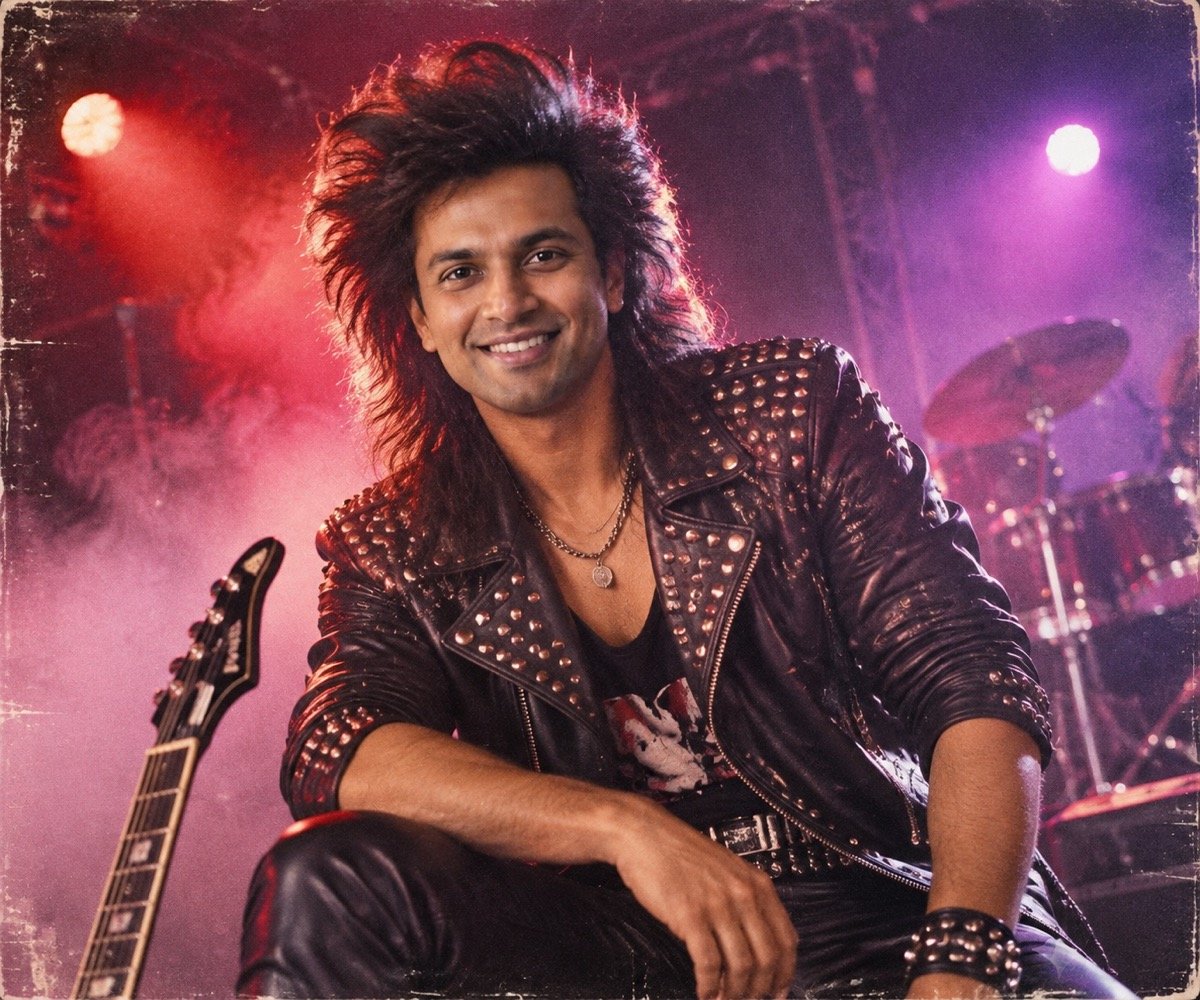
Turn the uploaded photo into a 1980s glam rock band promo photo of me: huge teased hair, a black leather jacket with silver studs, smoky stage haze, purple and red coloured lights, a low camera angle, hard flash, gritty film grain. Keep my face exactly the same as the uploaded photo — do not alter my facial features.
13. 80s fashion magazine cover
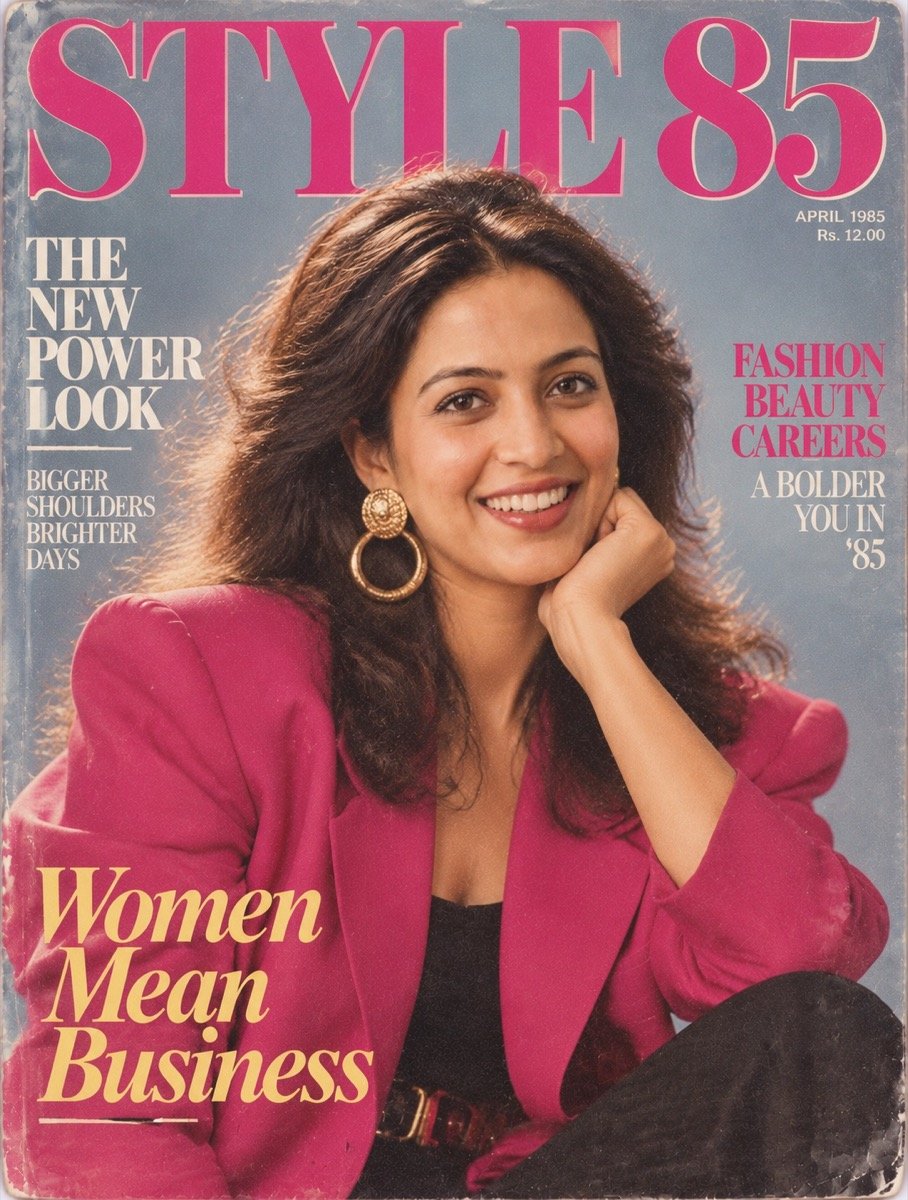
Turn the uploaded photo into a 1985 fashion magazine cover starring me: a power-dressing blazer with big shoulder pads, oversized earrings, glossy lips, big voluminous hair, a flat bright studio backdrop, the masthead 'STYLE 85' in large bold serif letters across the top, glossy print texture. Keep my face exactly the same as the uploaded photo — do not alter my facial features.
The only prompt here that asks for text, and ChatGPT got all of it right — including the cover lines it invented. That fits our benchmark, where GPT Image 2 (ChatGPT) scored 9.8 for text, the best of the ten tools we tested. In other apps, keep the masthead to a word or two.
↑ All looks80s look prompts for couples
Couple edits are harder than solo ones because the model has two faces to keep, and it usually sacrifices one. Use a single photo with both of you in it, and expect to regenerate more often. The wedding portrait is in the Indian section above; more two-person looks, tested in both apps, are on our prompt seen page.
14. Couple portrait with the dreamy double exposure
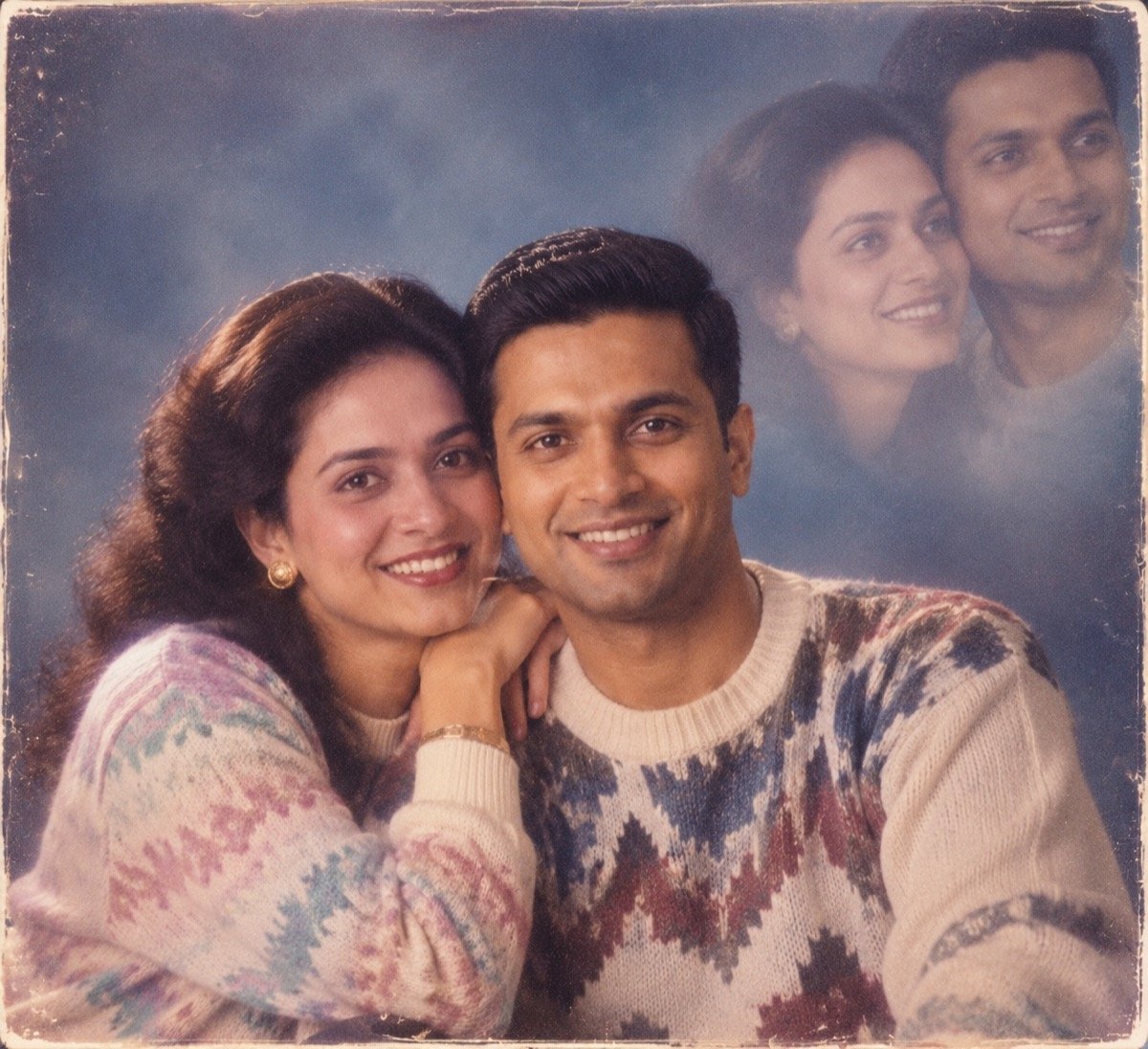
Create a classic 1980s couple portrait-studio photo from the uploaded photo: the two of us posed cheek to cheek in front of a soft blue mottled backdrop, a faint double exposure of our faces glowing in the top corner, a soft-focus vignette, warm studio light, matching knit sweaters, a faded colour print with grain. Keep both of our faces exactly the same as the uploaded photo — do not alter our facial features.
The ghostly second portrait in the corner was a genuine 80s studio effect, and it is the detail that makes people ask where you got the photo taken.
↑ All looks15. 80s Bollywood song on a snowy mountain
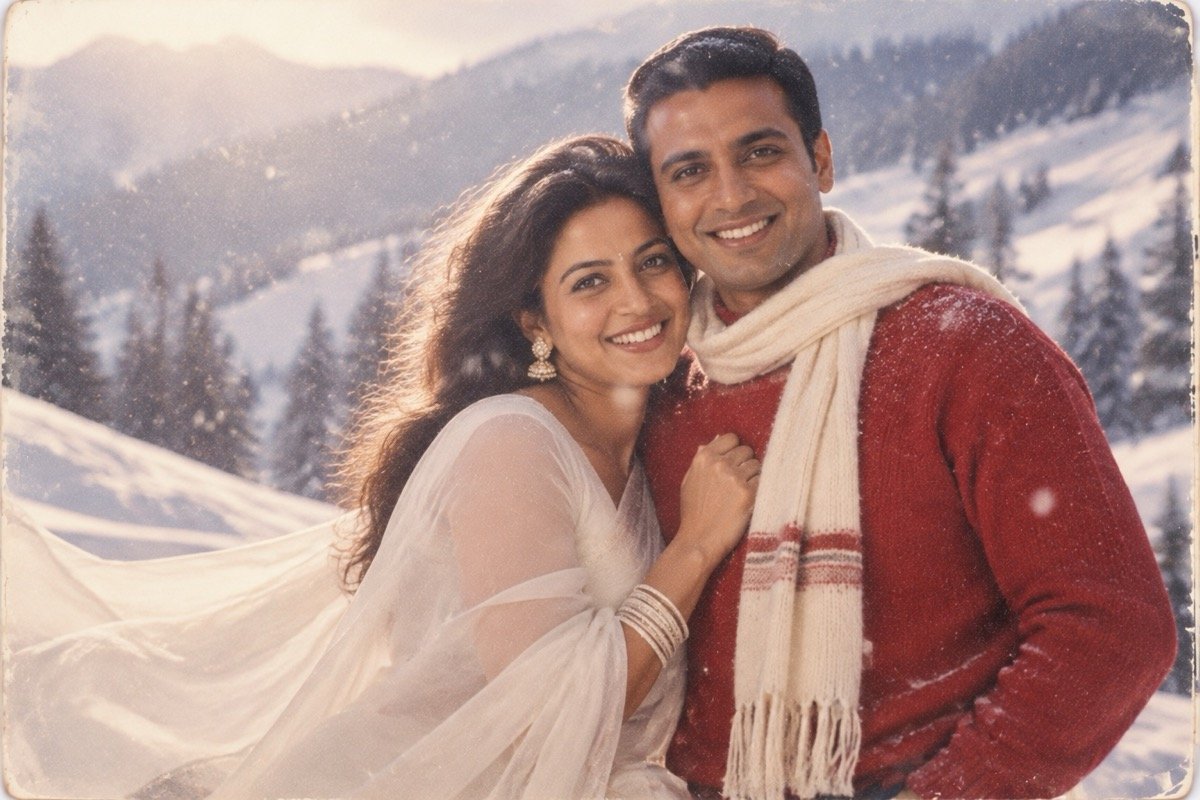
Transform the uploaded photo into a scene from a 1980s Bollywood romantic song: the two of us on a snowy mountain slope, I wear a flowing white chiffon saree and my partner wears a red sweater with a scarf, snow falling, soft misty backlight, a dreamy soft-focus glow, the grainy warm colours of an old film print. Keep both of our faces exactly the same as the uploaded photo — do not alter our facial features.
The 80s birthday snapshot
16. Instant-camera birthday photo
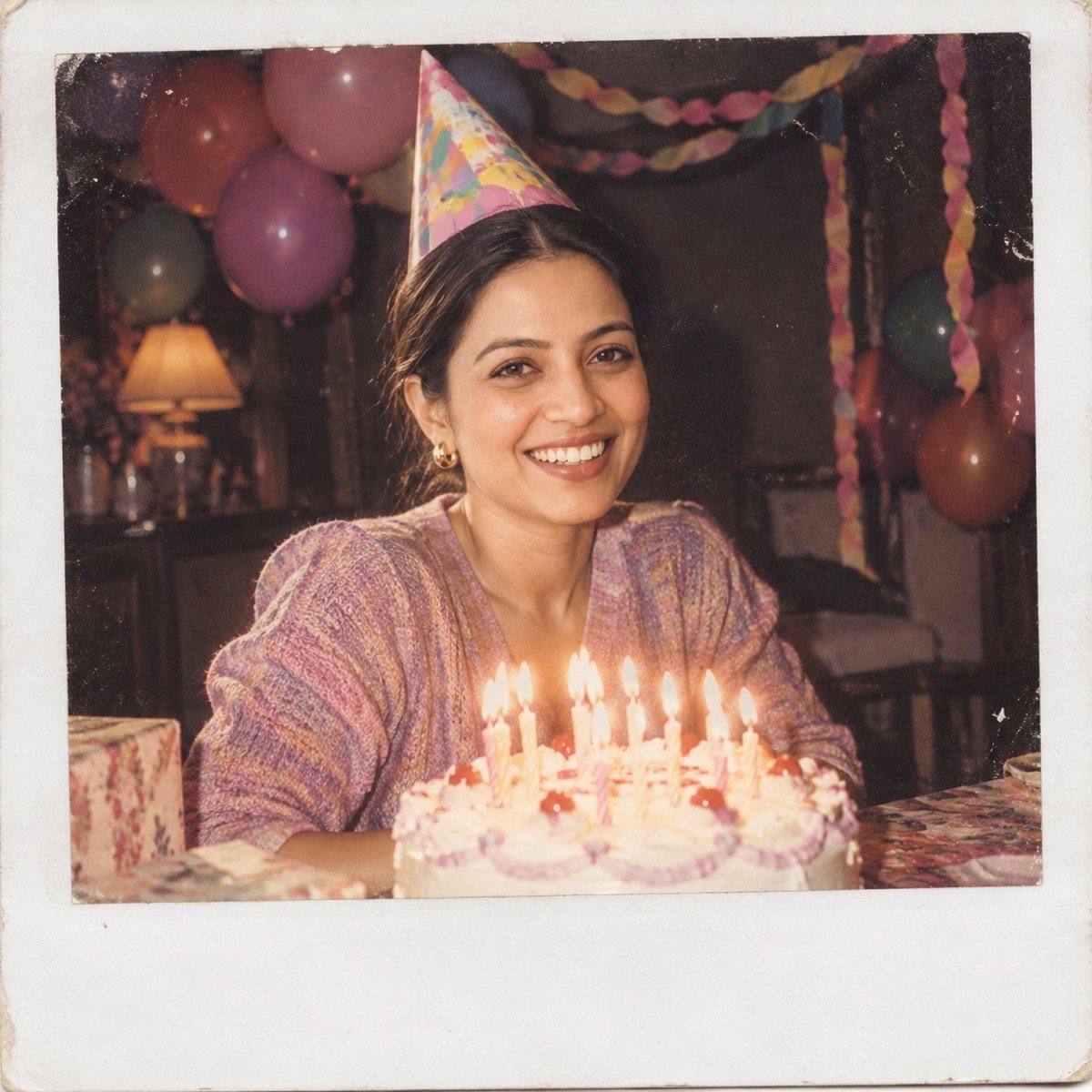
Turn the uploaded photo into a 1980s instant-camera snapshot of my birthday party: me behind a cake with lit candles, paper streamers and balloons, a paper party hat, harsh on-camera flash against a dark background, slightly washed-out colours, the thick white border of an instant photo. Keep my face exactly the same as the uploaded photo — do not alter my facial features.
Birthday edits are searched all year, not just during the trend. Change the number of candles and add “a cake that reads HAPPY BIRTHDAY” if you want lettering — short text is the kind models usually get right.
↑ All looksBuild your own 80s prompt: the five cues
Every prompt above is built from the same five parts. Once you know them you can write an 80s prompt for any photo, place or occasion.
What a 1980s prompt needs to say
| Cue | What to write | Why it matters |
|---|---|---|
| Hair and clothes | big blow-dried or permed hair, feathered hair, shoulder pads, wide collars, high-waisted jeans, sequinned chiffon | The fastest signal of the decade; vague prompts drift into the 70s or 90s |
| Setting | painted studio backdrop, laser backdrop, middle-class living room, campus, street with vintage taxis | Places the photo in time even when the outfit is subtle |
| Light | on-camera flash, flat studio flash, warm tungsten light, softbox | Cameras of the era lit faces hard or flat; soft modern light gives the edit away |
| Colour | faded colour print, warm or slightly washed-out tones | Old prints drift toward warm, low-contrast colour |
| Texture | visible film grain, soft focus, white print border | Removes the too-sharp digital finish |
Then add one detail that is yours — your city, your college, your wedding colours — and end with the face-lock line. Resist stacking every 80s cliché into one prompt: neon, lasers, leg warmers and a Bollywood saree in the same image read as a costume party, not a photograph.
The face-lock line: “Keep my face exactly the same as the uploaded photo — do not alter my facial features.” For two people, “Keep both of our faces exactly the same…”. Every prompt on this page ends with it, because a changed face is the most common way these edits fail.
When your 80s photo goes wrong
- It does not look like you. It happened twice in our 16 ChatGPT runs, both times to the woman: in the family-album photo (prompt 4) and the double-exposure couple portrait (prompt 14). Use a sharper, front-facing photo, keep the face-lock line and regenerate. If three tries miss, switch apps: in our face test, each app kept faces the other one lost.
- It looks like a modern photo with a filter. Add a period setting and a light source from the table above. “Faded colour print, visible film grain, soft focus” is the phrase doing the most work.
- It looks like the 70s or the 90s. Name the decade’s clothes and hair, not just the year: shoulder pads, feathered hair, high-waisted jeans.
- It added things you did not ask for. In this set ChatGPT added a bindi in two edits and stubble in one; in our prompt seen test the apps added bindis, a red saree and even a camera brand’s logo. Say what you do not want: “no bindi”, “clean-shaven”, “no logos or text”.
- It copied something from your photo. Our reference photos carry Gemini’s small sparkle watermark in the corner, and in the synthwave result (prompt 10) ChatGPT reproduced it. Crop watermarks, stickers and logos out of your photo before you upload it.
- Your skin looks plastic. Add “natural skin texture, no retouching”. Nobody airbrushed a photo in 1985.
ChatGPT or Gemini for the 80s trend?
The trend is named after ChatGPT, and on this page’s own test ChatGPT earns it. Across the 16 prompts it landed almost every period detail we named — the laser backdrop, the feathered hair, the aviators pushed up on the head, the cabinet TV — and it spelled “STYLE 85” and a full set of invented cover lines without a single error. Its weak spot was the one every app has: faces.
All 16 prompts in ChatGPT, first output: did the face survive?
| Result | Where it slipped | |
|---|---|---|
| Woman’s face kept (12 edits) | 10 of 12 | Family album (4), double-exposure couple (14) |
| Man’s face kept (7 edits) | 7 of 7 | — (stubble added in the glam rock shot) |
| Both faces kept in couple edits (3) | 2 of 3 | Double-exposure couple (14) |
| Added something unasked | 4 edits | Bindi (5, 15), gajra (5), stubble (12), a copied watermark (10) |
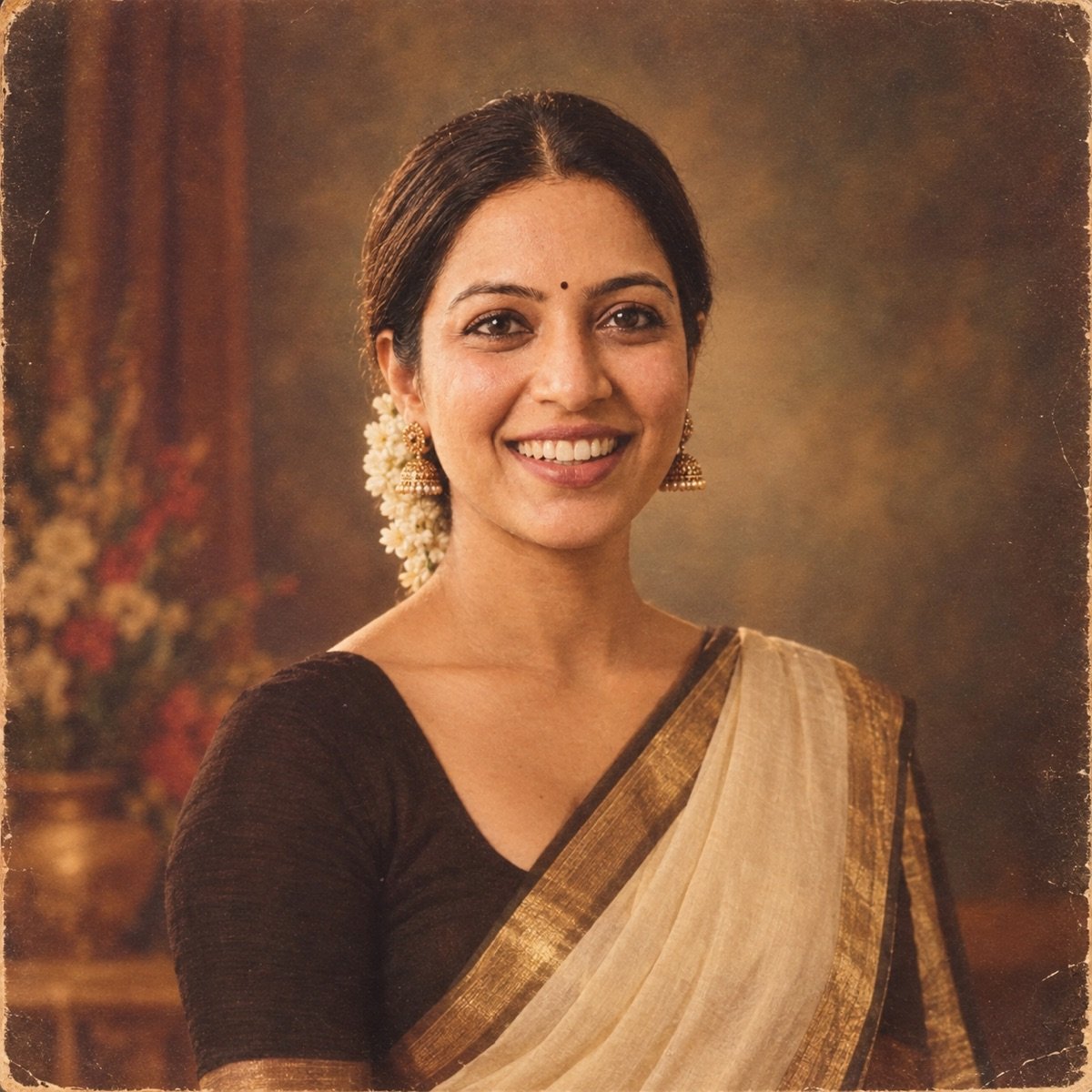
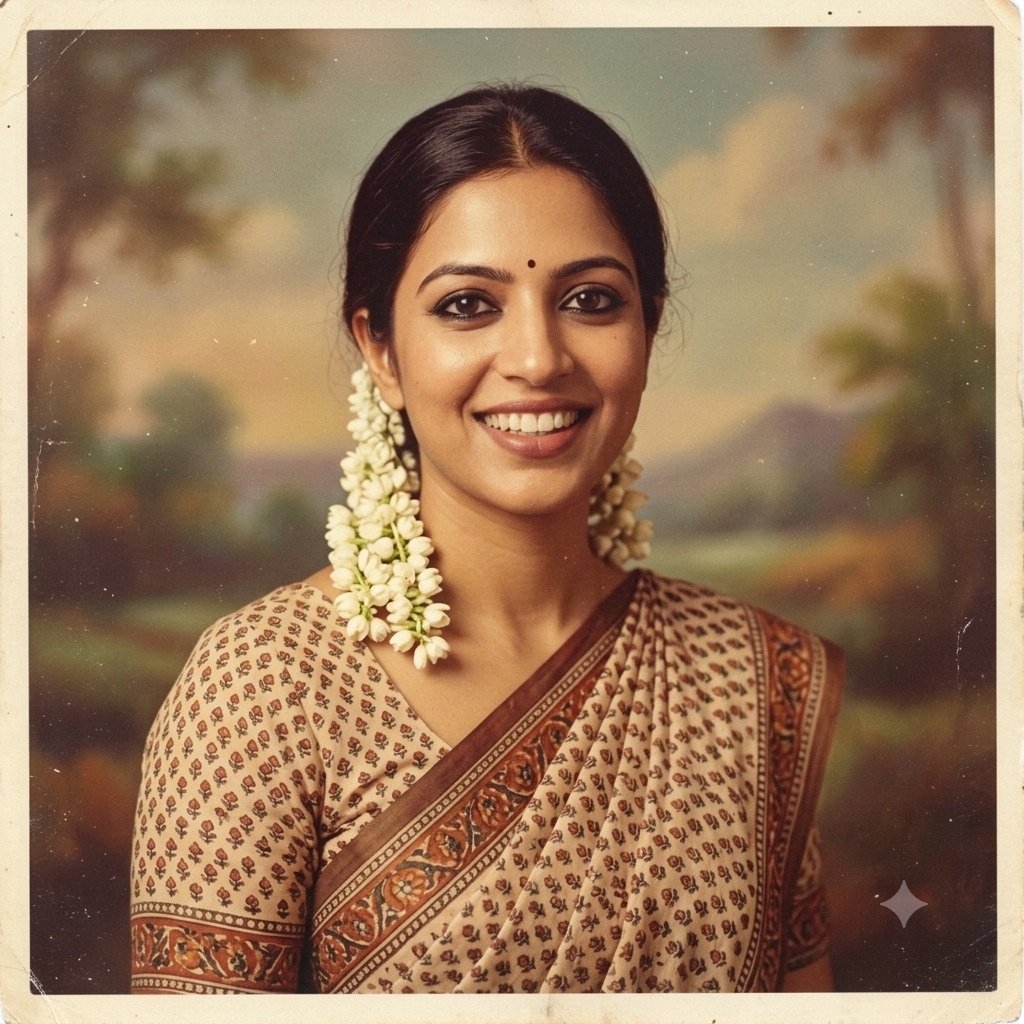
We ran this set in ChatGPT only. If you are choosing between apps, it still matters which one you open, because the two run different image models: ChatGPT uses OpenAI’s GPT Image and Gemini uses Google’s Nano Banana. Our best evidence on Gemini for retro looks comes from our earlier prompt seen test, which ran the same prompts through both apps with the same reference photos. Two of those edits were retro, and they split one each.
From our prompt seen test: a 1970s studio portrait, same prompt, first output
From our prompt seen test: a 1980s film-poster couple edit, same prompt, first output
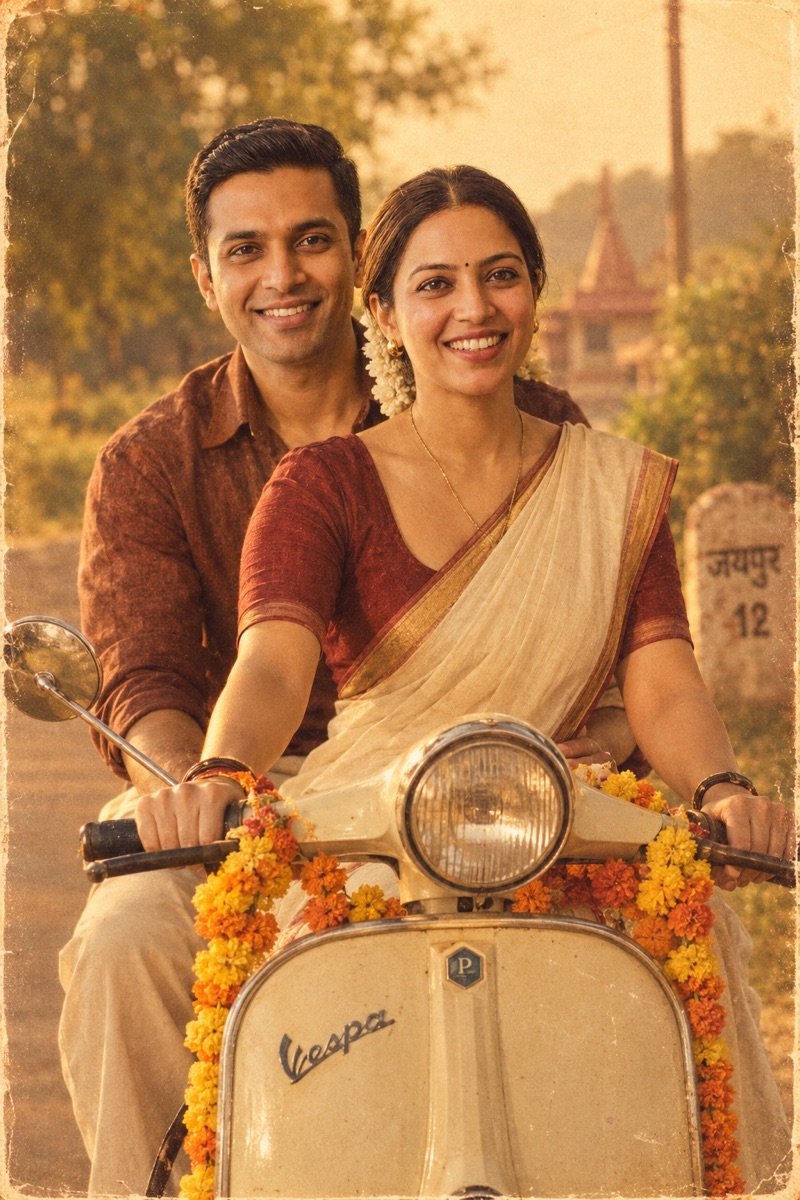
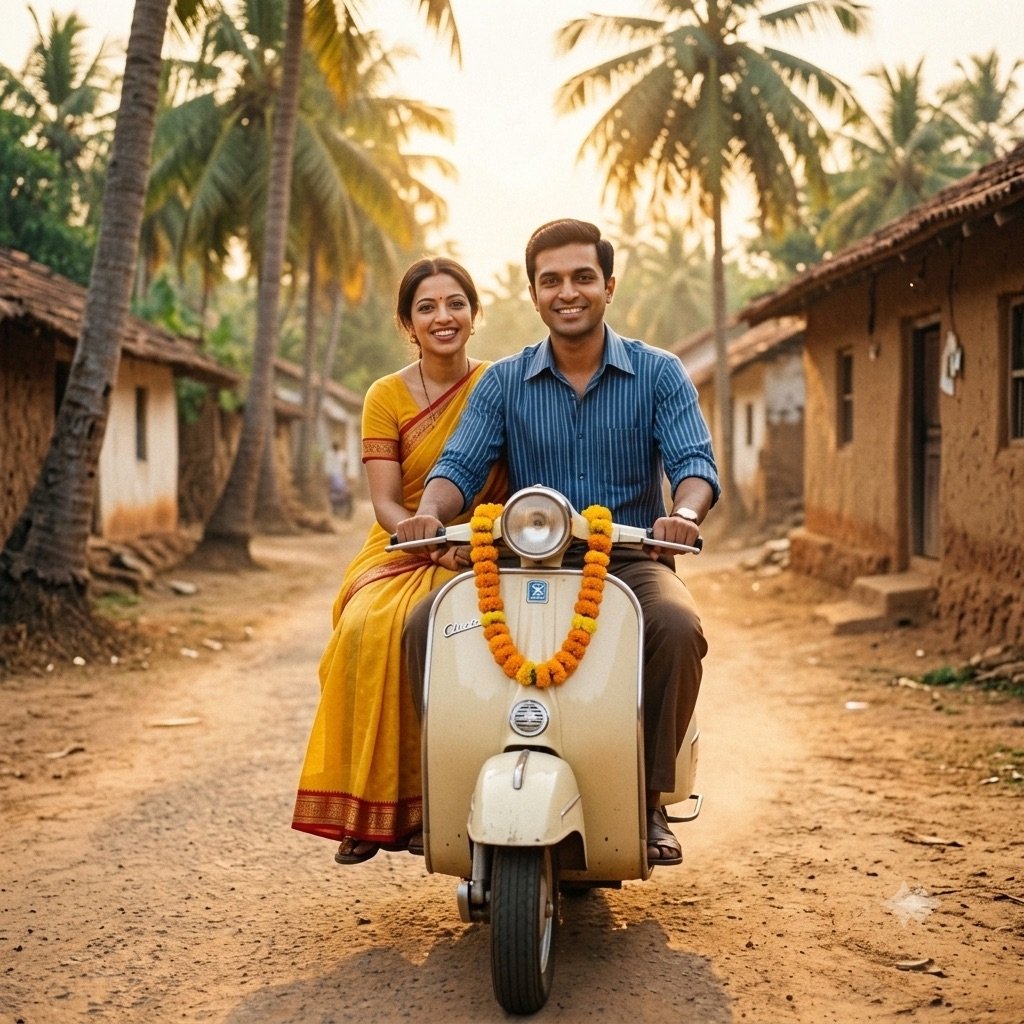
So for a solo 80s edit, where the point is period colour and texture, start with ChatGPT: it followed the period styling on this page almost without fail, and delivered the film-poster look Gemini ignored in our earlier test. For couples, try Gemini too: in that earlier test it kept both faces in four of five couple edits to ChatGPT’s three, and ChatGPT lost one face in three couple edits here. If one app misses, run the same prompt in the other.
The two engines behind the trend, from our 90-image benchmark
| What an 80s edit needs | GPT Image 2 (ChatGPT) | Nano Banana 2 (Gemini) |
|---|---|---|
| Portrait realism (skin, light on a face) | 9.5 — best of 10 tools | 9.2 |
| Instruction-following (many cues in one prompt) | 9.2 | 9.5 — best of 10 tools |
| Text (a magazine masthead, a birthday cake) | 9.8 — best of 10 tools | 9.0 |
| Overall average (9 prompts) | 9.4 | 9.4 |
The full ranking of all ten models is on the benchmark leaderboard.
Before you upload your photo
- Use the official apps. A crop of “80s AI photo” websites and apps appeared with the trend. You do not need any of them: the prompt is plain text, and ChatGPT and Gemini let you delete your uploads and opt out of model training.
- Only edit people who said yes. Turning someone else’s photo into a romantic couple portrait without asking is exactly the misuse these tools get criticised for.
- Post it as what it is. A convincing 1985 “photo” can be mistaken for a real one years later, in a family group or a search result. Gemini images carry an invisible SynthID watermark; say it is AI in the caption anyway.
- Think twice about children’s photos. Once uploaded, you have less control over where a child’s face ends up than over your own.
Frequently asked questions
What is the 1980s photo trend?
It is an AI photo edit that went viral on Instagram in India in September 2026: you upload a photo of yourself to ChatGPT or Gemini with a prompt, and it returns a portrait that looks like it was taken in the 1980s — period hair and clothes, a studio or family-album setting, faded colour and film grain — with your face kept.
What is the best 1980s photo prompt for ChatGPT?
There is no single official prompt; the trend runs on many. The safest start is prompt 1 on this page, which names the five cues that make a photo read as the 80s without forcing a look. For a specific style, the Bollywood heroine and laser yearbook prompts are the most-shared.
Are the 80s look prompt, the 80s trend prompt and the 1980s photo prompt the same thing?
Yes. “80s look prompt”, “80s trend prompt”, “prompt for 80s photo” and “1980s photo prompt chatgpt” are different ways of searching for the same edit: a text prompt that turns your photo into a portrait from the 1980s. Any prompt on this page works for all of them; prompt 1 is the all-purpose one.
How do I make an 80s photo in ChatGPT?
Open a new chat in ChatGPT, attach one clear, front-facing photo, paste one of the prompts above and send. Check that the face still looks like you before posting; if it does not, regenerate or run the same prompt in Gemini.
Is the ChatGPT 80s photo trend free?
The prompts are free. ChatGPT’s free plan allows only a few images a day, a number OpenAI changes with demand, so choose your look before you spend one. The same prompts also run in Gemini. See our free generators guide for what each free tool allows.
Does ChatGPT keep your face in the 80s trend?
Mostly. We ran all 16 prompts on this page in ChatGPT with the same two reference photos and kept the first output: it kept the face in 17 of the 19 faces across the set. Both misses were the woman, in the family-album photo and a couple portrait, so check the face before you post and regenerate if it has changed.
Does the 80s photo prompt work in Gemini?
Yes. Gemini runs the same prompts on Google’s Nano Banana model. In our earlier trend-edit test it kept both faces in couple edits more often than ChatGPT, but in a 1980s film-poster edit it returned a modern-looking photo where ChatGPT nailed the period styling.
Why does my 80s photo not look like me?
Identity drift is the most common failure in AI photo edits; it happened in 2 of 19 faces when we ran this page’s prompts in ChatGPT. Use a sharp, front-facing photo without filters, keep the line “Keep my face exactly the same as the uploaded photo” at the end of the prompt, and regenerate. If it keeps missing, switch between ChatGPT and Gemini.
How do I make it look more 80s and less like a filter?
Name a period setting and a period light source, not just the year: a painted studio backdrop or a laser backdrop, on-camera flash, and “faded colour print, visible film grain, soft focus”. The five-cue table above lists what to write.
What is the difference between the 80s and the trending 90s prompts?
The 90s version swaps big permed hair and studio backdrops for chiffon sarees in mustard fields, denim jackets and rooftop sunsets. Our prompt seen page has a 90s Bollywood saree prompt, tested in ChatGPT and Gemini, and a 90s hero prompt.
80s photo prompt kaise use kare?
Prompt copy karo, ChatGPT ya Gemini mein nayi chat kholo, apni ek saaf front-facing photo attach karo, prompt paste karke send karo. Prompt ke end wali line “keep my face exactly the same” mat hatao, warna chehra badal sakta hai. In English: copy a prompt, attach one clear photo in a new chat, paste and send, and keep the face-lock line.
Is it safe to upload my photo for the 80s trend?
Stick to the official ChatGPT and Gemini apps, where you can delete uploads and opt out of training. Avoid unknown “80s AI photo” sites that ask for your photo: the prompt works in the official apps, so there is no reason to hand your face to a middleman.