Pica AI does four things: face swap, AI headshots, photo enhancement and old-photo restoration. Only the first two run on Pica’s own pipeline — click the enhancer or the restorer and a pop-up tells you the feature is provided by Artguru. The free plan gives you 4 credits a day, stamps a “Pica AI” watermark on results and deletes them after 24 hours. Paid plans are $9.99/month for 1,000 credits or $59.99/year for 8,000. If you want to make images from a text prompt, this is the wrong tool entirely.
Pica AI is a face-swap, AI-headshot and photo-repair app, not a text-to-image generator. Its Photo Enhancer and Restore Old Photo tools are provided by Artguru. The free plan allows 4 credits per day, watermarks output and deletes it after 24 hours; paid plans start at $9.99 per month.
Pipgen hands-on test, Pica AI free plan, September 2026What Pica AI actually does
Pica AI is a browser-based photo app from a company called Pica, online since 2023. Its navigation lists exactly four tools, and that is the whole product.
Every tool Pica AI offers, and whose engine runs it
| Tool | What it does | Runs on | Credit cost |
|---|---|---|---|
| Face Swap | Swaps a face into a photo | Pica AI | 1 credit (stated in-tool) |
| Headshot+ | Turns selfies into studio-style headshots | Pica AI | Varies; needs 6–12 selfies |
| Photo Enhancer | Sharpens and cleans up a photo | Artguru | Shown before you run it |
| Restore Old Photo | Repairs damaged, faded scans | Artguru | Shown before you run it |
Just as important is what Pica AI does not do. There is no text-to-image generation, no video generation from a prompt, and no choice of model. If you arrived looking for something that turns a written description into a picture, see our benchmark of ten AI image generators instead — that is a different category of tool.
Two of the four tools are provided by Artguru
This is the thing the marketing does not tell you, and it is the single most useful fact about the product. Click Photo Enhancer or Restore Old Photo and Pica AI shows you this:
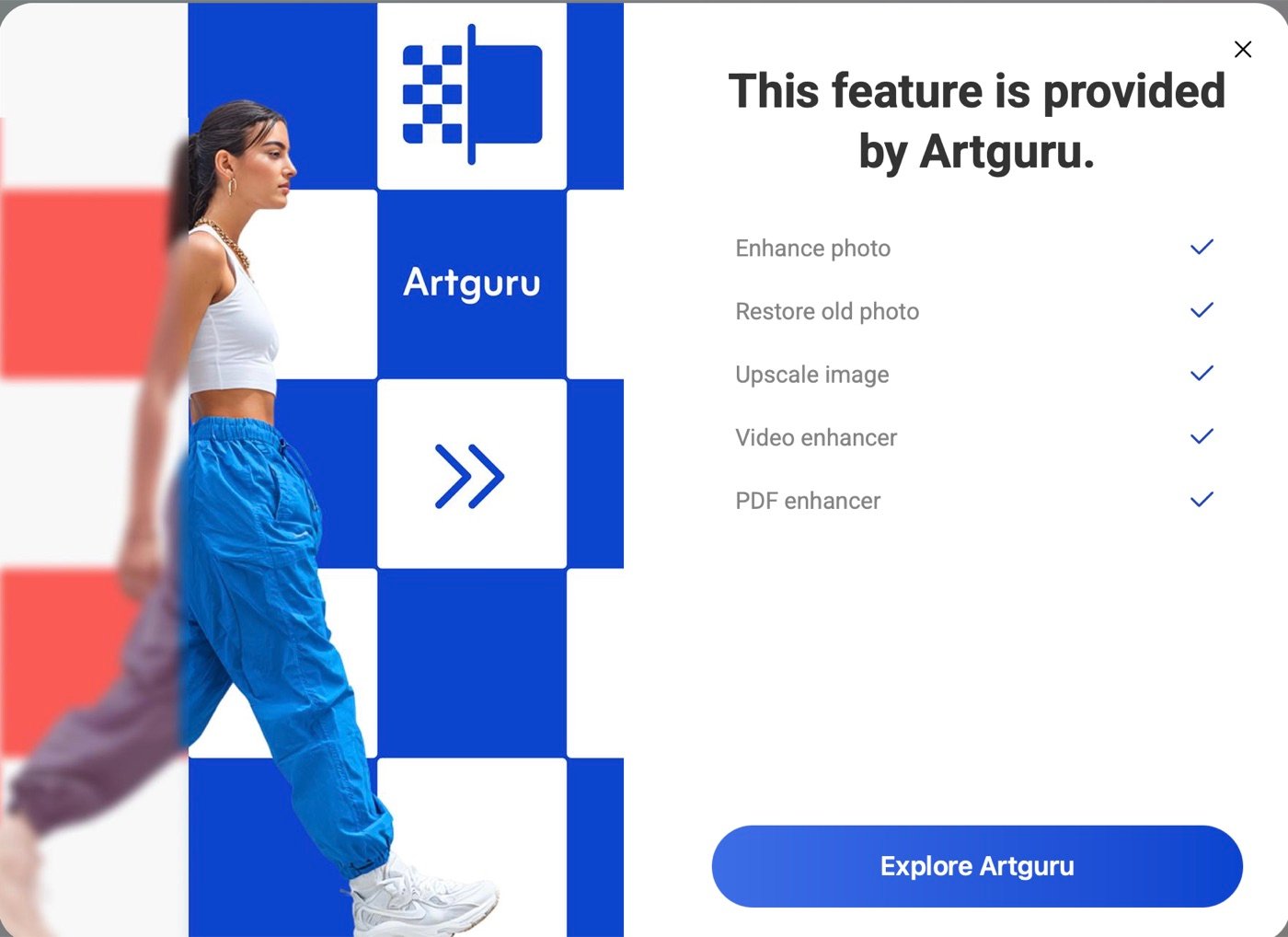
The wording is Pica AI’s, not ours: “This feature is provided by Artguru.” The dialog lists five features as Artguru’s — enhance photo, restore old photo, upscale image, video enhancer and PDF enhancer — and ends with an “Explore Artguru” button.
That means half of what Pica AI advertises on its homepage is a second company’s product wearing a Pica AI badge. This does not make the enhancer bad; as you will see below, the results were good. But it changes what you are buying. If enhancement or restoration is the only reason you are here, you are one click away from the company that actually builds it, and going there directly is worth a look before you subscribe.
Pica AI vs PicAI vs Pika: three different products
Three unrelated products have near-identical names, and search results mix them constantly. If you are comparing tools, make sure you are comparing the right one.
Which one you are actually looking at
| Product | Site | What it is |
|---|---|---|
| Pica AI | pica-ai.com | This review. Face swap, AI headshots, photo enhancement and restoration. |
| PicAI | picai.com | A different company. An AI image and video generator that bundles 25+ models. |
| Pika | pika.art | Pika Labs. Text- and image-to-video generation. Not a photo editor at all. |
PicAI is the one people most often confuse with Pica AI, because the names differ by a single hyphen. It aggregates models we have tested individually, including GPT Image 2, Nano Banana 2, Ideogram and Kling AI. Pika is a video tool from a separate startup. None of the three is a rebrand of another.
Pica AI Face Swap, tested
Face Swap is Pica AI’s own technology and its most-used feature. The interface is genuinely simple: upload the photo you want to change, add the face you want in it, press Swap. Before you commit, it tells you the price.
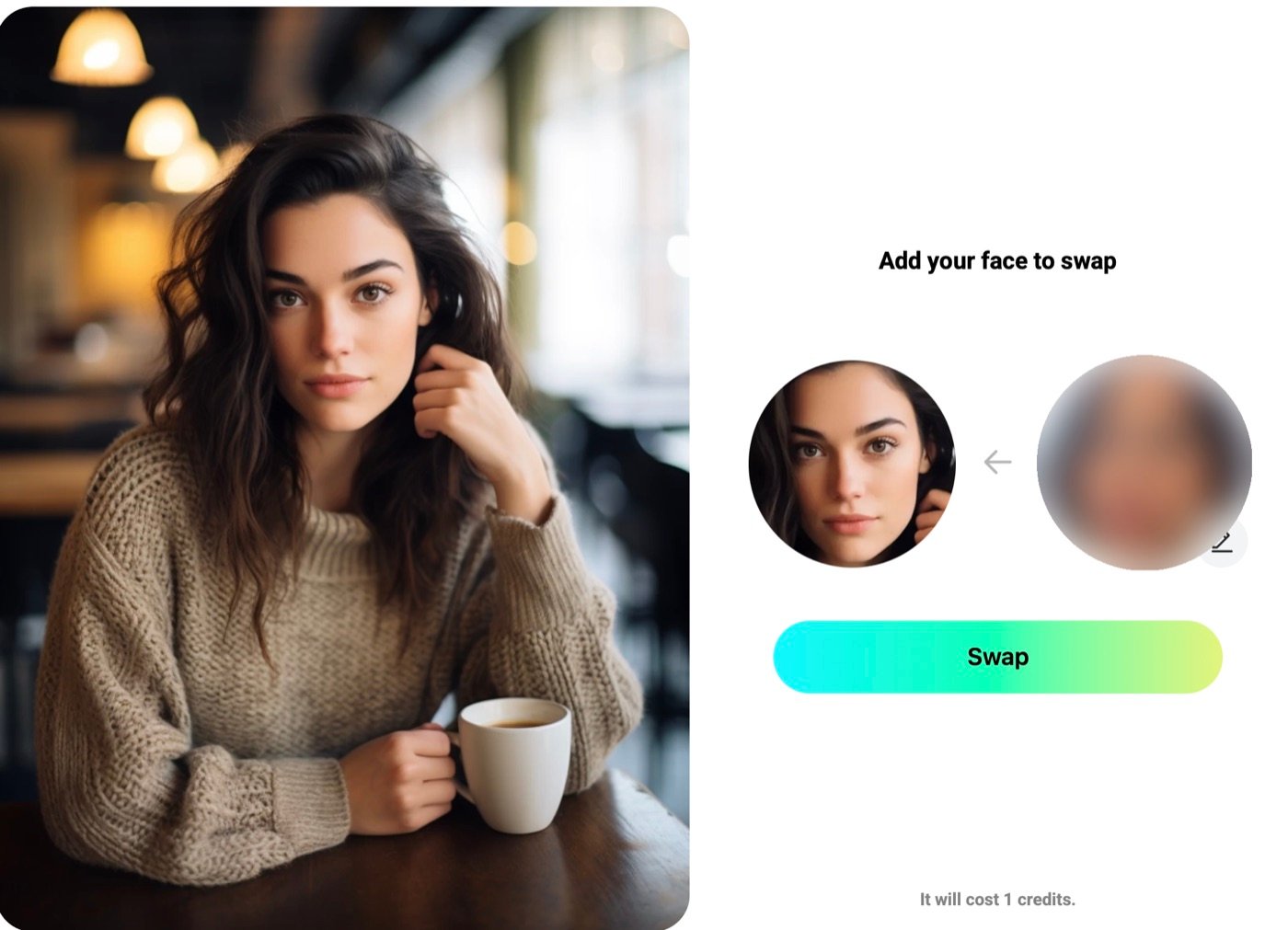

How to use Pica AI face swap
- Open Face Swap and upload the photo you want to change — the target scene.
- Add the face you want placed into it. The app shows both as thumbnails side by side.
- Check the credit cost shown under the button, then press Swap. It takes one credit.
- Download the result straight away. On the free plan it is watermarked and deleted after 24 hours.
It costs exactly 1 credit, which the interface states plainly. On the free plan’s 4 credits a day, that is four face swaps per day and no more.
Quality-wise the blend itself is clean. There is no visible seam at the hairline or jaw, the lighting matches the scene, and at a glance it reads as a real photograph rather than a composite. What it does not do is preserve identity. Our source face belonged to a specific person; the output slimmed the face, altered the nose and produced a noticeably younger-looking result that would not be recognised as the person we uploaded. If you want a laugh or a plausible stock-style portrait, that is fine. If you need the result to actually look like a particular individual, this is not reliable.
We blurred the source face in the screenshot above. It belonged to a real person, and their identity is not relevant to the test.
Headshot+ and what it demands before it runs
Headshot+ is the other tool running on Pica AI’s own pipeline, aimed at LinkedIn and CV portraits. It is also the one with the most friction.
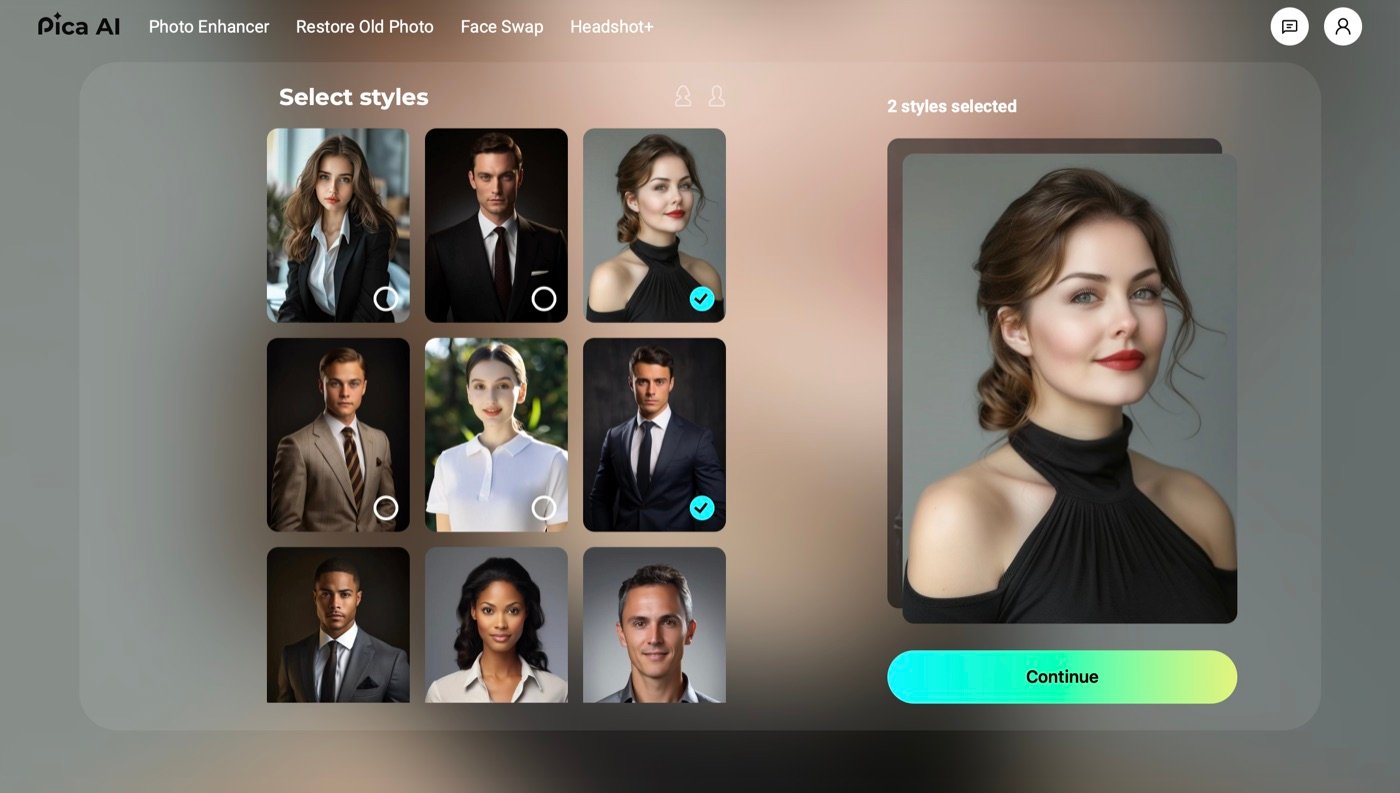
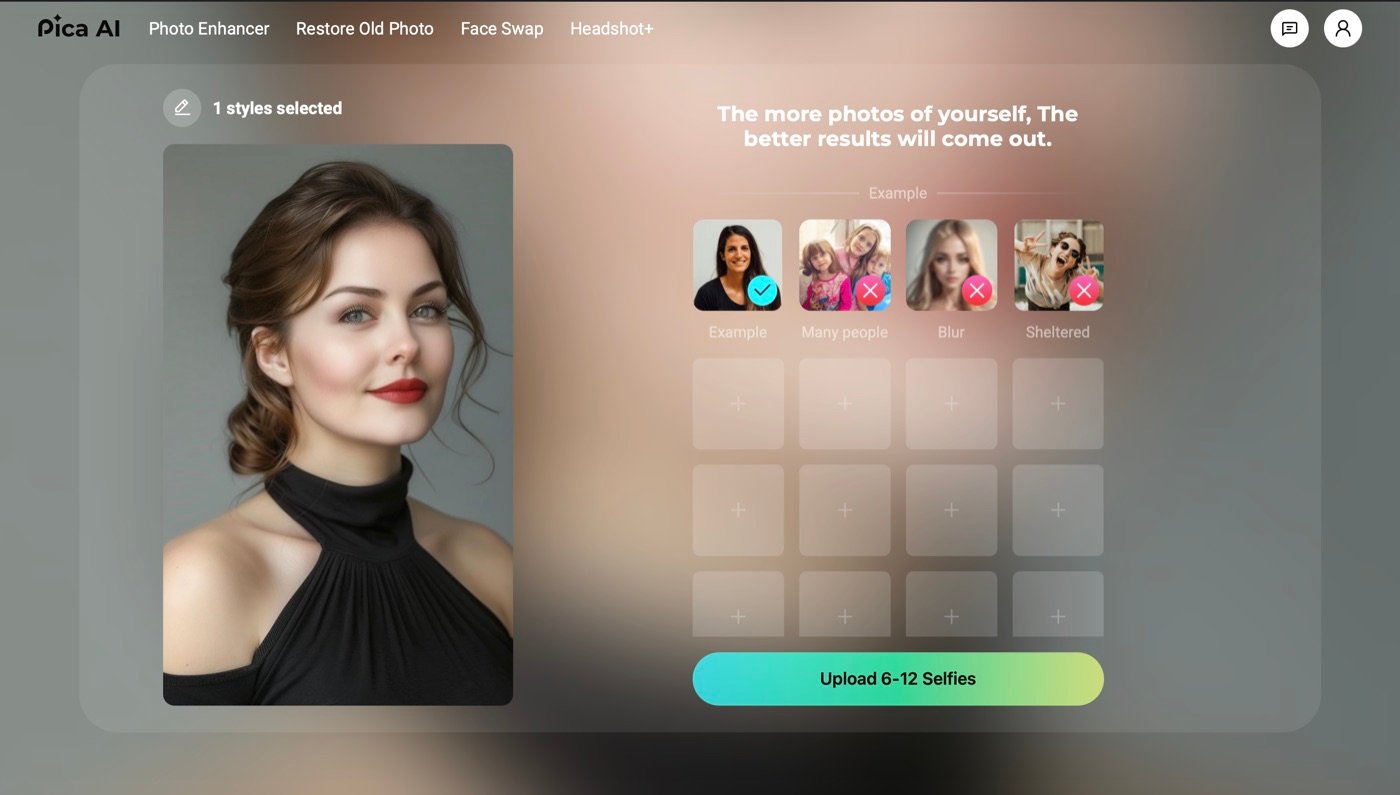
You choose one or more styles, then the app asks you to upload 6–12 selfies before it will generate anything, with on-screen guidance rejecting group shots, blurry photos and images where the face is obscured. Compared with a one-photo tool this is a real commitment, and it is worth knowing before you start rather than after.
We completed a run. We did not download the result immediately, and by the time we went back for it, it was gone — which is the free plan’s 24-hour storage limit working exactly as documented. That is a practical warning worth more than a screenshot: on the free plan, save your output the moment it appears. Because we did not capture it, we are not publishing a Headshot+ result image or scoring its quality here.
Pica AI Photo Enhancer and Restore Old Photo (that is, Artguru)
Both of these are the Artguru features described above. We tested them through Pica AI, so the results below are what you get if you use Pica AI — but the engine is Artguru’s.
The enhancer, on a soft indoor portrait:
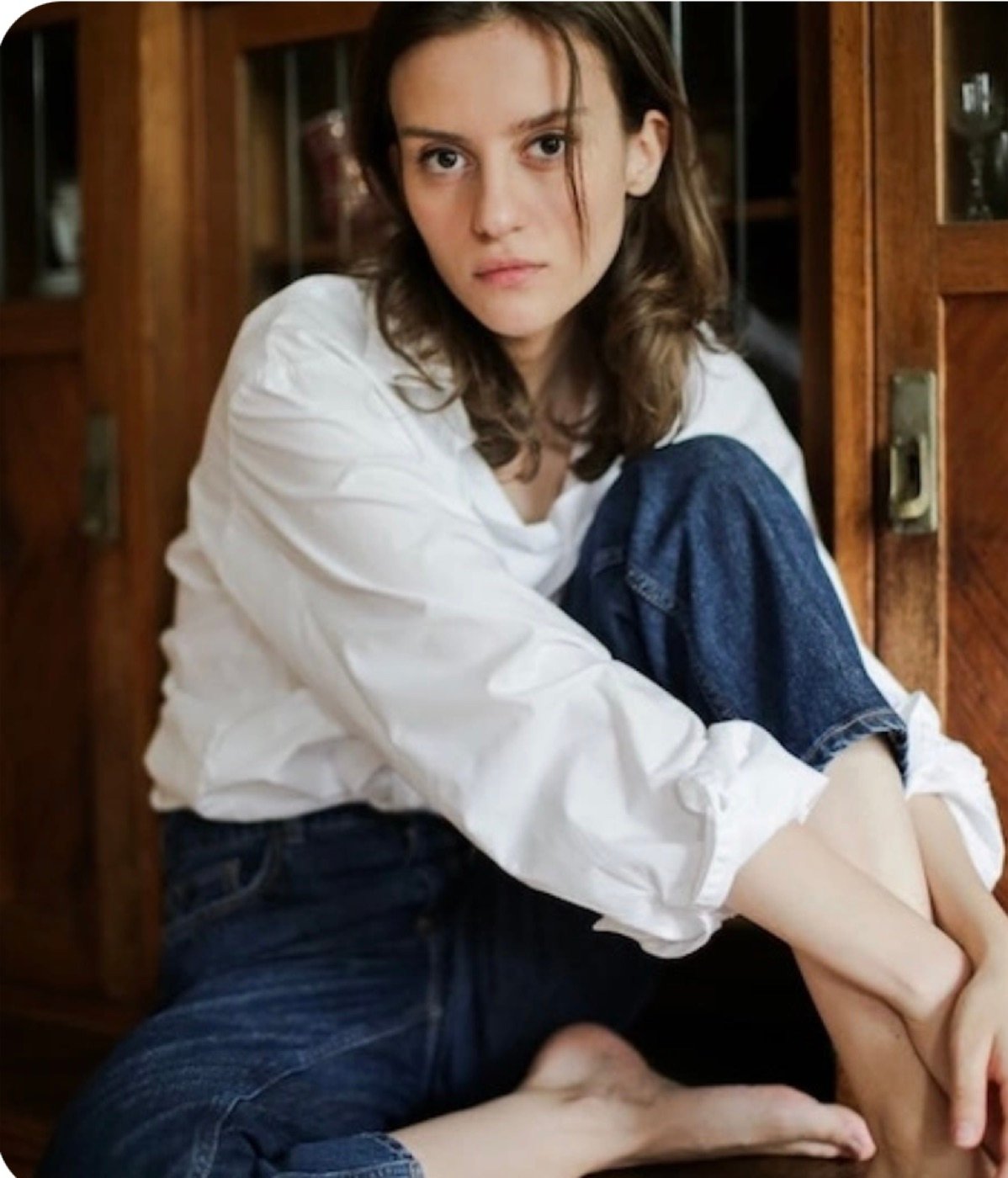
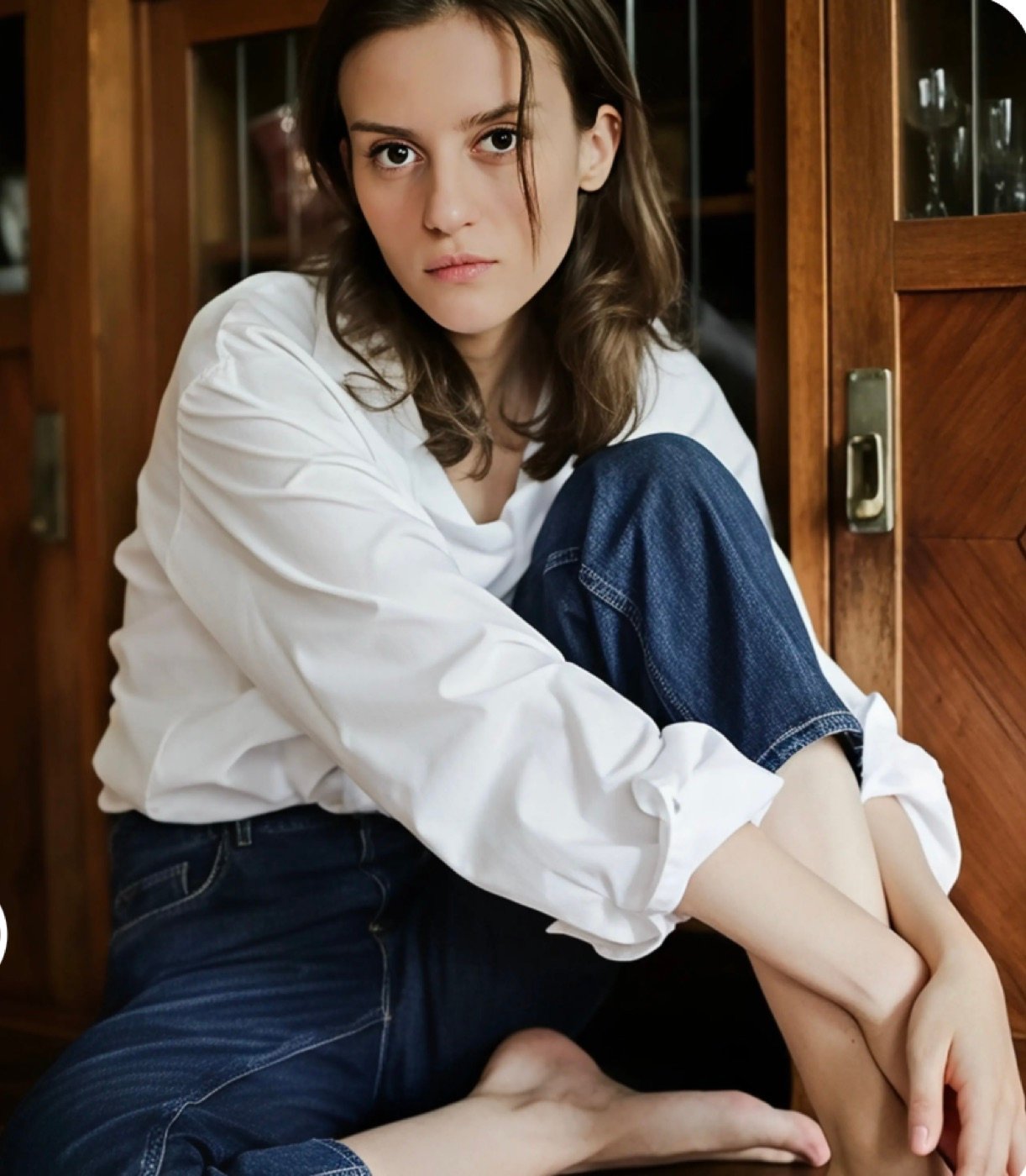
The improvement is real. Hair separates into strands, the denim weave resolves, and the wood grain behind the subject gains definition. One honest limitation: we captured the on-screen previews rather than the downloaded files, so we cannot tell you whether the tool increases pixel dimensions or simply sharpens at the same size. It clearly improves apparent detail; whether it genuinely upscales is something we did not measure.
Restoration is the more impressive of the two. Our input was a heavily cracked studio portrait roughly a century old:
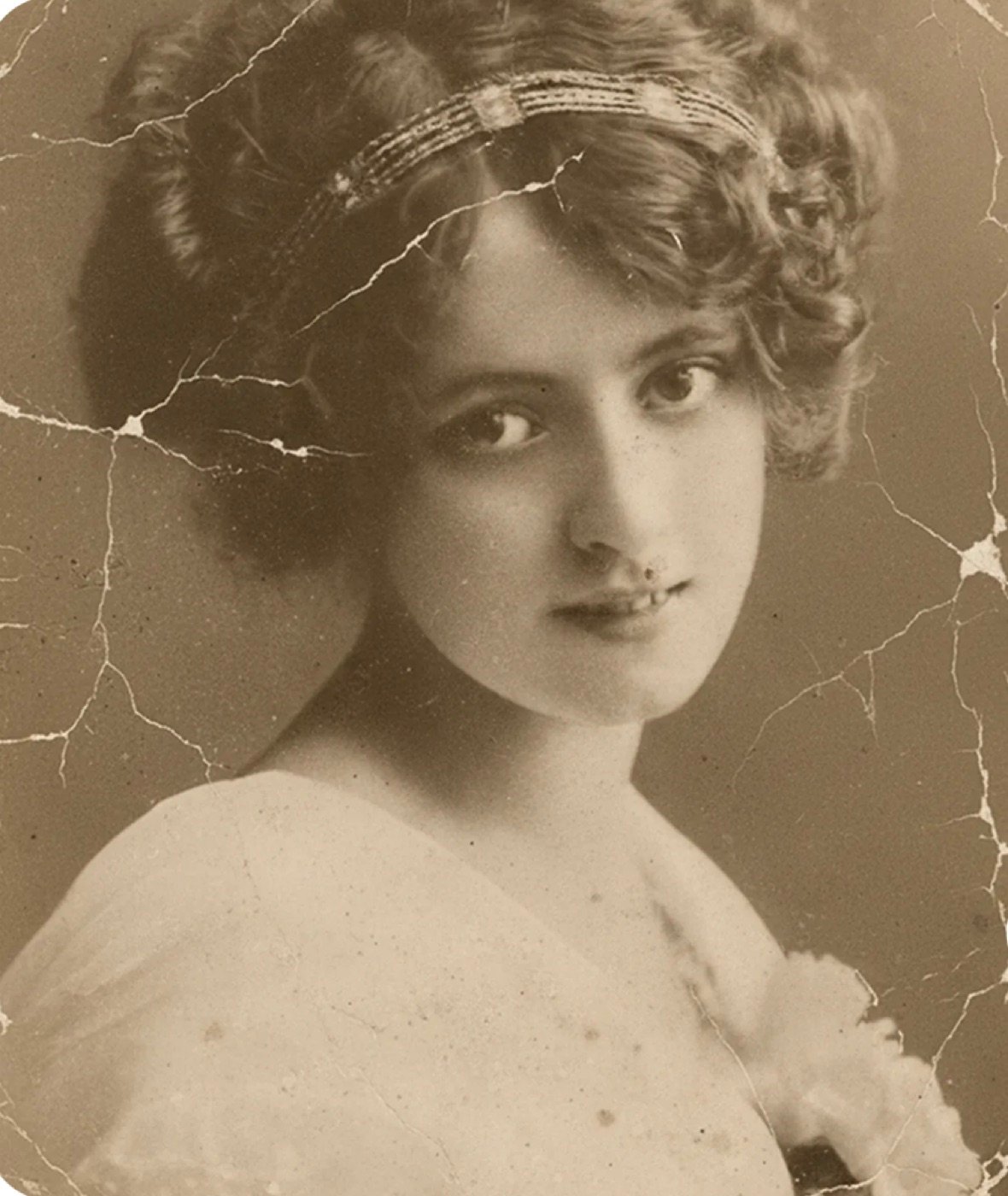
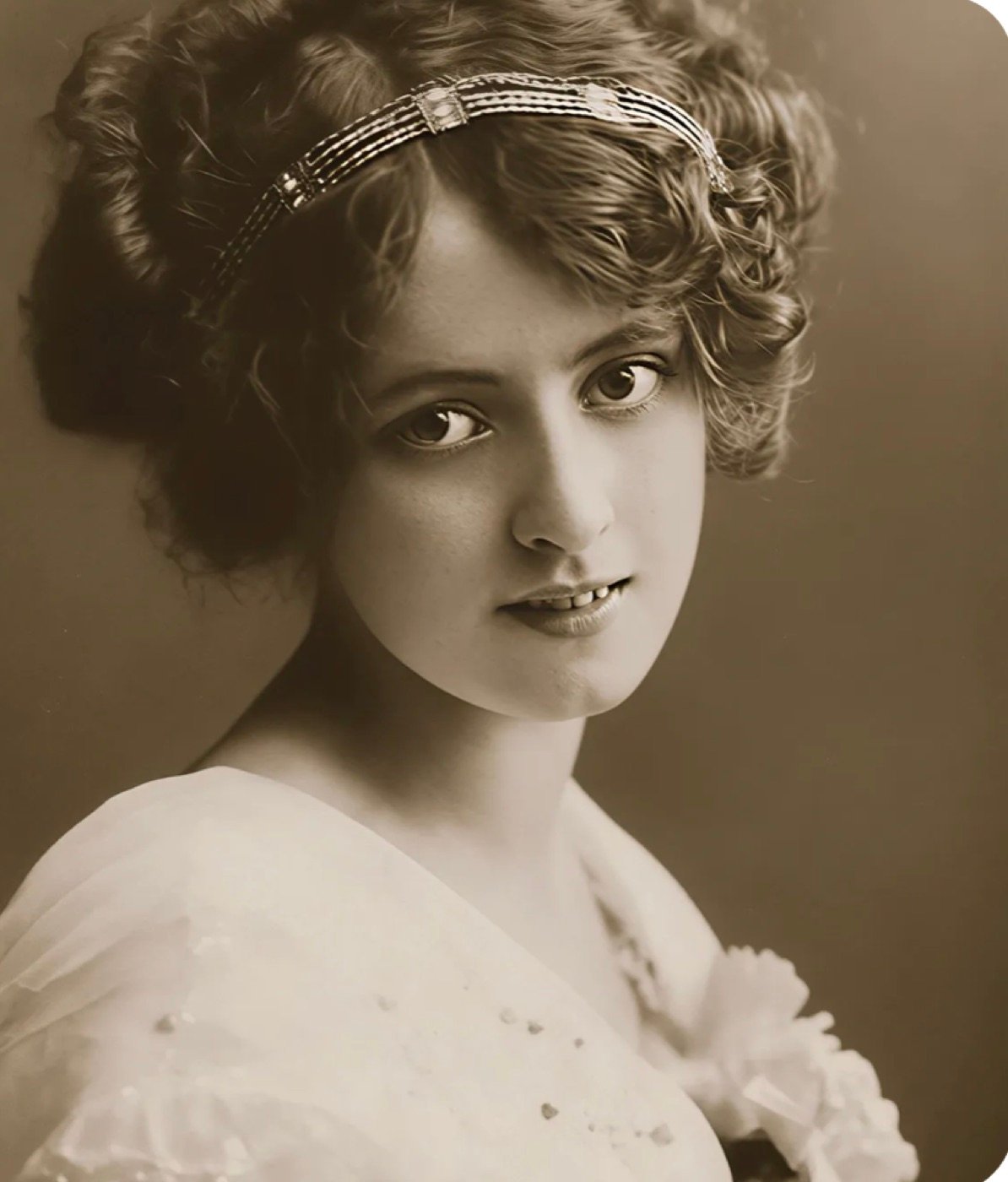
Every crack is gone, including the ones running directly across the face, and the tonal range is rebuilt convincingly. It is the strongest result we saw from any tool here.
The caveat matters though: it invents detail. The restored version shows clearly defined teeth and distinct jewels in the headband that are not legible in the original. For a family keepsake you want to frame, that is a feature. For anything where accuracy matters — archival work, historical research, evidence — you are looking at a plausible reconstruction, not a recovery of what was actually there.
Pricing, and the annual plan that gives you less
Pica AI runs on credits. Here is the full pricing, taken from its own pricing page.
Pica AI pricing, September 2026
| Plan | Price | Credits | Includes |
|---|---|---|---|
| Free | US$0 | 4 limited credits/day | Images stored 24h. Watermarked. |
| Monthly | $9.99/mo | 1,000 credits/month | Fast processing, no watermark |
| Annual | $59.99/yr | 8,000 credits/year | Fast processing, no watermark |
The annual plan is marketed as 25% off, and per credit it is: $59.99 for 8,000 credits works out at $0.0075 a credit, against $0.0100 on monthly. But look at the volume. Twelve months of the monthly plan costs $119.88 and gives you 12,000 credits. The annual plan costs half as much and gives you 8,000 — four thousand fewer for the year.
So the annual plan is the cheaper deal only if you use no more than about 667 credits a month. Above that you run dry and have to top up, and the saving evaporates. Light user: take the annual. Heavy user: monthly is the plan that actually keeps working.
What the free plan actually gets you
Pica AI’s pricing page advertises “no watermark” on its paid tiers. It never states the corollary, so we will: the free plan watermarks your results. Ours came back stamped “Pica AI” across the bottom-right corner.
4 credits a day
Not 4 a month — 4 every day, which is more generous than it first sounds. At 1 credit per face swap, that is four swaps daily, indefinitely, without paying.
A visible watermark
Free results carry a “Pica AI” mark. Fine for messing about; not fine for a profile picture, a client deliverable or anything printed.
24-hour storage
Results are kept for 24 hours and then deleted. We lost a completed Headshot+ run this way. Download immediately or lose it.
Costs vary by tool
Face Swap is 1 credit. Other tools price differently and show the cost before you run them — check the number on screen rather than assuming.
Pica AI alternatives
Which alternative makes sense depends entirely on which of Pica AI’s tools you came for.
For enhancement, upscaling or restoration
Artguru — because it is already what you are using. Pica AI hands these three features to Artguru, so going direct removes the middle layer and gives you the video and PDF enhancers Pica AI does not surface.
For making images from a text prompt
Pica AI cannot do this at all. We have benchmarked ten AI image generators on identical prompts, with every result published.
For a free tier without a watermark
Pica AI watermarks free output. Our free-tier comparison tracks which tools watermark, which cap you daily, and which grant commercial rights.
For face swap specifically
Face Swap is Pica AI’s own tool and it is competent at 1 credit a go. If your requirement is that the result genuinely resembles a specific person, no tool in this class did that reliably in our testing. For a swap with no watermark and no account, see our Remaker AI review.
Who Pica AI is for, and who should skip it
It is a reasonable choice if you want occasional face swaps, you have old family photos worth repairing, or you want to try AI headshots without booking a studio. The interface is genuinely beginner-friendly, everything runs in a browser, and the free plan is usable rather than a teaser.
Look elsewhere if you want to generate images from a text description — that is a different class of tool entirely, and we have tested ten of them. Also skip it if you need a face swap that genuinely resembles a specific person, if you need unwatermarked output without paying, or if you want enhancement and restoration specifically, in which case Artguru is the company actually providing them.
Verdict
Pica AI is a competent, narrow product that does what it claims, with two things the marketing leaves out. Half its advertised tools are Artguru’s. And its free tier watermarks your work, which the pricing page implies only by omission.
Neither is disqualifying. Restoration in particular produced the best result we saw, and $9.99 a month is fair for what you get. But go in knowing you are buying two companies’ products in one wrapper, choose monthly over annual unless you are a light user, and download anything you make before the day is out.
What we measured, and what we did not
We tested on the free plan in September 2026 and kept the first result in every case, with no re-runs, in line with our review policy. We verified the Artguru hand-off, the 1-credit face swap price, the free-tier watermark and the 6–12 selfie requirement directly. We did not measure output resolution, processing times, or per-tool credit costs beyond Face Swap, and we are not scoring Headshot+ quality because we lost the output to the 24-hour limit before capturing it. Pricing is taken from Pica AI’s own pricing page on the date shown and may change.
Frequently asked questions
What is Pica AI?
Pica AI is a browser-based photo app offering four tools: face swap, AI headshots, photo enhancement and old-photo restoration. It is not an image generator — it edits photos you already have rather than creating pictures from a text prompt.
Is Pica AI free?
There is a free plan giving 4 credits per day. It is genuinely usable — a face swap costs 1 credit, so you get four a day — but results are watermarked and deleted after 24 hours.
Does Pica AI put a watermark on images?
Yes, on the free plan. Our free face-swap result came back with a “Pica AI” watermark in the bottom-right corner. Both paid plans state “no watermark”.
How much does Pica AI cost?
$9.99 a month for 1,000 credits, or $59.99 a year for 8,000 credits. The annual plan is cheaper per credit but gives 4,000 fewer credits per year than paying monthly, so it only saves money if you use under roughly 667 credits a month.
Is Pica AI the same as Pika or PicAI?
No. All three are separate products. Pica AI (pica-ai.com) does face swaps and photo repair. PicAI (picai.com) is an image and video generator bundling 25+ models. Pika (pika.art) is Pika Labs’ video generator.
Can Pica AI generate images from text?
No. Pica AI has no text-to-image feature. For that you need an actual image generator — we have benchmarked ten of them on identical prompts.
Is Pica AI an HD photo converter?
Its Photo Enhancer is marketed for improving photo quality, and in our test it visibly sharpened a soft image — hair, fabric weave and background detail all resolved better. We captured on-screen previews rather than the downloaded files, so we cannot confirm whether it raises pixel dimensions or only sharpens at the existing size. Note the feature is provided by Artguru, not Pica AI.
How do you use Pica AI face swap?
Upload the target photo, add the face you want in it, check the credit cost shown on screen, then press Swap. It costs 1 credit, so the free plan’s 4 daily credits allow four swaps. Download immediately — free results are watermarked and deleted after 24 hours.