EditPro Tips is a YouTube editing channel (46K subscribers, 94 videos, India), not an app and not an AI. Its Gemini prompt videos, above all the couple retro style and the face-change problem, turned its name into a search for AI photo editing prompts, and a ring of unrelated websites now carries the name. You do not need any of them: copy a prompt below, open ChatGPT or Gemini, attach your photo, paste and send. Start with the couple retro film still, the 3D art portrait or the dandiya night, and read the face-change fix first if your edits keep coming back as someone else.
Edit Pro Tips AI refers to the AI photo editing prompts popularised by EditPro Tips, an Indian YouTube editing channel with about 46,000 subscribers whose Gemini prompt videos (couple retro style, 3D art, dandiya night, and a video on Gemini changing faces) made the name a search term. It is not an app or an AI tool; websites using the name are third parties. The looks are plain-text prompts that run in Google Gemini or ChatGPT with your own photo attached, and this page gives 16 of them in that style.
Pipgen hands-on test in ChatGPT, October 2026; channel facts from YouTube on 7 October 2026; search data from AhrefsWhat Edit Pro Tips AI actually is
Checked 7 October 2026. We are not affiliated with EditPro Tips, and none of the prompts below is theirs.
EditPro Tips is a YouTube channel, @EditproTips_1, run by an Indian creator who makes phone editing tutorials: CapCut and VN reel templates, Picsart and Hypic photo edits, and, since 2025, AI photo prompts for Google Gemini and ChatGPT. On 7 October 2026 it had 46,000 subscribers, 94 videos and about 57 lakh views, had been running since October 2022, and had not uploaded for five months. Its own links go to Instagram (@editpro_tips_), a Facebook page and a Telegram channel. There is no EditPro Tips app, and “Edit Pro Tips AI” is not an AI tool; it is the name people give to the prompts from the channel’s videos.
The channel behind the search, on 7 October 2026
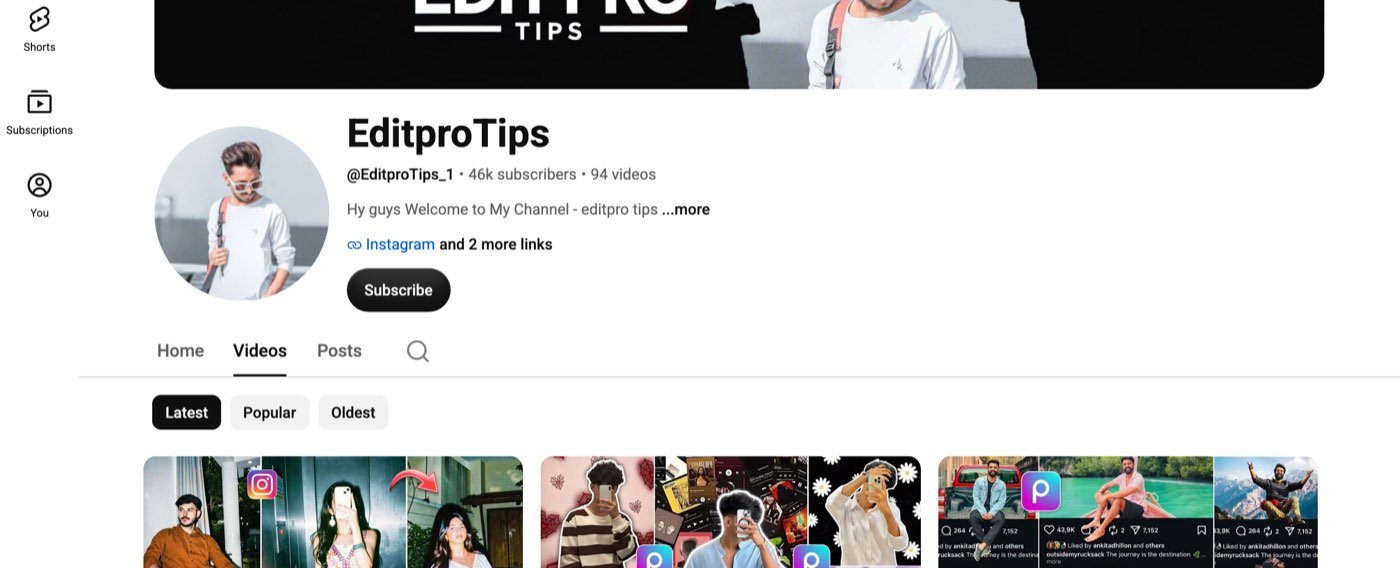
Thirteen of the 94 videos are AI prompt videos, and three of them did the work. “Couple Retro Style Gemini Prompt” has about 38,000 views, “Gemini Photo Edit Face Change Problem” about 40,000, and “Trending 3D Art Photo Editing” about 20,000; the others cover Navratri and dandiya edits, an Independence Day ChatGPT edit, a studio portrait, Ghibli art and a Diwali edit. Those videos are why “edit pro tips ai” drew about 51,000 searches a month in India by September 2026, according to Ahrefs, with the wider cluster around the name (“editpro tips”, “editprotips”, “template by editprotips”) well past 500,000. The rest of the channel is video: its most-watched uploads are a CapCut reels tutorial (13 lakh views), a Picsart birthday poster (7.5 lakh) and a bike reels edit (7.2 lakh).
The sites that use the name, and what they are
| Site | What it is | Linked from the channel? |
|---|---|---|
| youtube.com/@EditproTips_1 | The channel itself | — |
| editprotip.com | A blog of CapCut templates with one AI-prompt post; ranks 4th for the name and takes most of its traffic | No |
| aieditprotips.com | “EditPro Tips AI – Creative AI Editing Prompts”; the site did not load when we checked | No |
| editprotips.in | “Template by EditProTips”; its homepage returned “Nothing found” | No |
| editprotips.in.net | Describes itself as an “AI-powered smart editing” platform in a blog post | No |
“Template by editprotips”, the biggest search in the cluster, is about CapCut video templates, which are made inside the CapCut app and are not prompts at all. If you came for those, the CapCut app’s own template search is the only safe source. If you came for the AI photo edits, you need nothing but the text below and the ChatGPT or Gemini app you already have.
What we did and did not do
All the prompts here are ours, written in the looks the channel made popular; we have not copied any of its prompts, and we have not reviewed its videos as a product. We ran every prompt in ChatGPT on the date shown, pasted verbatim with one of our two reference photos (AI-generated test personas, not real people), in a new chat each time, keeping the first output. Every result is under its prompt, misses included. We test in ChatGPT only; every prompt is written to run in Gemini too. Channel figures are from YouTube on 7 October 2026 and search figures from Ahrefs for India.
The face-change problem, and the fix
The channel’s second most-watched prompt video is not a look at all. It is about Gemini returning a photo of someone who is not you, and it is the problem behind most “edit pro tips ai” searches. The cause is simple: an image model redraws the whole frame, and anything the prompt does not protect is free to change. Three habits fix it, and every prompt on this page uses all three.
How to keep your face in a Gemini or ChatGPT edit
- Write “my face sharp” in the prompt and put any grain, fade, glow or soft focus on the print or the scene, not on you. On our 80s page the only two faces that drifted were in the softest, most faded prompts.
- Never say where to look. “Looking away” and “over my shoulder” came back as stiff side-on faces in our girl prompts test. Say where the camera is instead: “the camera at eye level in front of me”.
- End with the face-lock line: “Keep my face exactly the same as the uploaded photo — do not alter my facial features.” For two people: “Keep both of our faces exactly the same…”. Make it the last sentence, where the model weighs it most.
Then use one clear, front-facing photo in decent light, no sunglasses, no beauty filter, and check the face before you post. If it still drifts after two tries, run the same prompt in the other app; in our prompt seen test each app kept faces the other lost. On our photo editing prompts page, written to these rules, ChatGPT kept the face in all 15 edits of a modern photo.
How to use these prompts
Copy, attach, paste
- Pick a look below and tap Copy.
- Open ChatGPT or Gemini and start a new chat. The channel uses Gemini; both work.
- Attach your photo. For couple looks, one photo with both of you in it, or one clear photo of each of you in the same message.
- Paste the prompt and send. Change the outfit words or the place to suit you before sending.
- Check the face first. If it is not you, see the fix above.
- New look, new chat. Chat apps carry details from one image into the next.
Free plan limits: ChatGPT’s free plan allows only a few images a day and the number moves with demand; Gemini’s free tier has a daily cap too. Pick your look before you spend one. What each free tool allows is in our free generators guide.
Couple retro and festival looks
The couple retro style is the look that made the channel. Ours sets it in a 90s film still rather than a studio, so it does not repeat the painted-backdrop studio couple on our 90s page. Navratri runs from 11 to 19 October 2026 and Durga Puja from 17 to 20 October, so the two festival looks are timed for this fortnight.
1. Couple retro film still
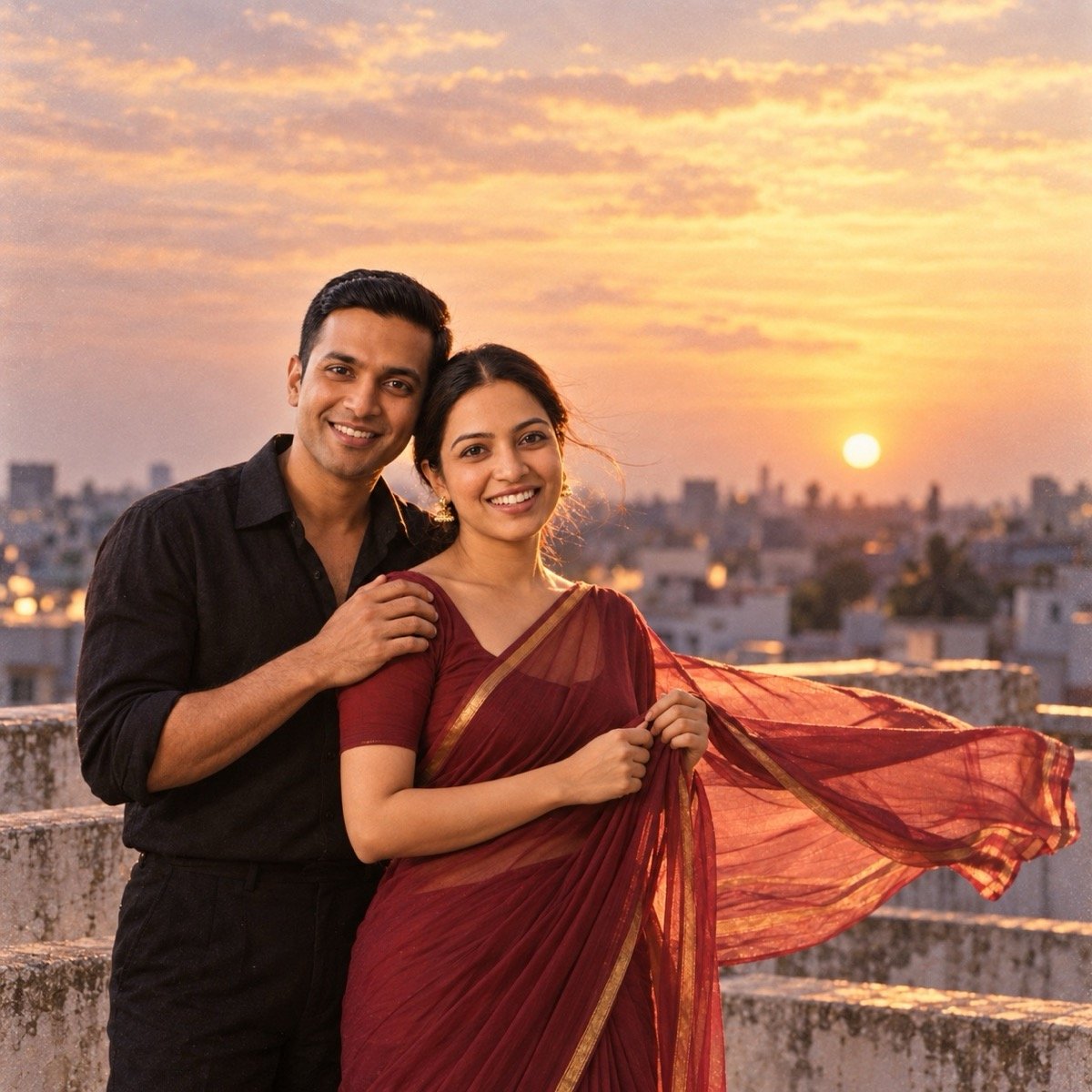
Turn the uploaded photos into a still from a 1990s Hindi film: the two of us on a terrace at dusk, I wear a maroon chiffon saree with a thin gold border and small jhumkas, my partner wears a black shirt with the top button open and the sleeves rolled, my partner's hand on my shoulder and my hands holding the pallu as it lifts in the wind, warm low light from one side with a soft glow behind us, both faces sharp, the grainy, slightly faded, warm colours of a 90s film print, no text anywhere. Keep both of our faces exactly the same as the uploaded photos — do not alter our facial features.
The channel’s version is a Gemini prompt; ours runs in either app. Swap maroon for red or navy and the shirt for a cream kurta to make it yours. Fifteen more couple looks, all run in ChatGPT, are on our couple prompts page.
↑ All looks2. Dandiya night, Navratri
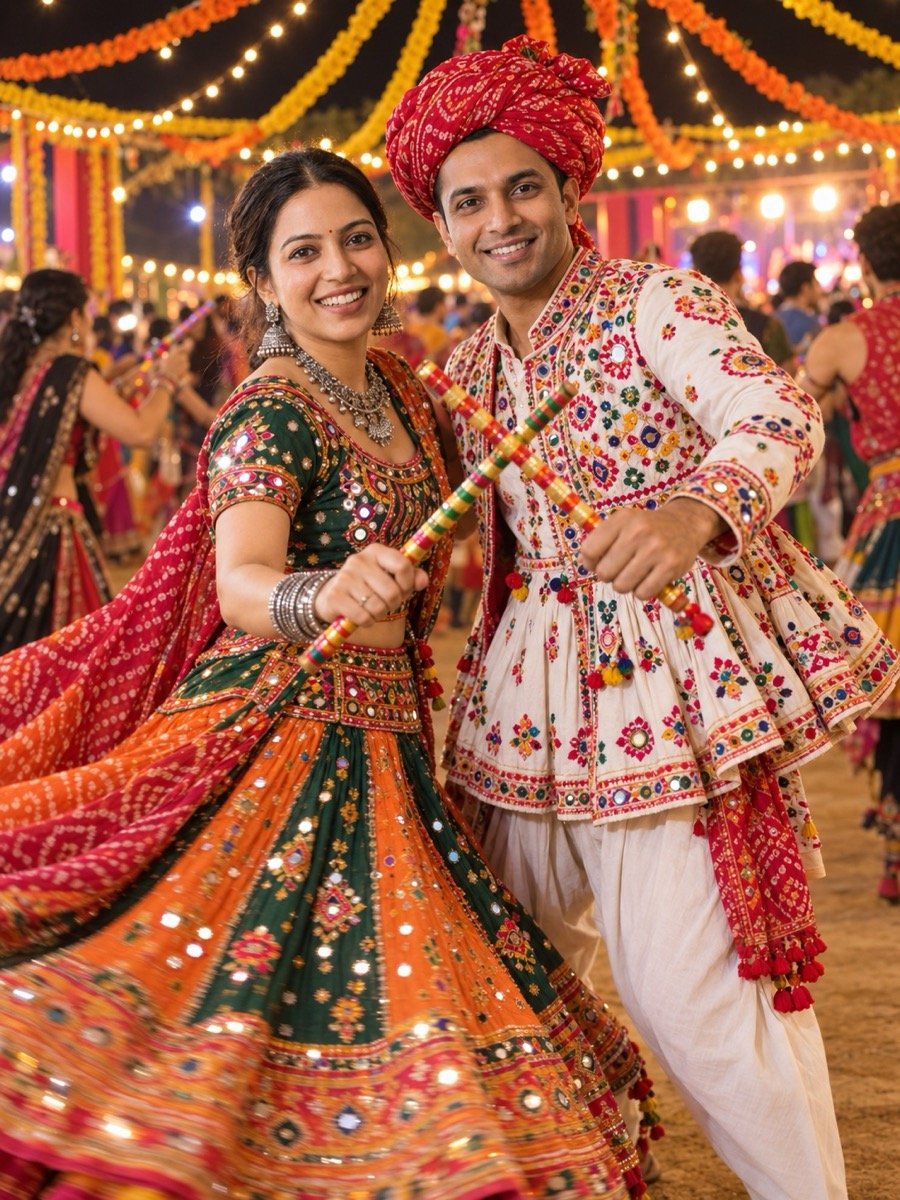
Turn the uploaded photos into a photo of the two of us at a Navratri dandiya night: I wear a mirror-work chaniya choli in green and orange with a bandhani dupatta and oxidised silver jewellery, my partner wears an embroidered kediyu with a red turban, our dandiya sticks crossed between us mid-beat, strings of marigolds and fairy lights overhead, other dancers blurred behind us, photographed from a few steps in front of us with the flash on, both faces sharp, warm colourful light with a little motion blur in the skirt. Keep both of our faces exactly the same as the uploaded photos — do not alter our facial features.
The solo version of this look, a woman mid-twirl, is prompt 16 on our editing page, where ChatGPT kept the face and drew the photographer into the frame because the prompt described one. This prompt says “photographed from a few steps in front of us” instead.
↑ All looks3. Durga Puja pandal portrait
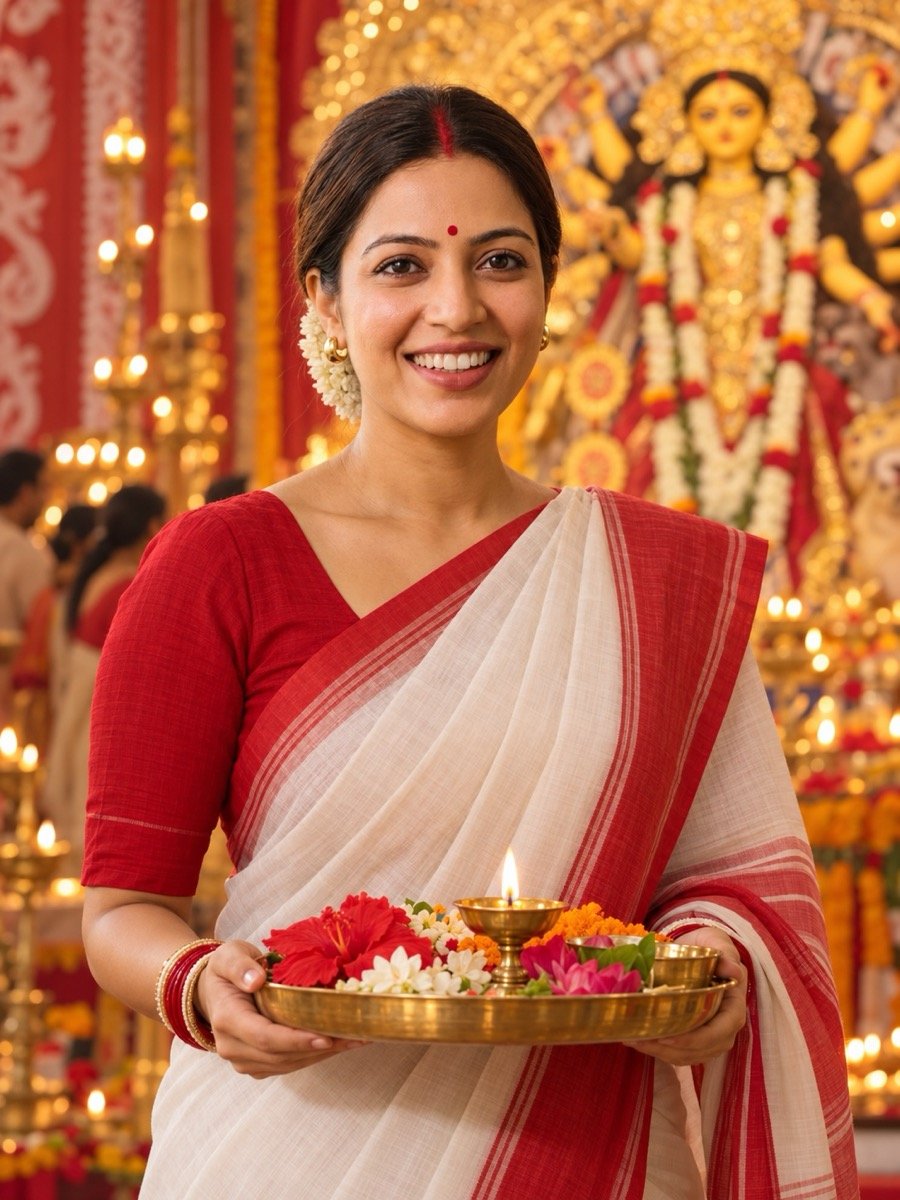
Turn the uploaded photo into a Durga Puja portrait of me: a white cotton saree with a broad red border, a red bindi, sindoor in the parting and a red blouse, holding a brass plate of flowers and a lit lamp in both hands, standing inside a pandal with the idol softly out of focus behind me, warm light from the lamps and the pandal lights, the camera at my eye level in front of me, my face sharp, no readable text. Keep my face exactly the same as the uploaded photo — do not alter my facial features.
The white-and-red saree is the look, and the idol stays out of focus so the model does not try to draw it in detail. Add “a dhunuchi in my hands” for the dance. In our run the idol came out sharp and a gajra appeared; add “no flowers in my hair” if you do not want one.
↑ All looksCinematic and studio looks
Four looks that show up again and again under the EditPro Tips tag on Instagram: the black-tone studio shot, the green cinematic grade, the candle-lit portrait and the retro brown-shirt street look.
4. Black-tone studio portrait
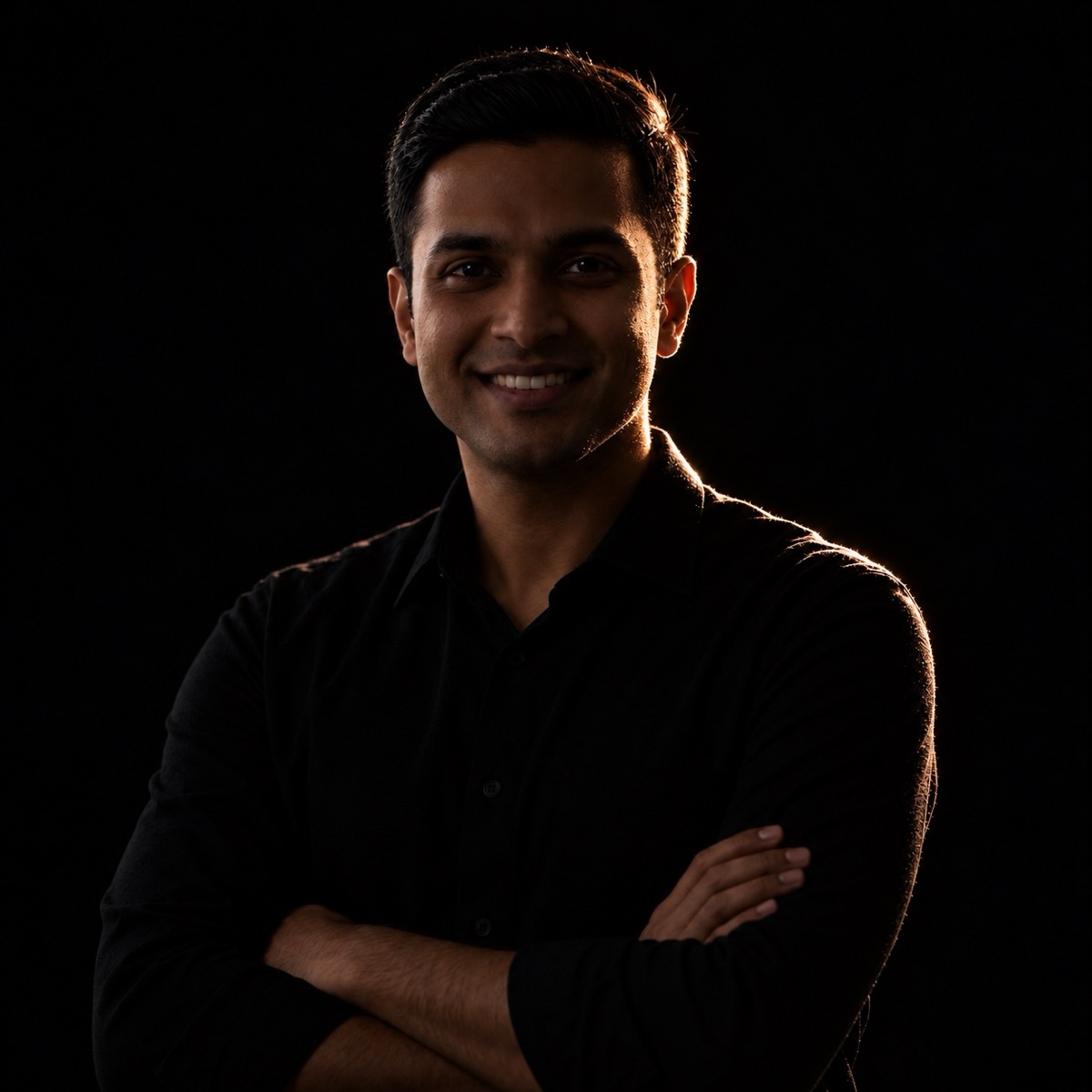
Turn the uploaded photo into a black-tone studio portrait of me: a plain black shirt against a pure black background, a single hard light from the side and slightly behind me so a thin rim of light traces my face and shoulder, the rest falling into shadow, arms folded, framed from the chest up, the camera at eye level in front of me, my face sharp with visible skin texture, deep blacks and muted colour, no text. Keep my face and facial hair exactly the same as the uploaded photo — do not alter my facial features.
“Black tone” is the channel’s name for this. The rim light is what makes it a portrait rather than a silhouette; keep it.
↑ All looks5. Green cinematic street portrait
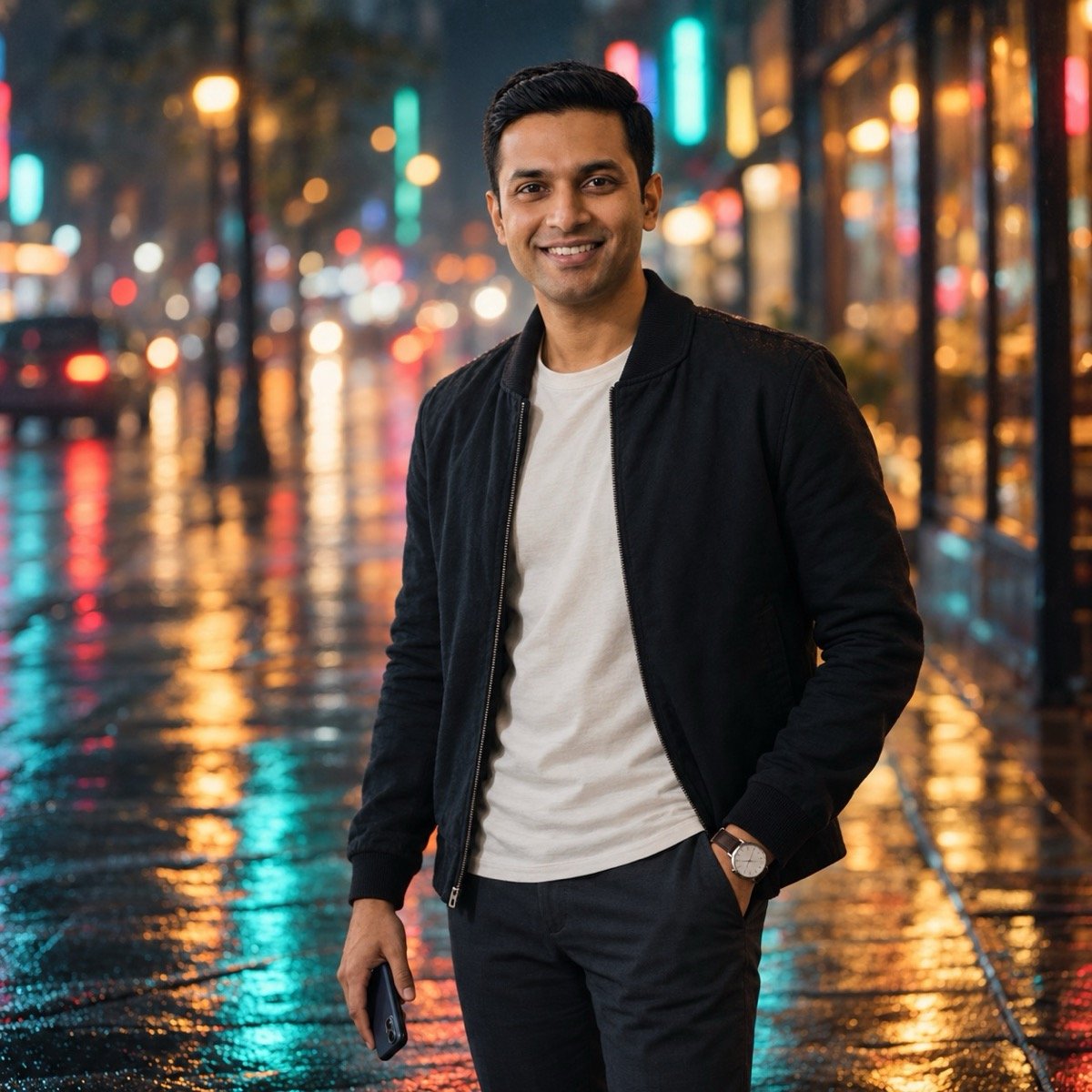
Turn the uploaded photo into a cinematic night portrait of me: standing on a wet city street with neon shop lights blurred behind me, a dark jacket over a plain tee, one hand in my pocket and the other holding a phone at my side, a teal-green colour grade over the shadows with warm skin tones, a shallow depth of field, fine film grain and a little haze, a 2.39:1 widescreen frame with me off-centre, my face sharp, no readable signs or text. Keep my face and facial hair exactly the same as the uploaded photo — do not alter my facial features.
“Green cinematic prompt” is one of the most-shared looks under the tag. The grade is in two words, teal-green shadows and warm skin; the rest of the prompt is just a street at night. ChatGPT ignored the widescreen shape in our run; crop the square to 2.39:1 yourself, or run it in Gemini, which follows framing instructions more closely in our benchmark.
↑ All looks6. Candlelight portrait
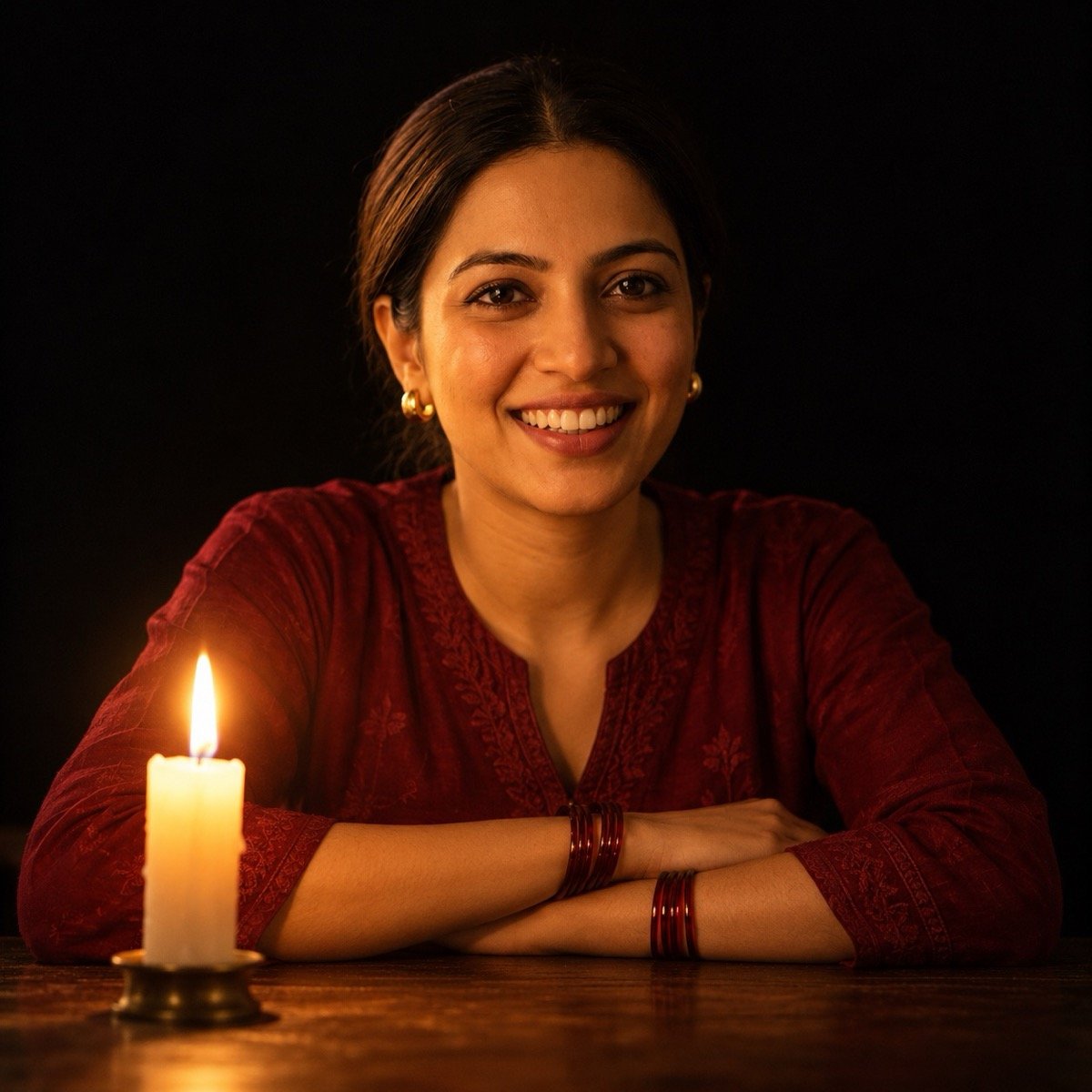
Turn the uploaded photo into a candlelit portrait of me: sitting at a dark wooden table with a single lit candle in front of me, my folded arms resting on the table with glass bangles on both wrists, a dark red kurta, everything else in the room black, the candle as the only light so it warms one side of my face, the camera low at the level of the table in front of me, my face sharp, soft shadows and fine grain, no text. Keep my face exactly the same as the uploaded photo — do not alter my facial features.
The one light source is the whole look. If the app adds lamps or windows, write “the candle is the only light in the room” and regenerate.
↑ All looks7. Retro brown shirt, golden-hour street
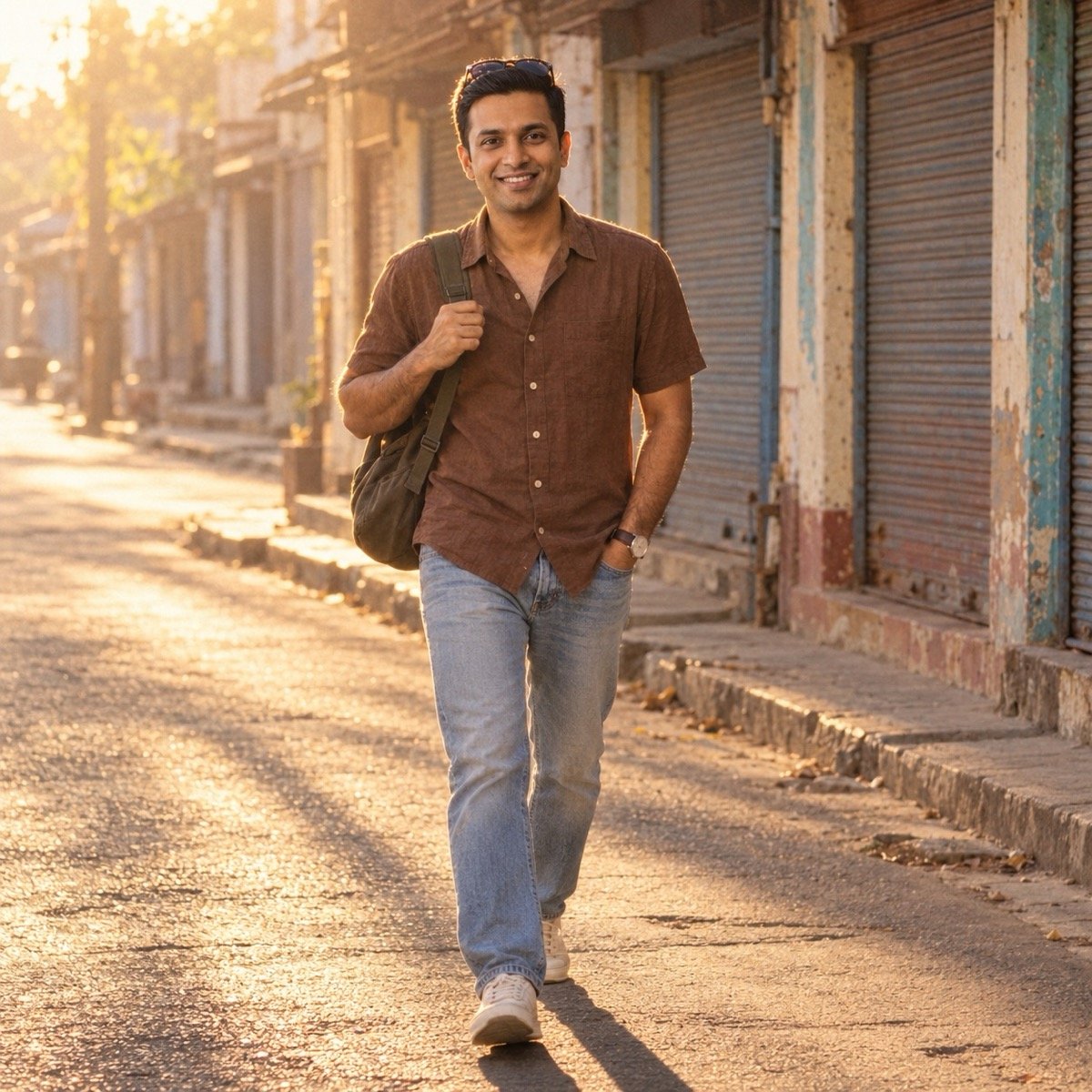
Turn the uploaded photo into a retro golden-hour street photo of me: a brown half-sleeve shirt open at the collar, dark sunglasses pushed up on my head, one hand in the pocket of light jeans and the other holding the strap of a bag on my shoulder, walking past old shuttered shops with no readable signs, low warm sun from behind me with long shadows on the road, a snapshot from across the street, my face sharp, the slightly faded warm colours of a 90s film print. Keep my face and facial hair exactly the same as the uploaded photo — do not alter my facial features.
The sunglasses stay on his head rather than his eyes on purpose: eyes behind dark lenses are where face matches go wrong.
↑ All looks3D art and effects
The 3D art edit was the channel’s third big prompt video. On our editing page a 3D-character prompt came back as a plain photograph, so this one names what it must not be. The other two are the particle and multi-exposure effects that fill the tag.
8. 3D art portrait
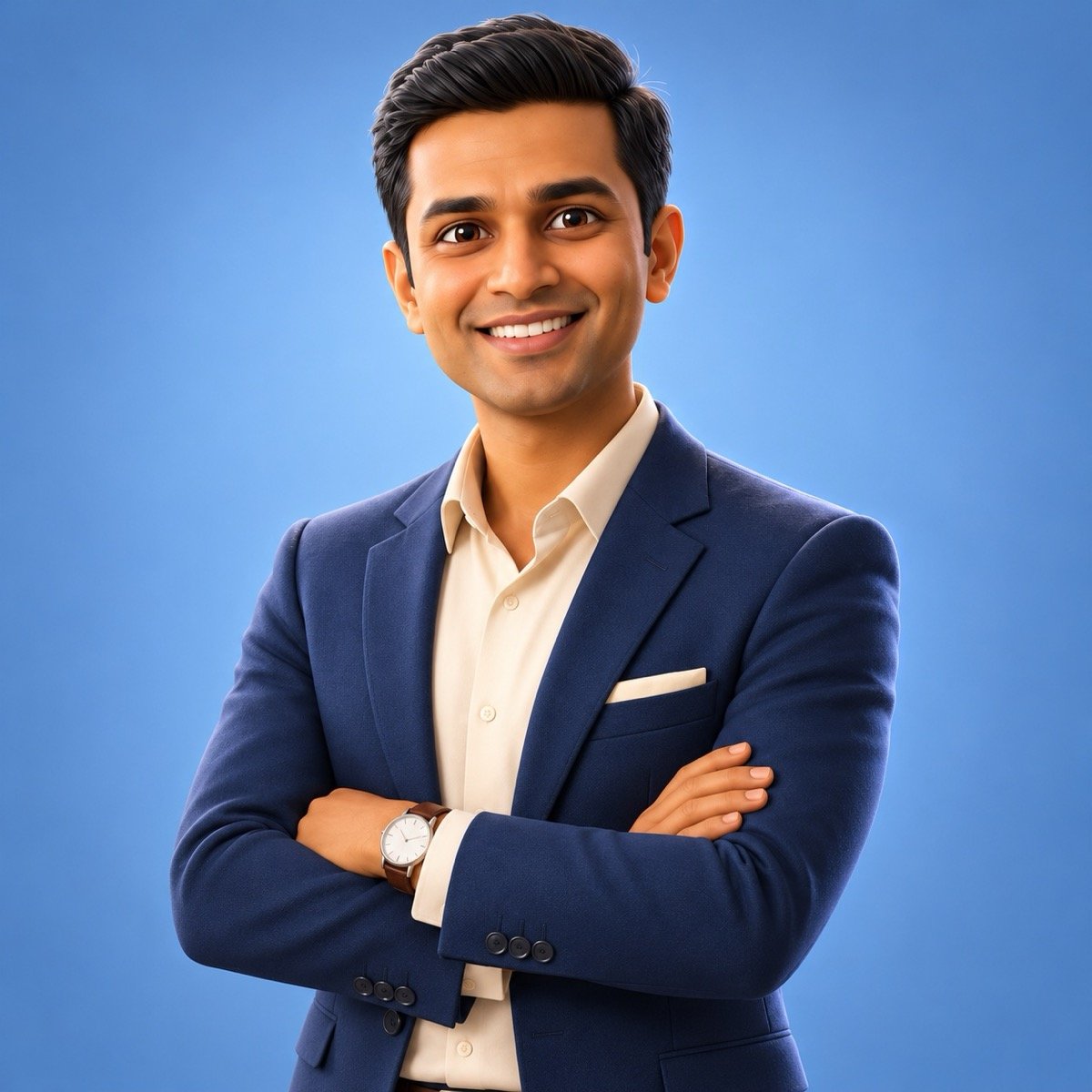
Redraw the uploaded photo as a stylised 3D cartoon character, not a photograph: large expressive eyes, slightly enlarged head, smooth skin with soft subsurface light, detailed hair, the same outfit as the photo, standing with my arms crossed on a plain soft-blue studio backdrop, soft three-point lighting, a clean high-quality render like a frame from an animated film, a medium shot, no text. Keep my likeness clearly recognisable — the same face shape, hairstyle and features as the uploaded photo, drawn in this style.
“A stylised 3D cartoon character, not a photograph” is the sentence our editing page lacked when its 3D prompt came back photoreal. The 3D figurine-on-a-desk look, the other big 3D trend, is prompt 13 there.
↑ All looks9. Fire dispersion effect
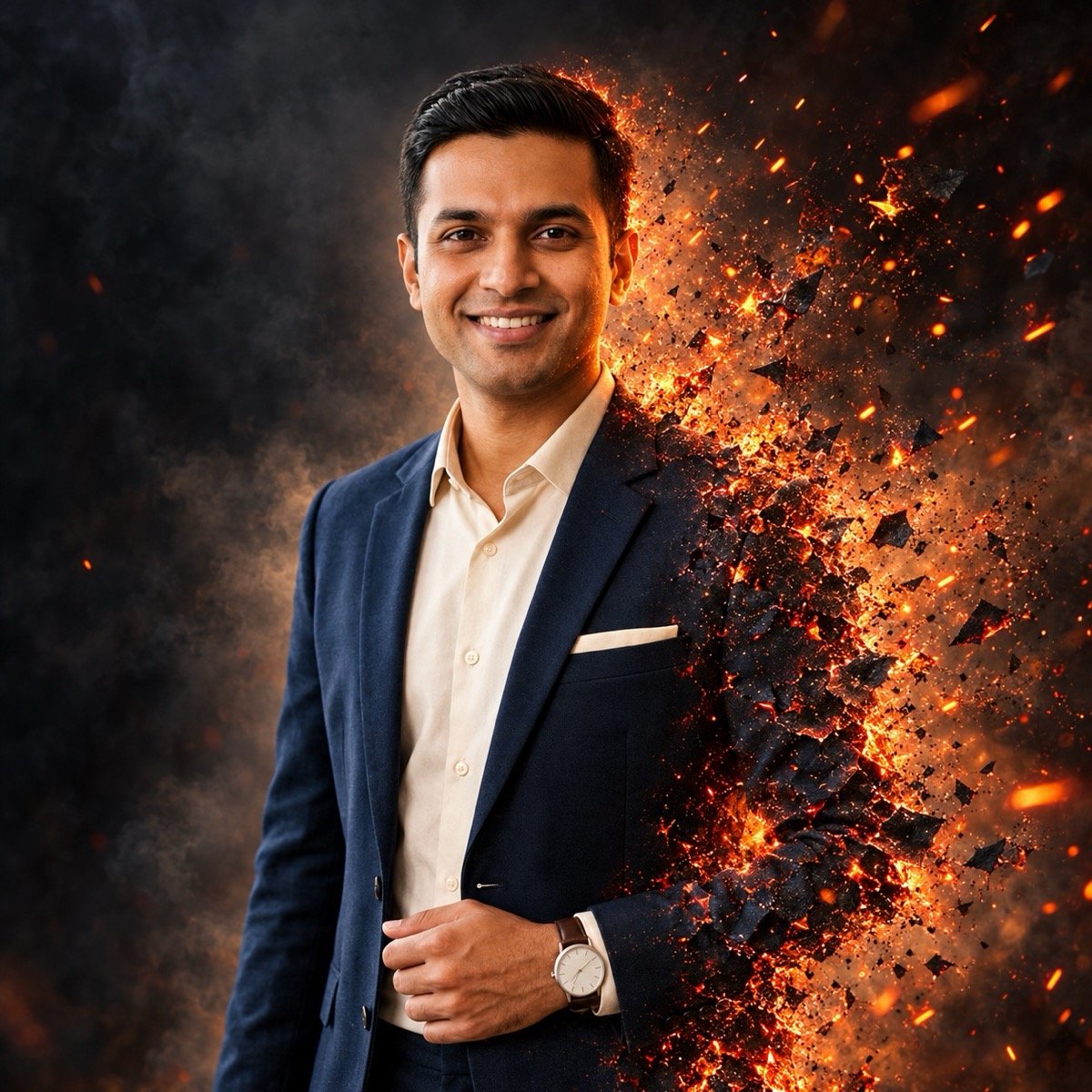
Edit the uploaded photo into a dispersion-effect portrait of me: keep me, my pose and my clothes as they are, and make the right side of my body and the trailing edge of my shirt break apart into glowing orange embers and sparks that drift away behind me, a dark smoky background, warm light from the embers on that side of my face, the camera at eye level in front of me, my face sharp and untouched by the effect, no text. Keep my face and facial hair exactly the same as the uploaded photo — do not alter my facial features.
“My face sharp and untouched by the effect” keeps the particles off the face, which is where this look usually fails.
↑ All looks10. Triple exposure: three of me in one frame
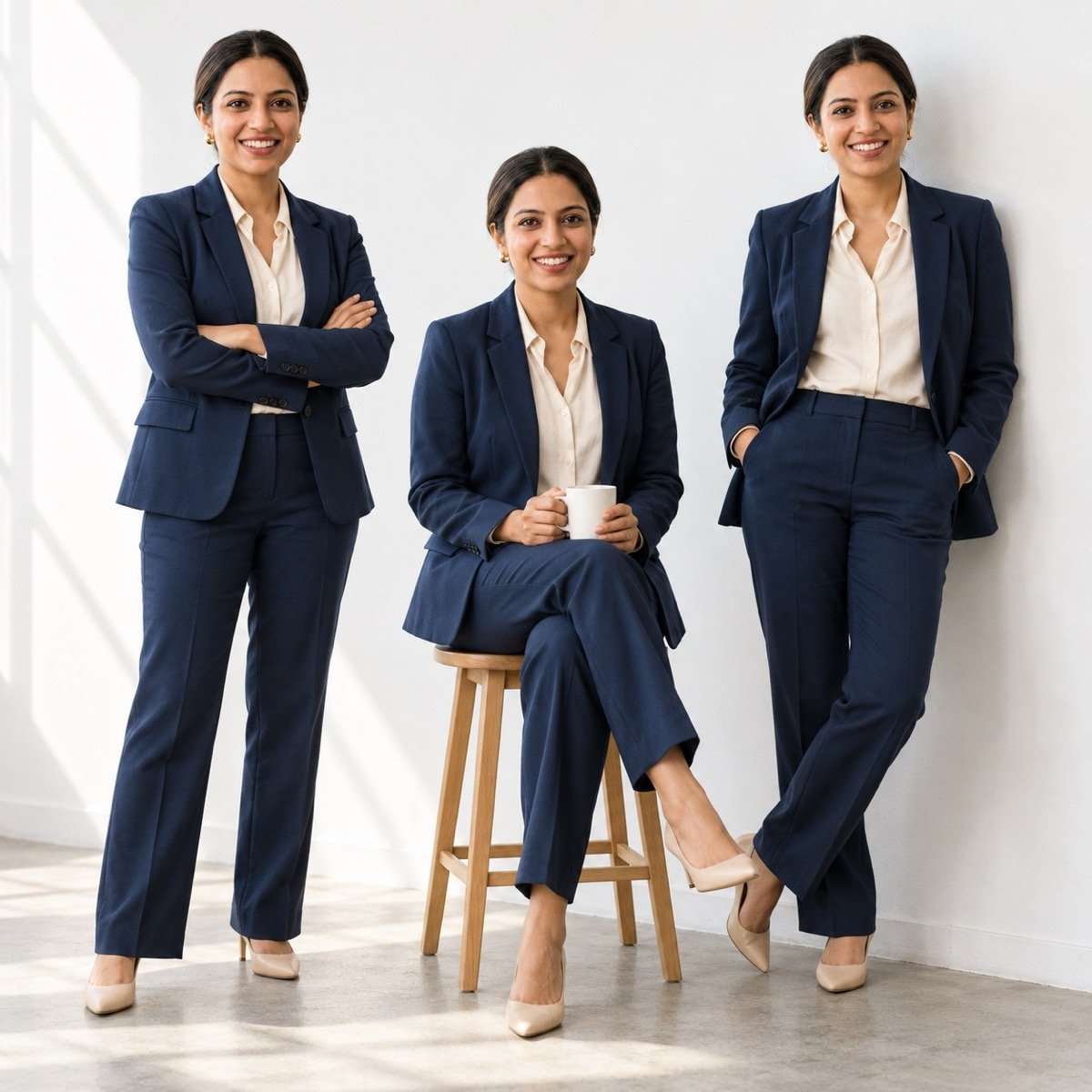
Turn the uploaded photo into a single photo of three versions of me in one frame: one standing with my arms crossed on the left, one sitting on a wooden stool in the middle holding a coffee cup, one leaning against the wall on the right with my hands in my pockets, all three wearing the same outfit as the uploaded photo, in a plain sunlit studio with a white wall, soft daylight from one side, the camera at eye level in front of us, all three faces sharp and identical to the uploaded photo, no text. Keep my face exactly the same as the uploaded photo — do not alter my facial features.
The channel’s “3 layer” edit is a video trick in VN; this is the one-prompt photo version. Three copies means three faces to keep, so expect to regenerate once.
↑ All looksStreet and bike looks
Bike reels are the channel’s most-watched genre after CapCut templates, and the “AI photo editing” before-and-after, an ordinary phone photo turned into a fashion-shoot frame, is the edit the whole tag is built on.
11. Bike at night under sodium lights
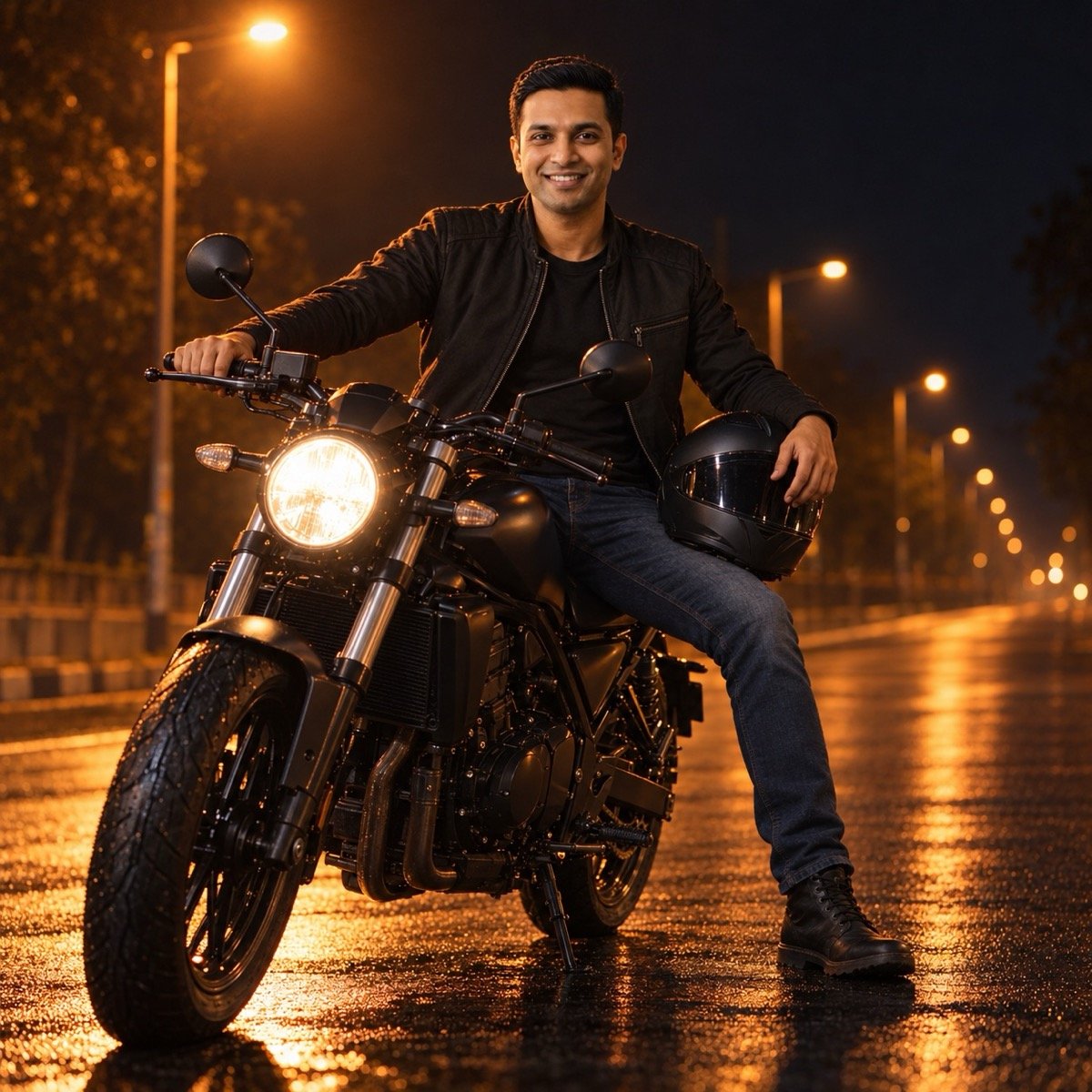
Turn the uploaded photo into a night photo of me sitting on a parked black motorcycle with no logos under orange sodium street lights on an empty road, a black jacket and jeans, a helmet resting on my knee under one hand and the other hand on the handlebar, wet tarmac reflecting the lights, the camera low on the road a few metres in front of me, my face sharp, warm orange light on one side and deep shadow on the other, fine grain, no readable text. Keep my face and facial hair exactly the same as the uploaded photo — do not alter my facial features.
The daytime version, a bike on a mountain road, is on our boy prompts page. “No logos” stops the model inventing a brand badge on the tank.
↑ All looks12. The "AI photo editing" glow-up
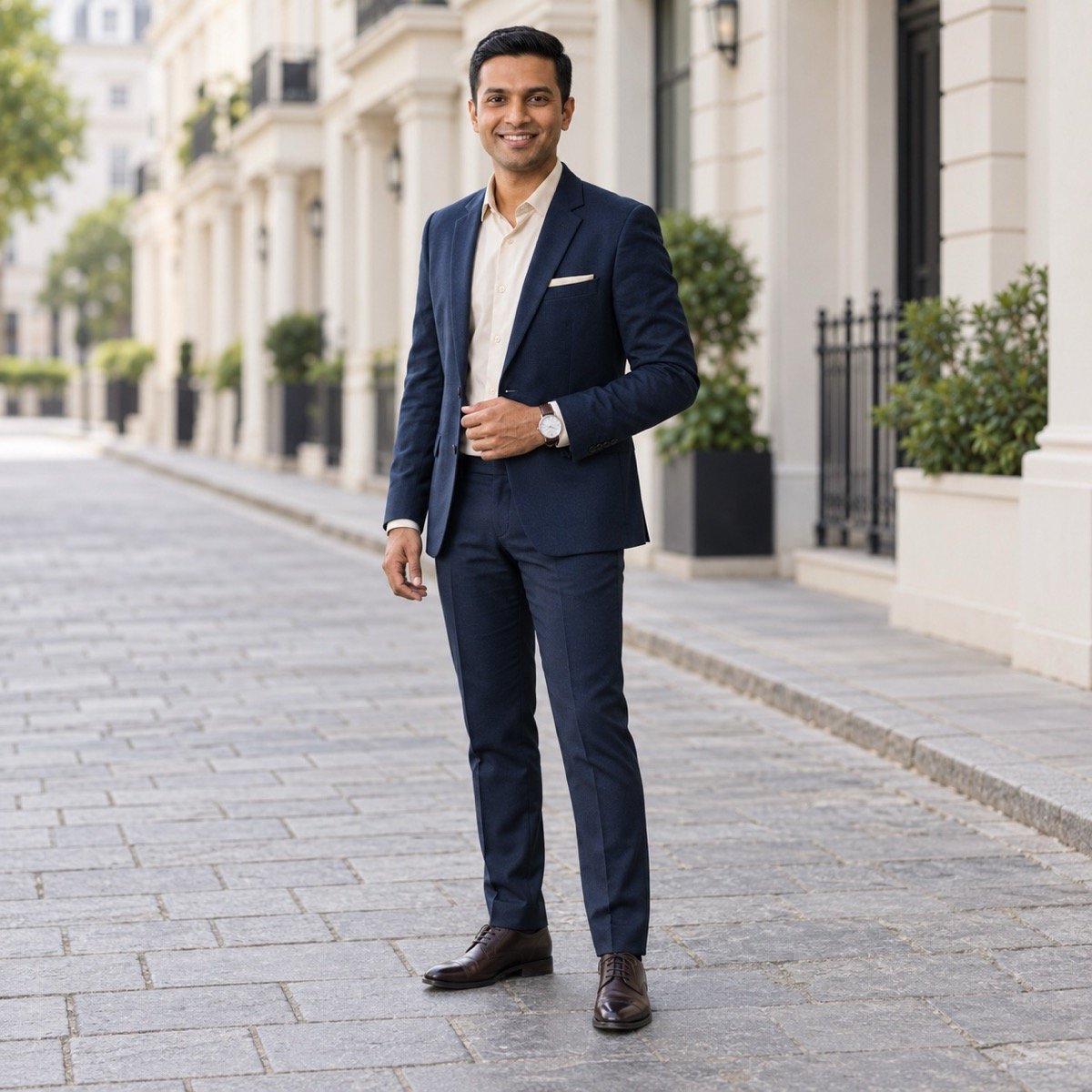
Edit the uploaded photo into a polished full-length fashion-shoot photo of me: keep my clothes, hair and pose exactly as they are, and change the setting to a clean empty street with pale buildings, soft overcast light with a gentle fill on my face, the background slightly out of focus, colours graded clean and slightly muted, the camera at waist height a few metres in front of me, my face sharp with natural skin texture and no smoothing, no text. Keep my face and facial hair exactly the same as the uploaded photo — do not alter my facial features.
This is the generic “AI photo editing” transformation: same person, same clothes, a shoot-quality frame. The keep list at the start is what stops it turning into a different outfit.
↑ All looksPure edits: DP and sky change
Two edits from the channel’s most-watched non-AI videos, done with a prompt instead of an app: the Instagram profile photo and the sky change, which had 1.7 lakh views as a Krea tutorial.
13. Instagram DP: clean profile photo
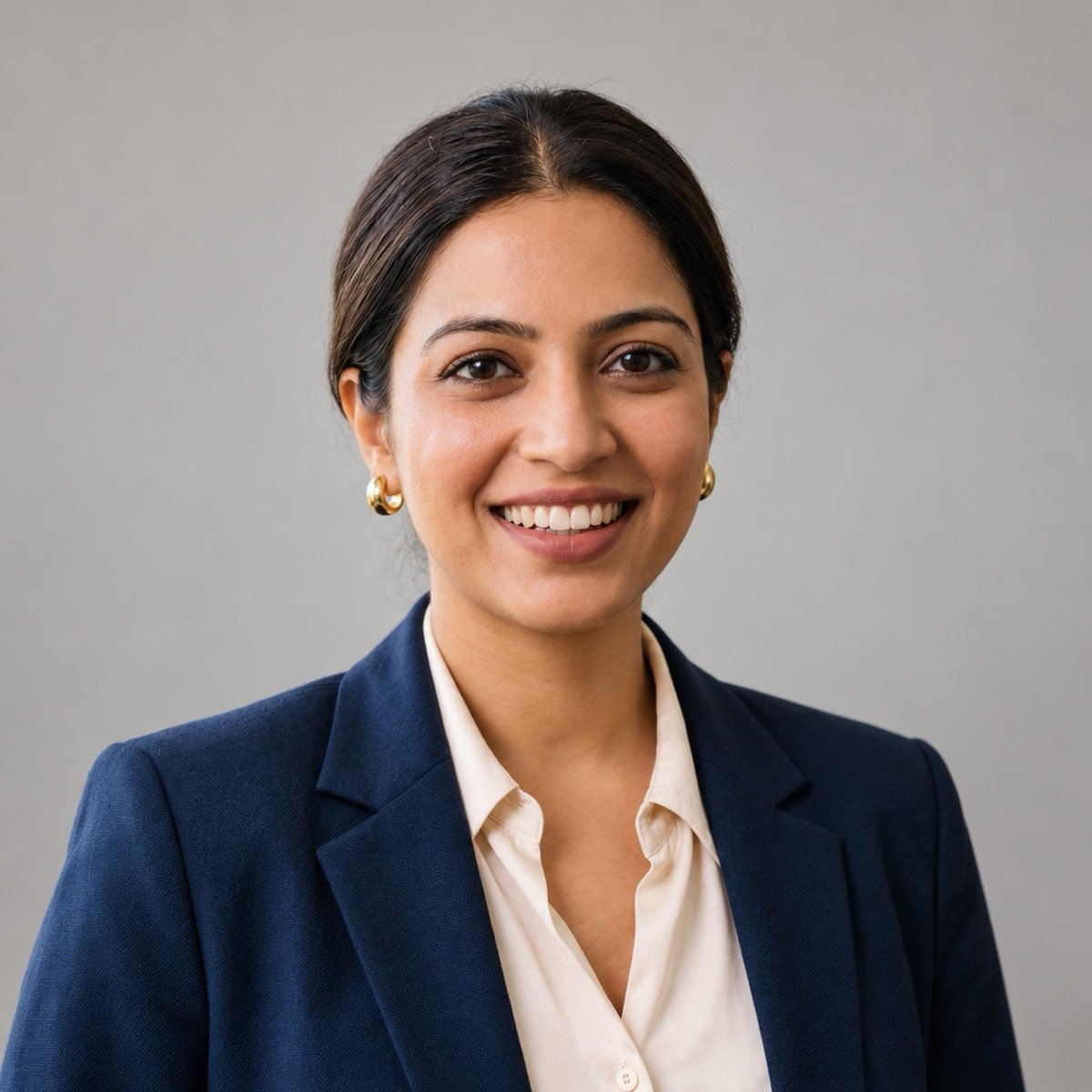
Turn the uploaded photo into a clean Instagram profile photo of me: a square 1:1 frame with my head and shoulders centred and room above my head so it survives a circular crop, a plain warm-grey background, soft even light from the front, the same outfit and hair as the photo, a natural half-smile, my face sharp with natural skin texture and no beauty filter, no text or logos. Keep my face exactly the same as the uploaded photo — do not alter my facial features.
“Room above my head so it survives a circular crop” is the only line a DP needs that a portrait does not.
↑ All looks14. Sky change: dramatic sunset
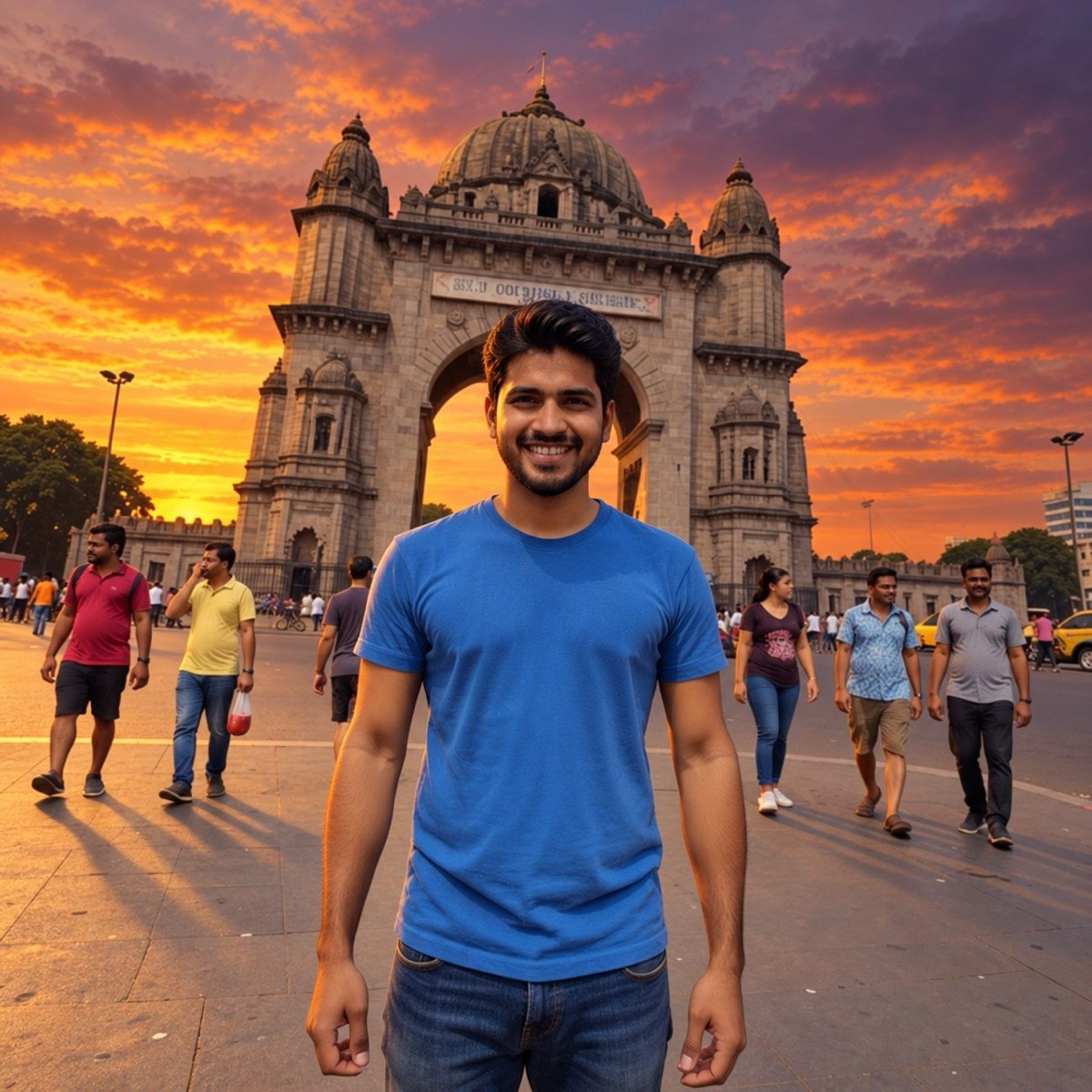
Edit the uploaded photo and change only the sky: replace the hazy sky with a dramatic sunset of orange and purple clouds lit from below, and relight the scene to match, warm low light on my face and on the monument, with longer shadows on the ground. Keep me, my clothes, my pose, every person and building, and the framing exactly as they are. Keep my face and facial hair exactly the same as the uploaded photo — do not alter my facial features.
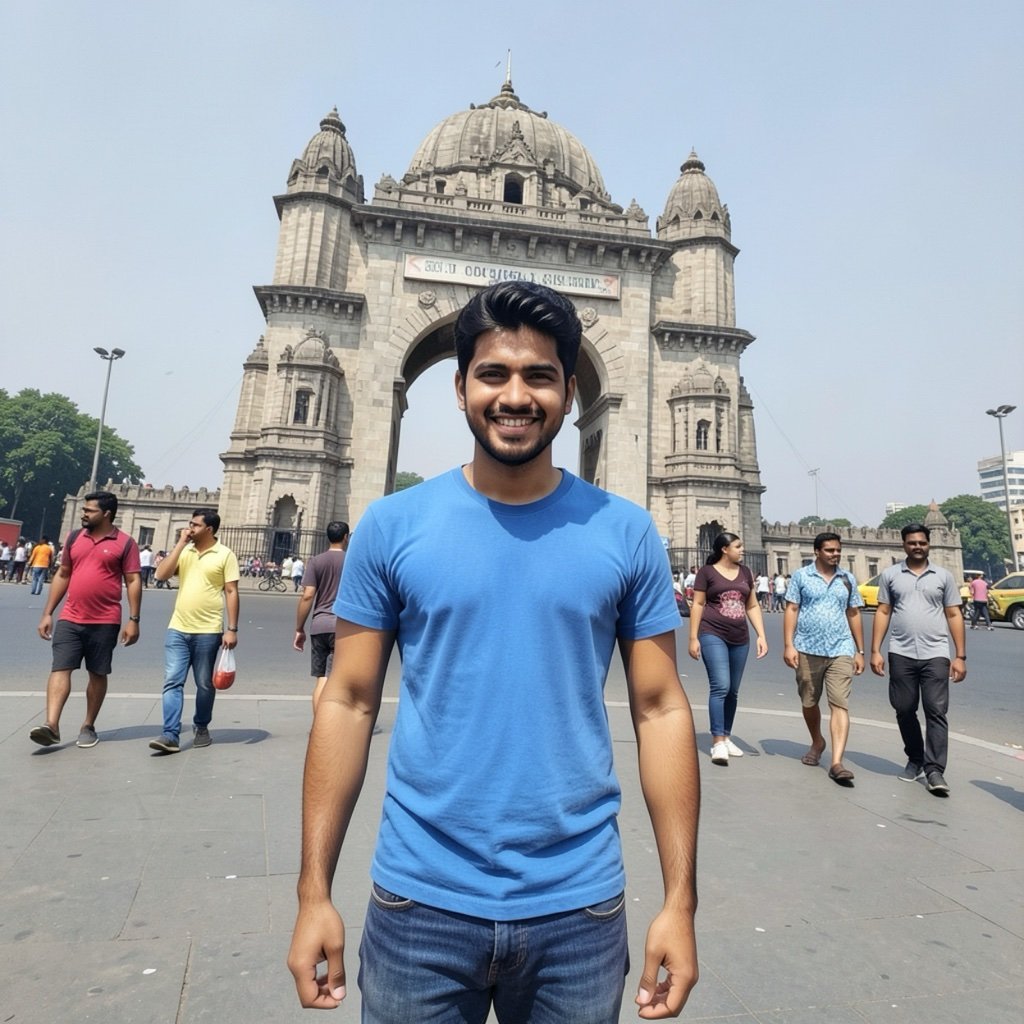
The relighting sentence is the difference between a sky swap and a sticker. The same photo with the strangers removed and the background blurred is on our editing page.
↑ All looksSnowfall and New Year 2027
The channel’s New Year photo edits were among its most-watched (95,000 and 81,000 views for the 2025 ones), and the snowfall edit comes back every December. Both looks are here early.
15. Snowfall winter portrait

Turn the uploaded photo into a winter portrait of me in falling snow: a long camel coat over a cream sweater, a knitted woollen cap and a scarf, both hands wrapped around a paper cup, standing on a snowy mountain road with pine trees and a wooden cabin behind me, large soft snowflakes falling and a few caught on the cap and scarf, soft grey daylight, the camera at eye level in front of me, my face sharp, no text. Keep my face exactly the same as the uploaded photo — do not alter my facial features.
“A few caught on the cap and scarf” is what makes the snow look real rather than an overlay.
↑ All looks16. Happy New Year 2027 photo
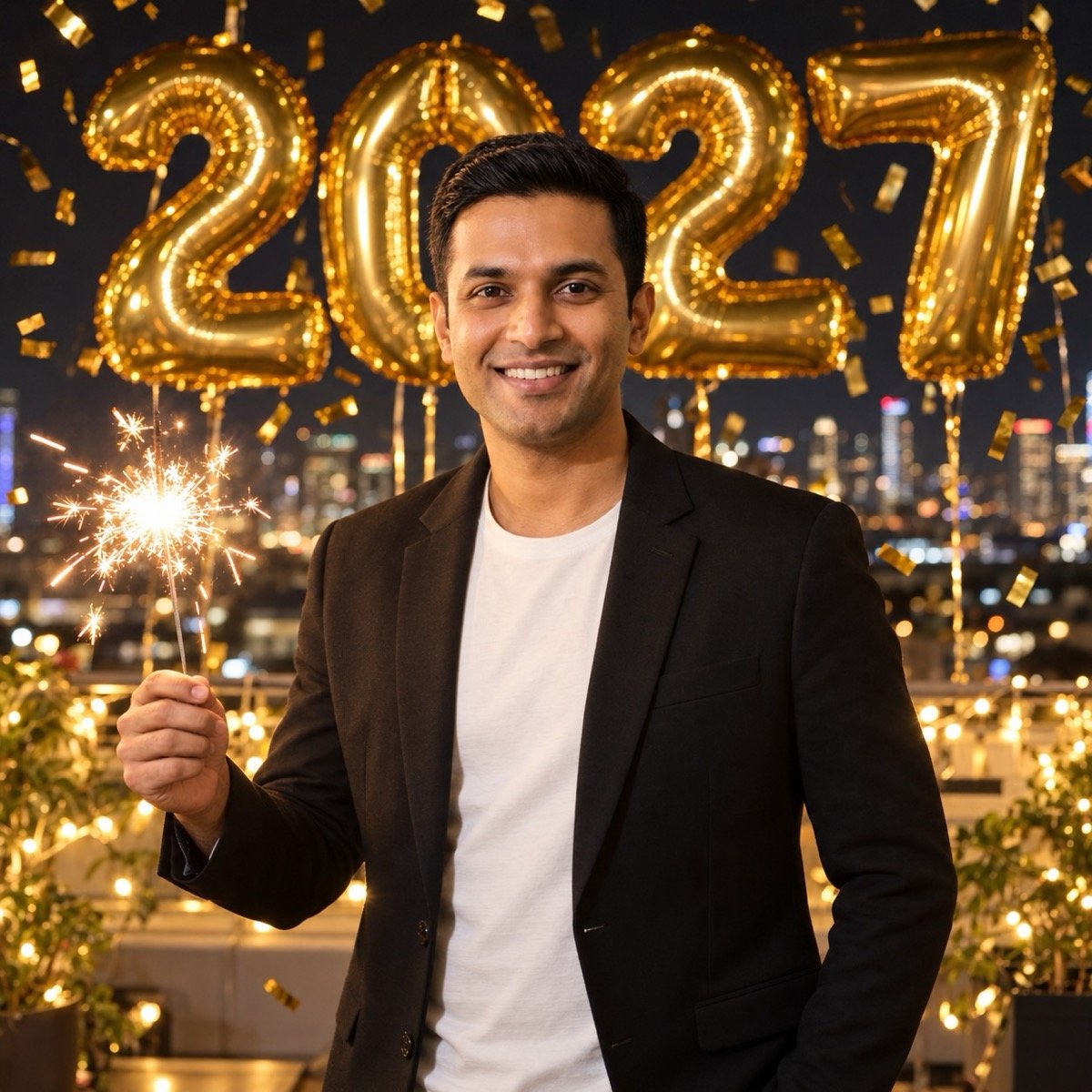
Turn the uploaded photo into a New Year party photo of me at midnight: a black blazer over a white tee, holding a lit sparkler in one hand, gold foil balloons reading 2027 and a cloud of gold confetti behind me, fairy lights and a dark rooftop skyline out of focus, warm light from the sparkler on my face, photographed from in front of me with the flash on, my face sharp, no other text anywhere. Keep my face and facial hair exactly the same as the uploaded photo — do not alter my facial features.
Four characters on balloons is as much text as these apps get right every time; on our editing page the “25” balloon rendered correctly. Keep “no other text anywhere” or the model adds a banner with wrong letters.
↑ All looksGemini or ChatGPT for EditPro Tips prompts?
The channel’s prompt videos are mostly for Google Gemini, which runs Google’s Nano Banana model; ChatGPT runs OpenAI’s GPT Image. Every prompt above is plain English and runs in either. First, what ChatGPT did with the 16 prompts on this page:
All 16 EditPro Tips looks in ChatGPT, first output
| Result | Notes | |
|---|---|---|
| Faces kept | 19 of 19 | Both faces in both couple looks, all three in the triple exposure, and the face in every solo edit |
| Likeness kept in the 3D art | Yes | “Not a photograph” produced a real 3D character (8) |
| Effects kept off the face | 2 of 2 | Dispersion (9), candlelight (6) |
| Text | 1 of 1 | The 2027 balloons read correctly (16) |
| Missed an instruction | 2 | Square frame instead of 2.39:1 (5); idol sharp instead of soft (3) |
| Drifted from the brief | 2 | Faint 90s grain (1); full smile for a half-smile (13) |
| Added something unasked | 3 | A gajra (3); the headlight on (11); invented trousers and shoes for full-length frames (10, 12) |
The face-change fix held: nineteen faces, none lost, with every prompt written to the three rules above. From our 90-image benchmark, the two engines compare like this on what these looks need:
The two engines behind the apps
| What the look needs | GPT Image 2 (ChatGPT) | Nano Banana 2 (Gemini) |
|---|---|---|
| Portrait realism | 9.5 — best of 10 tools | 9.2 |
| Instruction-following (many cues in one prompt) | 9.2 | 9.5 — best of 10 tools |
| Text (the 2027 balloons) | 9.8 — best of 10 tools | 9.0 |
| Overall average (9 prompts) | 9.4 | 9.4 |
Start with ChatGPT for a solo look and try Gemini as well for couples: in our prompt seen test Gemini kept both faces in four of five couple edits to ChatGPT’s three. If one app misses, run the same prompt in the other.
When a look goes wrong
- The face is not mine. The face-change fix above: “my face sharp”, no gaze words, face-lock last, a clear front-facing photo, then the other app.
- The 3D look came back as a photo. Keep “a stylised 3D cartoon character, not a photograph” in the prompt; with it, our run came back as a true 3D character.
- The frame is square when you asked for widescreen. ChatGPT did this on the green cinematic look. Crop it afterwards, or run the prompt in Gemini.
- A photographer or phone appeared in the frame. You described the camera as a person. Write “photographed from in front of me”, never “a friend taking my photo”.
- The effect ate the face. For dispersion and double exposures, add “my face sharp and untouched by the effect”.
- It added a bindi, sindoor, a logo or a sign. Say what you do not want: “no bindi”, “no logos or readable text”.
- The text is wrong. Keep it to a few characters, like 2027, and write “no other text anywhere”.
Before you upload your photo
- Use the official apps only. The sites and apps carrying the EditPro Tips name are not the channel, and none of them is needed: the prompt is text, and ChatGPT and Gemini let you delete uploads and opt out of training. Do not install an “EditPro Tips AI” APK.
- Only edit people who said yes. A couple edit of someone who did not agree to be in it is exactly the misuse these tools get criticised for.
- Post it as what it is. Gemini images carry an invisible SynthID watermark and ChatGPT images carry content credentials; say it is AI in the caption anyway.
Frequently asked questions
What is Edit Pro Tips AI?
It is the name people use for the AI photo editing prompts shown on EditPro Tips, an Indian YouTube editing channel (@EditproTips_1, about 46,000 subscribers and 94 videos as of October 2026). The channel’s Gemini prompt videos, especially the couple retro style and a video on Gemini changing faces, made the name a search term. It is not an app and not an AI tool.
Is there an EditPro Tips AI app or APK?
No. The channel links only to Instagram, Facebook and Telegram, and there is no app of its own. Apps or APK files carrying the name are third-party, and you do not need one: every look is a text prompt that runs in the official ChatGPT or Gemini apps.
How do I use EditPro Tips AI prompts in Gemini?
Open a new chat in the Gemini app, attach a clear front-facing photo of yourself, paste a prompt from this page and send. Gemini returns the edited photo in the chat. For a couple look, attach one photo of both of you or one photo of each person in the same message.
Why does Gemini change my face with EditPro Tips prompts?
Because the model redraws the whole picture and nothing in a short prompt protects the face. Write “my face sharp”, do not tell the app where to look, and end the prompt with “Keep my face exactly the same as the uploaded photo — do not alter my facial features.” Every prompt on this page does all three. See the face-change fix.
Do EditPro Tips prompts work in ChatGPT?
Yes. The channel mostly uses Gemini, but the looks are plain English and ChatGPT runs them on its GPT Image model. On this site every published result is from ChatGPT, and the prompts are written to work in both apps.
Are EditPro Tips AI prompts free?
Prompts are text, so they are free to copy from the channel’s videos or from this page. Any site charging for EditPro Tips prompts is charging for something free. ChatGPT and Gemini both have free plans with a daily image limit.
What is “template by editprotips”?
Those are CapCut video templates the channel makes for Instagram reels, used inside the CapCut app. They are not AI prompts and cannot be run in ChatGPT or Gemini. The templates are the channel’s bigger audience; its most-watched video is a CapCut reels tutorial with about 13 lakh views.
Which EditPro Tips look should I try first?
The couple retro film still if there are two of you, the 3D art portrait or the green cinematic street portrait if it is just you, and the dandiya night during Navratri.
Edit pro tips AI prompt kaise use kare?
Prompt copy karo, Gemini ya ChatGPT mein nayi chat kholo, apni ek saaf front-facing photo attach karo, prompt paste karke send karo. Prompt ki aakhri line “keep my face exactly the same” mat hatao, warna chehra badal sakta hai. In English: copy a prompt, attach one clear photo in a new chat, paste and send, and keep the face-lock line.
Is EditPro Tips the same as Prompt Seen?
No. Both are creator names that became search terms for AI photo prompts, but they are different creators. Prompt Seen is a prompt gallery site and app; EditPro Tips is a YouTube editing channel. Our Prompt Seen page covers the first.
Is it safe to upload my photo for these edits?
Stick to the official ChatGPT and Gemini apps, where you can delete uploads and opt out of model training. Avoid any EditPro Tips website or app that asks you to upload your photo to it; the prompt works in the official apps, so there is no reason to hand your face to a middleman.