Copy a prompt, open Gemini (ChatGPT works too), attach one clear, front-facing photo, paste and generate. A boy photo edit looks styled rather than pasted-on when the prompt names five things: outfit, setting, light, colour and pose. Start with prompt 1, the attitude portrait, or prompt 10 for a birthday post. On our prompt seen page, where both apps edited the same man’s photo, Gemini kept his face in 7 of 8 edits and ChatGPT in 6 of 8, and ChatGPT followed styling cues more closely — so Gemini is a fine place to start, and ChatGPT is the one to try when the details of a look do not land.
A “prompt for Gemini AI boy” is a text instruction a young man pastes into Google Gemini along with a photo of himself, to restyle the photo — new outfit, setting, light and pose — while keeping his face. The same prompts work in ChatGPT. In India the phrase is searched about 12,300 times a month.
Pipgen, with search data from Ahrefs (India, September 2026)What people mean by “prompt for Gemini AI boy”
Updated 25 September 2026. We add looks as new ones start trending.
“Boy” in these searches means a young man, not a child. Someone typing “prompt for Gemini AI boy” has seen an edited photo on Instagram — an attitude portrait, a bike on a mountain road, a birthday shoot — and wants the text behind it, so he can upload his own photo and get the same look with his own face. That phrase alone is searched about 12,300 times a month in India, and its close cousins are nearly as big: “gemini ai photo prompt trending boy 2026” (11,200), “boys prompt” (10,800), “prompt for boys” (10,100) and “ai prompt for boys” (7,600), according to Ahrefs (India, September 2026). Together that is more than 50,000 searches a month for what is really one question.
Most of those searches name Gemini, but “boys prompt chatgpt” (3,500) shows plenty of people make the same edits in ChatGPT, and every prompt on this page works in both. What people ask for falls into a few groups, and so does this page: attitude and stylish looks, bikes, cars and sport, birthday posts, kurta and sherwani, and Instagram looks such as rain and flash photos.
A good boy AI photo editing prompt is not long; it is specific. “Make me look stylish” leaves every choice to the app. What works is naming the five parts in build your own.
Where these prompts come from
All 16 prompts are ours, written for this page — not copied from any creator or prompt site — and we have not run them through either app yet; results will go under each prompt when we do. Our advice on which app to use comes from our 90-image benchmark and the men’s edits on our prompt seen page, where ChatGPT and Gemini edited the same photo of a man; those results are below.
How to use these boys prompts in Gemini or ChatGPT
Photo to finished edit in under a minute
- Choose a look below and tap Copy.
- Open Gemini or ChatGPT and start a new chat.
- Attach one photo of yourself: face clearly visible, front-facing, decent light, no sunglasses or beauty filter. A photo that shows your shoulders gives the app more to work with than a tight selfie.
- Fill in anything in [BRACKETS], then paste the prompt and send.
- Check the face first. If it no longer looks like you, regenerate or switch apps; that is quicker than rewording the prompt.
- New look, new chat. Chat apps carry details from one image into the next: on our prompt seen page, a red saree from one edit turned up uninvited in the next.
Free plan limits: Gemini’s free plan includes image generation, and Google says its limits can change without notice, including when capacity is tight. ChatGPT’s free plan allows only a few images a day, and OpenAI changes that number with demand. So pick your look before you spend one. What each free tool allows is in our free generators guide.
Attitude and stylish boy prompts
Two searches ask for the same thing in different words: “prompt seen attitude boy” (3,800 searches a month in India) and “prompt for gemini boy attitude” (2,800) both want a serious, confident portrait with strong light and not much else going on. Two attitude looks come first, then streetwear, a rooftop and a film-hero shot.
Two looks from this family are already on our prompt seen page, with results from both apps — the old-money suit beside a vintage car and the neon street portrait in a leather jacket — so they are not repeated here.
1. The dark attitude portrait
Edit the uploaded photo into a moody attitude portrait of me: a black crew-neck T-shirt under an open charcoal overshirt, arms folded, chin slightly raised, a calm, serious expression straight into the lens, a plain dark-grey backdrop, one hard light from the side that leaves half my face in shadow, deep blacks, muted colour and fine grain, sharp texture in the fabric. Keep my face and facial hair exactly the same as the uploaded photo — do not alter my facial features.
Attitude comes from the light and the expression, not the outfit. The single hard side light is what puts half your face in shadow; if your result looks flat, add “deep shadows, no fill light”.
2. The look-away attitude shot
Turn the uploaded photo into a golden-hour attitude shot of me: leaning one shoulder against the carved gateway of an old fort, arms loose, head turned three-quarters away from the camera, eyes on the distance, a rust-coloured linen shirt with rolled sleeves and beige trousers, the setting sun through the arch edging my jaw and hair in gold, warm dust in the air, a soft film-like finish. Keep my face exactly the same as the uploaded photo — do not alter my facial features.
Keep it to a three-quarter turn. In a full side profile there is much less of your face for the app to hold on to, and more room for it to invent one.
3. Stylish streetwear under the flyover
Edit the uploaded photo into a stylish streetwear portrait of me: an oversized sand-coloured hoodie, loose olive cargo trousers and chunky white trainers with no logos, a small black crossbody bag, standing against a bare concrete wall under a city flyover, hands in my pockets and one foot forward, soft overcast daylight, clean muted colours, full-length fashion-lookbook framing from head to toe. Keep my face exactly the same as the uploaded photo — do not alter my facial features.
“No logos” is there on purpose. Image apps add brand marks nobody asked for: on our prompt seen page, Gemini printed a real camera brand’s logo on the drums of a festival procession.
4. Rooftop at blue hour
Turn the uploaded photo into a cinematic rooftop portrait of me at blue hour: leaning with both forearms on a glass railing high above the city, turned three-quarters toward the camera, a black turtleneck under a camel overcoat, the sky deep blue just after sunset, thousands of warm windows and streetlights glowing below, cool sky light on my left cheek and warm city glow on my right, crisp detail. Keep my face exactly the same as the uploaded photo — do not alter my facial features.
Blue hour rather than night keeps colour in the sky and puts cool and warm light on either side of your face.
5. Cinematic hero entry
Turn the uploaded photo into a hero-entry shot of me, like the key frame of an Indian film trailer: walking slowly toward the camera along an empty railway platform at dawn, drifting haze lit gold by the low sun behind me, a black shirt with rolled sleeves and dark trousers, a steady, determined look, a wide lens at chest height, amber lens flare, deep contrast, a warm bronze grade. Keep my face and facial hair exactly the same as the uploaded photo — do not alter my facial features.
Swap the platform for a harbour, a mill yard or an old fort gate; keep the backlit haze and the chest-height wide lens, which do most of the work. For the Bollywood hero of an earlier decade, see the 80s publicity still in our 80s photo prompts.
Bike, car, cricket and gym prompts for boys
Four looks built around something you ride, drive or play. Two rules run through them. No brands: a real badge turns your portrait into someone else’s advert, so every prompt asks for a vehicle or kit with no logos. Nothing reckless: the bike is parked and the car is standing at the roadside. An edit of you speeding without a helmet is not something we will write a prompt for.
6. Parked bike on a mountain road
Edit the uploaded photo into a travel portrait of me with my motorbike: sitting sideways on a parked matte-black touring motorcycle with no logos or badges, at a viewpoint beside a winding mountain road, my helmet resting on the fuel tank, a dark waxed jacket over a grey T-shirt, jeans and boots, pine-covered hills and low clouds behind me, soft late-afternoon light, earthy colours, crisp detail on the leather and metal. Keep my face exactly the same as the uploaded photo — do not alter my facial features.
Want it moving? Add “riding slowly along the road, wearing a full-face helmet with the visor up”. The visor matters: with it down, there is no face for the app to keep.
7. Car window portrait at night
Turn the uploaded photo into a night-time car portrait of me: sitting in the driver’s seat of a car parked at the roadside, window rolled down, one arm resting on the door as I look toward the camera, the soft amber glow of the dashboard on my face, blurred city lights and red tail-lights behind, streetlight reflections sliding across the dark-grey paint, a black knit polo shirt, shallow depth of field, rich shadows. Keep my face exactly the same as the uploaded photo — do not alter my facial features.
Sitting in the car puts your face large in the frame, lit by the dashboard. For a suit and a vintage car instead, use the old-money prompt on our prompt seen page.
8. Cricket on the local ground
Edit the uploaded photo into a cricket portrait of me: plain cricket whites with no logos, batting gloves on and a bat resting on my shoulder, standing on a dusty local ground at golden hour, wooden stumps and a worn pitch behind me, a big banyan tree and low apartment blocks at the edge of the field, long shadows across dry grass, a relaxed, confident stance, warm natural colours. Keep my face exactly the same as the uploaded photo — do not alter my facial features.
The gloves are there on purpose: a hand gripping a bat is a hard test for an image model, and gloves hide the fingers. For hands, Gemini is the better bet; in our 90-image benchmark its model scored 9.7 for hands, the best of ten tools, to ChatGPT’s 9.0.
9. Gym portrait under hard light
Turn the uploaded photo into a gym portrait of me: resting on a bench between sets with a towel over one shoulder, a fitted black training T-shirt, a rack of dumbbells behind me, a dark industrial gym with bare concrete walls, one hard overhead light carving out my shoulders and arms, a light sheen of sweat, a focused expression, gritty desaturated colour, high contrast. Keep my face exactly the same as the uploaded photo — do not alter my facial features.
If you want the app to keep your real build rather than hand you a new one, add “keep my body proportions the same as the uploaded photo”, and upload a photo that shows more than your face.
Birthday prompts for boys
“AI birthday prompt for boy” (4,200 searches a month) and “birthday prompt for boy” (4,100) together come to more than 8,000 searches a month in India. Unlike a trend, a birthday comes round every year, so these two are worth saving. The first is the balloon studio shoot; the second is a film-style birthday poster with your name on it. For a retro instant-camera version, see the 80s birthday snapshot.
10. Birthday shoot with number balloons
Edit the uploaded photo into a birthday photoshoot of me: posing beside a backdrop of black, gold and chrome-silver balloons, large gold foil number balloons reading [AGE] next to me, a black cake with gold drip icing and lit candles on a small marble table, a crisp white shirt under a black blazer, soft studio lighting, gold confetti drifting down, a big natural smile, clean premium colours. Keep my face exactly the same as the uploaded photo — do not alter my facial features.
Replace [AGE] with your age before you generate. A two-digit number is about the easiest lettering you can ask for; for a name, see the next prompt.
11. Birthday poster, film-hero style
Turn the uploaded photo into a bold birthday poster starring me, in the style of an Indian film poster: a crisp white shirt with the sleeves rolled up, one hand in my pocket, a confident half-smile, a deep maroon background with rays of gold light and falling gold confetti, dramatic rim light around my shoulders, the title HAPPY BIRTHDAY [NAME] in large gold 3D letters across the bottom, a glossy poster finish. Keep my face exactly the same as the uploaded photo — do not alter my facial features.
Replace [NAME] before you generate, and keep it short. Lettering is where the two apps differ most: in our 90-image benchmark ChatGPT’s model scored 9.8 for text, the best of ten tools, to Gemini’s 9.0, so run this one in ChatGPT. More in our text-in-images guide. Making one for a friend? Use a photo he has said you can use.
Traditional boy prompts: kurta and sherwani
For Eid, Diwali, a wedding or a family function; festival prompts for Ganpati, garba and Diwali are on our prompt seen page. Both prompts protect your facial hair as well as your face, because a traditional outfit is where an app might decide you need a beard or moustache to match.
12. Kurta on the stepwell steps
Edit the uploaded photo into a traditional portrait of me: a bottle-green silk kurta with a cream churidar, a thin cream stole over one shoulder and embroidered mojari shoes, standing on the carved stone steps of an old stepwell, the geometric steps and arches repeating behind me, soft late-afternoon sun, warm sandstone and deep green colours, a calm half-smile, editorial fashion-magazine framing. Keep my face and facial hair exactly the same as the uploaded photo — do not alter my facial features.
Change the kurta colour to suit the occasion — ivory, mustard and maroon all sit well against sandstone — and keep the stepwell, whose repeating steps give the photo its depth.
13. Velvet sherwani in a palace corridor
Turn the uploaded photo into a wedding-season portrait of me: a midnight-blue velvet sherwani with fine gold threadwork and a matching stole, standing in a palace corridor of carved arches lit by glowing brass lanterns at dusk, strings of marigolds between the pillars, warm lantern glow falling across my face from the left, deep sapphire and gold tones, the corridor softly blurred behind me, a calm, regal posture. Keep my face and facial hair exactly the same as the uploaded photo — do not alter my facial features.
For a groom look, add “a safa in the same colour with a jewelled brooch”. For a mehendi or haldi, swap the velvet for a yellow or pastel cotton kurta and the palace for a courtyard hung with marigolds. Couple and wedding portraits for two are on our couple prompts page.
New Instagram trend prompts for boys: rain, travel and flash
“New Instagram trend prompt for boy” (3,700 searches a month) and “new prompt for boys” (2,200) are after whatever is new this week, and that changes too fast for a page like this to keep up. We follow the current viral edits on our trending prompts page. These three are looks that suit an Instagram feed in any month: a monsoon portrait, a mountain travel shot and the candid flash photo.
14. Monsoon chai-stall portrait
Edit the uploaded photo into a rainy monsoon evening shot of me: standing under the tin awning of a roadside tea stall in heavy rain, holding a small glass of chai, a dark denim shirt with rain-darkened shoulders and damp hair, raindrops caught as bright lines in the glow of a single bare bulb, a wet road and misty green hills behind me, cool blue-green tones against the warm bulb light, fine grain. Keep my face exactly the same as the uploaded photo — do not alter my facial features.
The chai, the tin roof and the single bulb are what make it read as an Indian monsoon rather than a rain filter. For two people under one umbrella, see the rain couple prompt on our prompt seen page.
15. Mountain lake travel shot
Turn the uploaded photo into a mountain travel portrait of me: standing on a rocky trail high above a turquoise glacial lake, snow-capped peaks behind me, a mustard puffer jacket, dark trekking trousers and backpack straps over my shoulders, facing the camera with an easy grin, a cold breeze tugging at my jacket, bright clear morning light, a cloudless sky, sharp detail, vivid true-to-life colour. Keep my face exactly the same as the uploaded photo — do not alter my facial features.
Swap the lake for a place you have been — a desert dune, a tea estate, a beach — and keep a jacket colour that stands out against it.
16. The flash photo for your photo dump
Turn the uploaded photo into a candid night-out flash photo of me, the kind that goes in a casual Instagram photo dump: harsh direct on-camera flash, slightly overexposed skin with natural texture, a boxy washed-grey shirt over a white vest, a relaxed half-smile, a dark street and a glowing shop sign with no readable text blurred behind me, slightly tilted framing, the grain of a cheap 35mm point-and-shoot, vertical frame. Keep my face exactly the same as the uploaded photo — do not alter my facial features.
This look works because it is imperfect: flash glare, grain and a crooked frame. If the result comes back too polished, add “unretouched, slightly soft focus, like a real party photo”. “No readable text” keeps the app from inventing a misspelled shop sign.
Stylish boy prompt generator: build your own in five parts
People search for a “stylish boy prompt generator” (5,500 searches a month) expecting a tool. You do not need one. Every prompt above is built from the same five parts, and once you know them you can write a boys photo prompt for any photo, place or occasion.
What a boy photo editing prompt needs to say
| Part | What to write | Why it matters |
|---|---|---|
| Outfit | colour, fabric and fit: rust linen shirt with rolled sleeves, oversized sand hoodie, bottle-green silk kurta | “A stylish outfit” leaves the choice to the app; named clothes come back as named |
| Setting | one real place: old fort steps, tea stall in the rain, stepwell, rooftop at blue hour | Puts you somewhere instead of in front of a blank background |
| Light | one named source: a single hard side light, low sun behind me, dashboard glow, on-camera flash | Light sets the mood — attitude, warm, cinematic — more than the outfit does |
| Colour and finish | muted colour and fine grain, warm bronze grade, clean premium colours, natural skin texture | Pulls the result away from the glossy, over-smoothed AI finish |
| Pose and expression | arms folded, chin slightly raised, three-quarter turn, sitting sideways on a parked bike | Without it, the app picks a pose for you |
Or fill in this template:
Edit the uploaded photo into a [MOOD] portrait of me: [OUTFIT, WITH COLOUR AND FABRIC], [POSE AND EXPRESSION], in [ONE SPECIFIC PLACE], [ONE LIGHT SOURCE], [COLOUR AND FINISH]. Keep my face exactly the same as the uploaded photo — do not alter my facial features.
Or let the app be the generator: ask Gemini or ChatGPT for “a photo-editing prompt for a stylish young man, spelling out outfit, setting, light, colour and pose”, then add the face-lock line. Either way, add one detail that is yours — your city, your bike’s colour — and do not stack every idea into one image: a kurta, a sports car and a neon rooftop in one frame reads as a costume.
The face-lock line: “Keep my face exactly the same as the uploaded photo — do not alter my facial features.” If you have a beard or moustache, or do not want one, use “Keep my face and facial hair exactly the same…”. Every prompt on this page ends with one of the two, because a changed face is the most common way these edits fail.
When your boy photo edit goes wrong
- It does not look like you. Use a sharper, front-facing photo, keep the face-lock line and regenerate. On our prompt seen page, both apps kept the man’s face in all three of his solo edits — every miss came in a couple shot — so a single miss on a solo edit is worth one more try before you switch apps.
- It gave you a beard, or took yours away. Use the facial-hair version of the face-lock line, and say it outright: “clean-shaven” or “keep my short beard”.
- You asked for attitude and got a grin. Start from a photo where you are not smiling: the face-lock line asks the app to keep your face as it is, and it may keep the smile too. Add “serious expression, mouth closed”.
- It added logos or writing. On our prompt seen page Gemini printed a real brand’s logo on festival drums that no prompt mentioned. Add “no logos, no brand names, no readable text”.
- Your skin looks plastic. Add “natural skin texture, no retouching”.
- The bat, the helmet or your hands look wrong. Fewer props, and gloves where they make sense. Hands are where Gemini’s model led our benchmark, so try Gemini first for these.
Gemini or ChatGPT for boy prompts?
The two apps run different image models — Gemini uses Google’s Nano Banana, ChatGPT uses OpenAI’s GPT Image — and we have benchmarked both. We have not run this page’s prompts yet; the closest evidence is the men’s edits on our prompt seen page, where both apps got the same prompt and the same photo of a man, first output kept. Two of them:
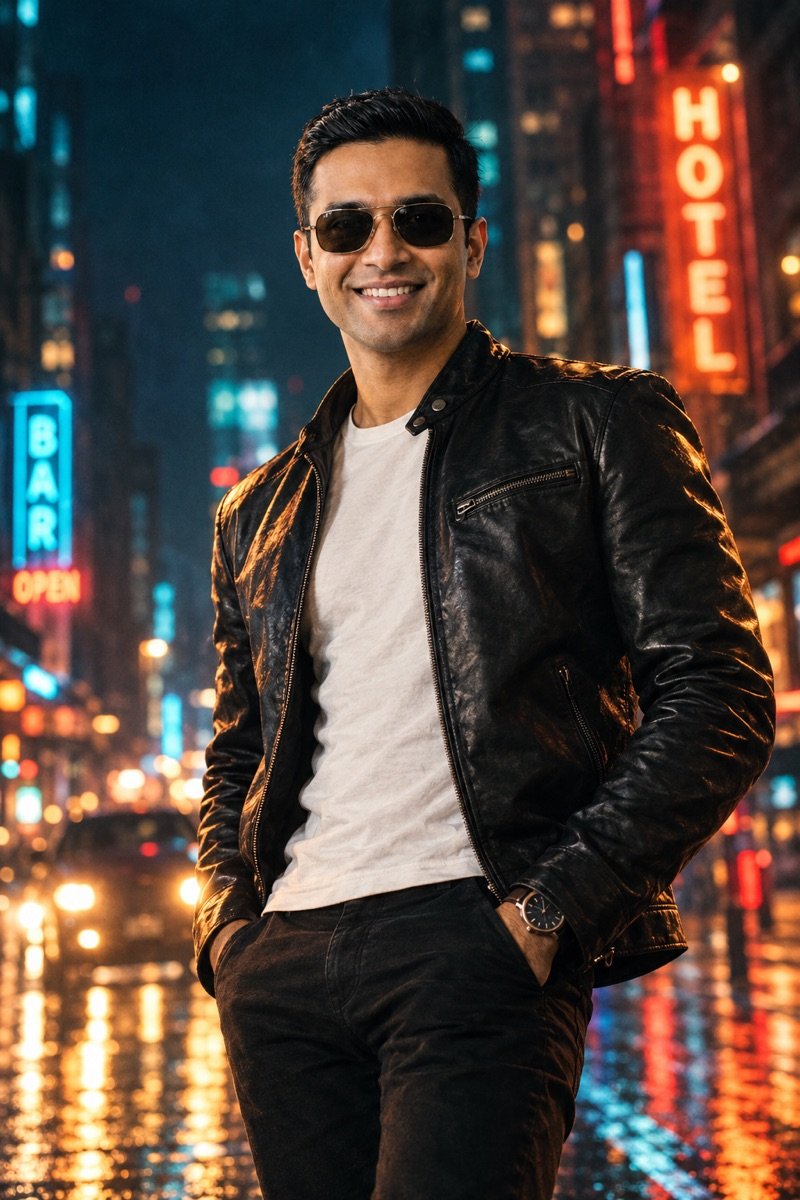
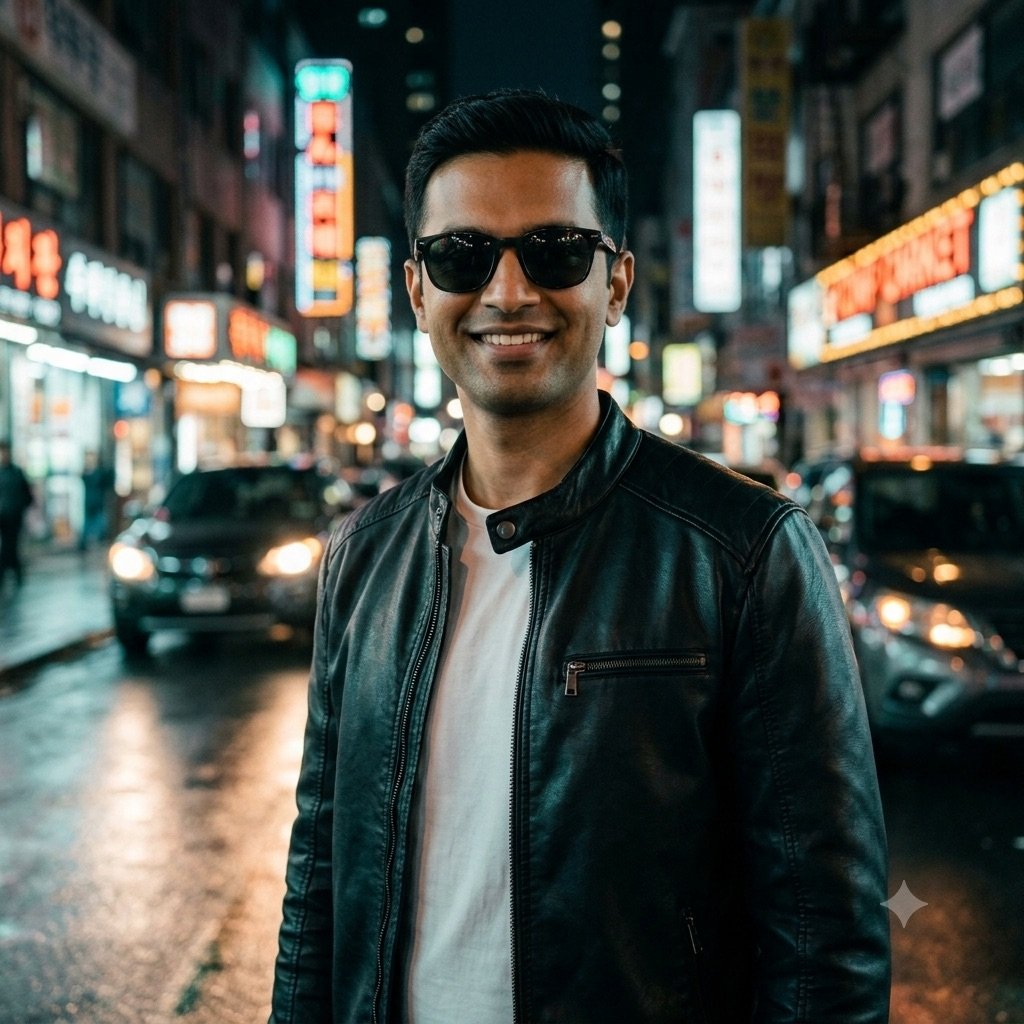
From our prompt seen test: the cinematic street portrait, same prompt, first output
From our prompt seen test: a white kurta and saffron pheta at a Ganpati procession, same prompt, first output
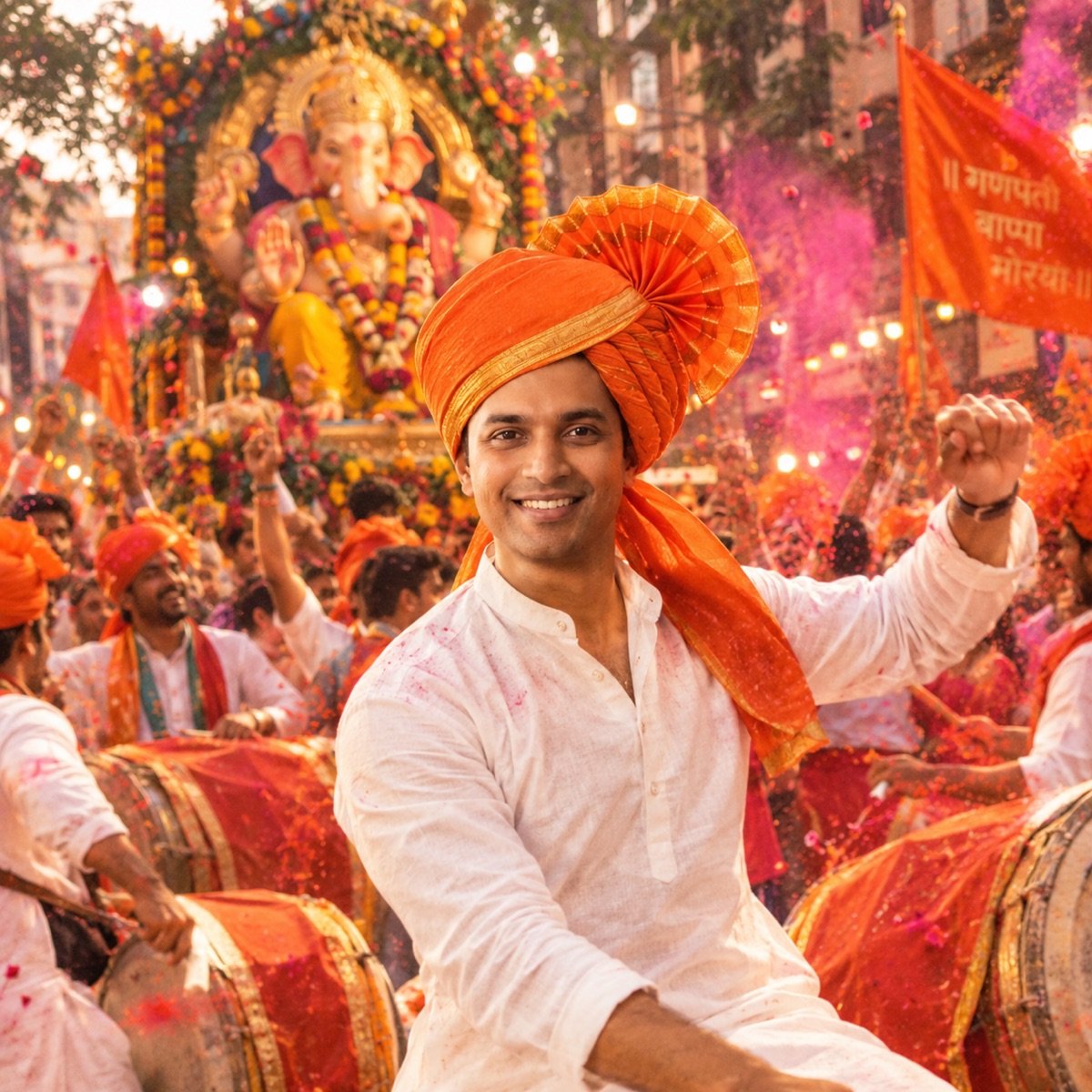
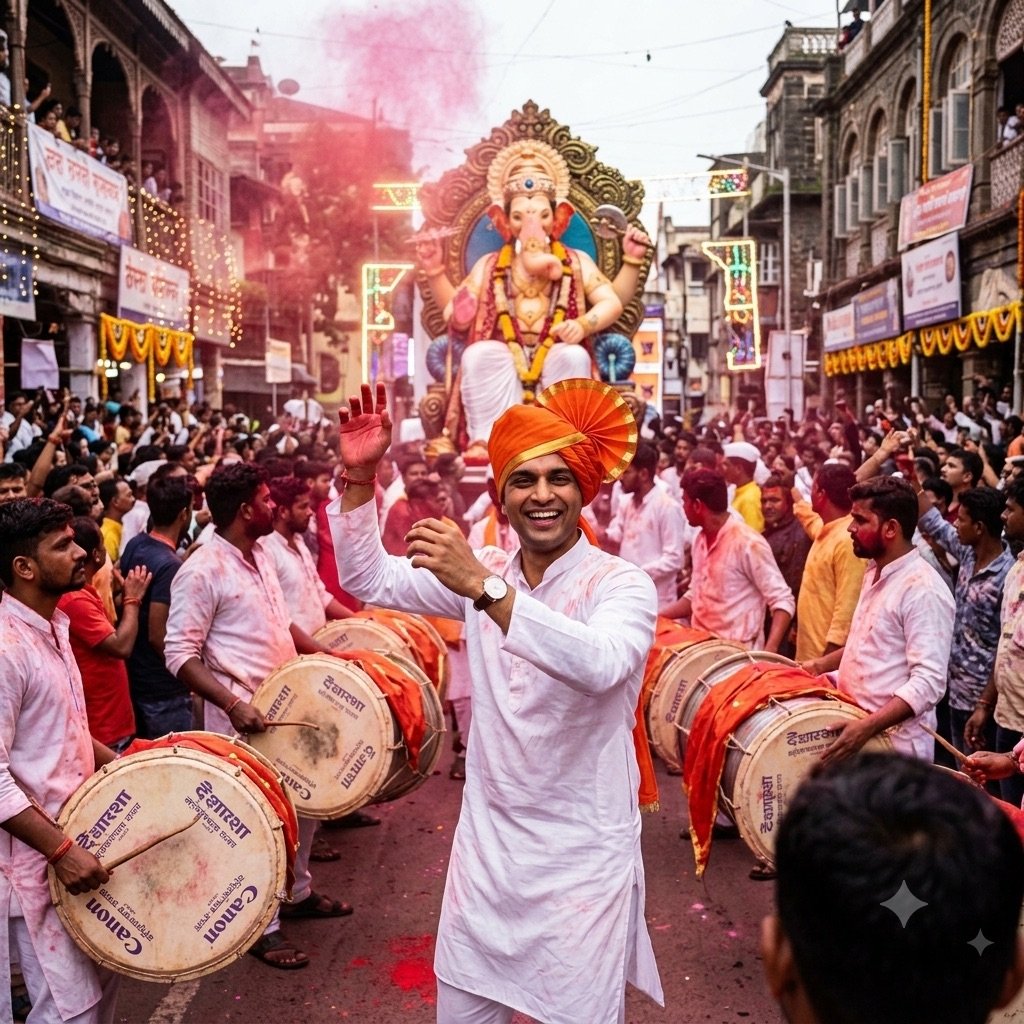
Across all eight edits of the man, Gemini kept his face in 7 and ChatGPT in 6. But every miss came in a couple shot, where each app had two faces to keep: in his three solo edits — the old-money suit, the street portrait and the procession — both apps kept his face every time. So for a solo boy edit, the face is not what separates them. Styling is. ChatGPT followed the cues more closely: leaning against the car rather than standing beside it, every item in the street portrait, a correctly spelled banner. Gemini made the truer documentary procession, but added a logo nobody asked for.
The practical read: use whichever app you have, and if the details of a look do not land, run the same prompt in ChatGPT. For a photo with a friend or partner in it, try Gemini first: it kept both faces in four of five couple edits to ChatGPT’s three. More two-person looks are on our couple prompts page; the women’s version of this page is girl prompts.
The two engines behind boy edits, from our 90-image benchmark
| What a boy edit needs | Nano Banana 2 (Gemini) | GPT Image 2 (ChatGPT) |
|---|---|---|
| Portrait realism (skin, light on a face) | 9.2 | 9.5 — best of 10 tools |
| Instruction-following (many cues in one prompt) | 9.5 — best of 10 tools | 9.2 |
| Hands (a bat, a dumbbell, a glass of chai) | 9.7 — best of 10 tools | 9.0 |
| Text (birthday balloons, a cake) | 9.0 | 9.8 — best of 10 tools |
| Overall average (9 prompts) | 9.4 | 9.4 |
The benchmark generates scenes from a prompt alone, with no uploaded photo, so it does not always agree with the photo edits above. The full ranking of all ten models is on the benchmark leaderboard.
Before you upload your photo
- Use the official apps. Plenty of “boy prompt” sites and apps ask for your photo; you do not need them, because the prompt is plain text. In ChatGPT, switching off “Improve the model for everyone” under Settings → Data controls keeps your new chats out of training. In Gemini, turning off Keep Activity means Google does not use your future chats to improve its AI models unless you send feedback. Both let you delete past chats.
- Only edit people who said yes. A birthday edit of a friend is a nice surprise only if he is happy with his photo being used.
- Post it as what it is. Google says images made or edited in the Gemini app carry an invisible SynthID watermark. Say it is an AI edit in the caption anyway, especially for anything that could pass as a real photo.
- Keep it to adults. These prompts are written for young men. Think twice before uploading a child’s photo: once it is uploaded, you have less control over where that face ends up.
Frequently asked questions
What is the best prompt for Gemini AI boy photos?
There is no single official prompt. The safest start is prompt 1, the dark attitude portrait, or prompt 3 for a stylish streetwear look; for a birthday post, use prompt 10. Each names the outfit, setting, light, colour and pose, and ends with a line telling Gemini to keep your face.
How do I use a boys prompt in Gemini?
Open Gemini and start a new chat, attach one clear, front-facing photo of yourself, paste the prompt and send. Check that the face still looks like you before posting; if it does not, regenerate or run the same prompt in ChatGPT. Gemini’s free plan includes image generation, with limits Google says can change without notice.
Do these boys prompts work in ChatGPT?
Yes. Every prompt is plain text and works the same way in ChatGPT. Its free plan allows only a few images a day, a number OpenAI changes with demand. On our prompt seen page, ChatGPT followed styling cues more closely than Gemini, while Gemini kept the man’s face in 7 of 8 edits to ChatGPT’s 6.
What is a prompt seen attitude boy prompt?
“Prompt seen” is the phrase people search to find the prompts behind viral AI photo edits, and “attitude boy” is the serious, confident portrait with strong light. Prompts 1 and 2 on this page are attitude prompts; the neon street portrait in a leather jacket, with results from both apps, is on our prompt seen page.
What is a good AI birthday prompt for a boy?
Prompt 10 is the balloon studio shoot with number balloons and a cake; prompt 11 is a film-style birthday poster with your name in gold letters. Fill in the [AGE] or [NAME] first. For anything with a name in it, ChatGPT is the safer bet: its model led our benchmark for text.
Is there a stylish boy prompt generator?
You do not need an app. Use the five-part template on this page — outfit, setting, light, colour and pose — or ask Gemini or ChatGPT to write a prompt with those five parts, then add the face-lock line. Avoid prompt-generator sites that ask you to upload your photo.
What are the trending Gemini AI photo prompts for boys in 2026?
Individual trends turn over in weeks, so we keep the current viral edits on our trending prompts page. The looks that keep coming back are the ones on this page: attitude portraits, bikes and cars, birthday shoots, kurta and sherwani, rain and travel, and the candid flash photo.
Why does my AI photo not look like me, or have a beard I do not have?
Identity drift is the most common failure in AI photo edits. Use a sharp, front-facing photo without filters, keep the face-lock line — the version that says “face and facial hair” if the beard matters — and regenerate. If it keeps missing, switch between Gemini and ChatGPT.
Gemini AI boy photo prompt kaise use kare?
Prompt copy karo, Gemini ya ChatGPT mein nayi chat kholo, apni ek saaf front-facing photo attach karo, prompt paste karke send karo. Attitude look chahiye to aisi photo lo jisme aap smile nahi kar rahe. Prompt ke end wali line “keep my face exactly the same” mat hatao, warna chehra badal sakta hai. In English: copy a prompt, attach one clear photo in a new chat, paste and send, and keep the face-lock line.
Is it safe to upload my photo for these edits?
Stick to the official Gemini and ChatGPT apps, where you can delete your chats and switch off the use of your chats for training. Avoid unknown “boy prompt” sites and apps that ask for your photo: the prompt works in the official apps, so there is no reason to hand your face to a middleman.