Copy a prompt, open Gemini or ChatGPT, attach one clear photo with both of you in it, paste and generate. Couple edits go wrong more often than solo ones because the app has two faces to keep, and it usually lets one of them drift. Start with prompt 1, the all-purpose couple portrait, then pick a look. In our earlier prompt seen comparison, Gemini kept both faces in 4 of 5 couple edits to ChatGPT’s 3, so try Gemini first — and check both faces, not just yours, before you post.
A couple prompt is a written instruction you paste into an AI image editor such as Gemini or ChatGPT, together with a photo of two people, to restyle them into a new scene — a wedding portrait, a rain shot, a festival photo — while keeping both faces. In September 2026 “couple prompt” drew about 33,500 searches in India, according to Ahrefs.
Pipgen, with search data from Ahrefs (India, September 2026)What a couple prompt is, and what people search for
Updated 25 September 2026. We add looks as new couple edits start circulating.
A couple prompt is a paragraph of plain text. You attach a photo of yourself and your partner in Gemini or ChatGPT, paste the prompt, and the app redraws the two of you in the scene it describes — the outfits, the place, the light, the pose — while the photo supplies your faces. That is all a “couple photo prompt” is, and it is why the same prompt can give a thousand couples a thousand different pictures.
And a lot of people are looking for one. In September 2026, Ahrefs put “couple prompt” at about 33,500 searches in India, “couple photo prompt” at 16,600, “prompt seen romantic couple” at 15,700 and “couple prompt chatgpt” at 13,400, and “couple prompt for gemini ai” at 7,100. The searches tell you what people want to make: romantic scenes above all, then married-couple and Indian looks (“couple prompt chatgpt indian” alone drew 4,500), then weddings, hugs and realistic candids. The sections below follow that order.
One thing the numbers say to leave alone: the retro couple look that did the rounds earlier has cooled, and “retro style couple” now draws next to no searches, according to Ahrefs. If you do want a period look, the 80s couple prompts are on our 80s page, where that trend is current.
Where these prompts come from
All 15 prompts are ours, written for this page: none is copied from a creator, a prompt site or our own prompt seen page. They have not been through our ChatGPT-versus-Gemini comparison yet. The advice on which app to use comes from the five couple edits in that earlier comparison and from our 90-image benchmark; both are below.
Making a solo edit instead? The girl prompts and boy prompts pages cover portraits of one person, and trending prompts collects the looks moving this week.
How to use these couple prompts
From a photo of you two to a couple edit, in under a minute
- Choose a look below and tap Copy.
- Open Gemini or ChatGPT and start a new chat.
- Attach your photo. One photo with both of you in it is the better start: both faces sharp, front-facing, roughly the same size, decent light, no sunglasses or beauty filter. If you do not have one together, attach a clear photo of each of you in the same message — that is how the couple edits in our prompt seen comparison were made.
- Paste the prompt and send. No need to add “make it romantic” on top; the prompt already says what romantic looks like.
- Check both faces. It is easy to approve a result because your own face looks right and miss that your partner’s has changed. If either is off, regenerate or switch apps.
- New look, new chat. Chat apps carry details from one image into the next; a saree from one edit can turn up in the following one.
Each prompt says what “I” wear and what “my partner” wears. “I” is whoever sends it. Swap the outfits to suit the two of you — two sarees, two sherwanis, a lehenga and a suit — and keep everything else.
Free plan limits: ChatGPT’s free plan allows only a few images a day, and OpenAI adjusts that number with demand instead of publishing it, so pick your look before you spend one. Couple edits need more regenerations than solo ones, so the limit runs out faster. Every prompt here also runs in Gemini. What each free tool allows is in our free generators guide.
The all-purpose couple photo prompt
If you want one prompt for any photo of the two of you, use this. It fixes what matters in a couple portrait — closeness, natural light, real skin — and leaves the setting to the app, so it picks a background that suits your photo.
1. The all-purpose couple portrait
Turn the uploaded photo into a realistic, professionally shot portrait of the two of us: standing close together, relaxed and smiling, in coordinated outfits in soft neutral colours, a softly blurred outdoor background that suits the photo, warm natural light from one side, true-to-life skin texture with no airbrushing, shallow depth of field, like a real photograph from a good camera rather than an AI render. Keep both of our faces exactly the same as the uploaded photo — do not alter our facial features.
Every prompt below is this one with the place, the clothes and the moment pinned down. If a result from this one already looks like the two of you, the app is reading your photo well; if it does not, fix that here before you try anything more elaborate.
Romantic couple prompts: hug, rain and candid moments
After the generic searches, the biggest couple searches are romantic ones: “prompt seen romantic couple” drew about 15,700 in September and “romantic couple prompt” 4,800, according to Ahrefs. Our prompt seen page already has an umbrella in the rain, a scooter ride and a beach at sunset, with both apps’ results; these four are new moments, and none repeats those.
2. Couple hug at golden hour
Create a romantic couple photo from the uploaded photo: my partner hugging me from behind on a rooftop terrace at golden hour, arms wrapped around my waist, my hands resting on theirs, both of us laughing with our eyes half closed, warm fairy lights and potted plants behind us, a soft orange sky, gentle lens flare, natural skin texture, warm film tones. Keep both of our faces exactly the same as the uploaded photo — do not alter our facial features.
Hugs are where hands go wrong: two pairs of arms overlapping gives an image model a lot of fingers to count. In our benchmark, Nano Banana 2 (Gemini) scored 9.7 for hands, the best of ten tools, to 9.0 for ChatGPT’s model, so this is a good one to start in Gemini. If the fingers still merge, change “my hands resting on theirs” to “my hands folded in front of me”.
3. First monsoon rain on the terrace
Transform the uploaded photo into a monsoon romance scene: the two of us caught in heavy rain on an old terrace, laughing, holding one cotton dupatta stretched over both our heads, soaked hair and clothes, a rusty water tank and grey-blue clouds behind us, warm yellow light spilling from an open doorway, raindrops frozen mid-air, slightly muted cinematic colour, light film grain. Keep both of our faces exactly the same as the uploaded photo — do not alter our facial features.
The dupatta, the water tank and the doorway light are what make this an Indian monsoon rather than a stock rain photo. Want the city version instead? The umbrella-on-a-wet-street prompt is on the prompt seen page, and its results are below.
4. Realistic candid couple photo
Turn the uploaded photo into a realistic candid photograph of the two of us, as if a friend took it: sitting side by side on the worn sandstone steps of an old monument, sharing a paper cone of roasted peanuts, my partner mid-laugh at something I said, casual cotton clothes, soft winter afternoon light, natural skin texture with small imperfections, a 35mm documentary look, no posing, no retouching. Keep both of our faces exactly the same as the uploaded photo — do not alter our facial features.
“Realistic” on its own does little. What makes a couple photo read as real is the last part of the prompt: small imperfections, no posing, no retouching, and one small shared activity so your hands have something to do. For realism specifically, ChatGPT’s GPT Image 2 scored 9.5 for portrait realism in our benchmark, the best of ten, so run this one in ChatGPT too.
5. Cafe date by the window
Create a cosy cafe-date photo of the two of us from the uploaded photo: sitting across a small wooden table by a big window, two cups of coffee and one slice of cake between us, my chin resting on my hand while my partner tells a story, trailing plants and warm pendant lamps inside, soft daylight from the window, muted earthy colours, shallow depth of field. Keep both of our faces exactly the same as the uploaded photo — do not alter our facial features.
For an everyday version, swap the cafe for a roadside tea stall: “two glasses of cutting chai on a steel counter, a busy street softly blurred behind us”.
Indian and married couple prompts: saree, wedding, anniversary
This is the part of the search that is most specifically Indian. “Couple prompt chatgpt indian” drew about 4,500 searches in September, “prompt seen married couple” 3,600 and “indian couple prompt for gemini ai” 1,800, according to Ahrefs. People want their own clothes, their own rituals and their own kind of house in the picture, not a Western couple shoot with a saree added.
These five cover the married couple at home, traditional clothes, the pre-wedding shoot, the varmala and the anniversary. The classic haveli wedding portrait is on our prompt seen page; it was one of only two couple edits in that comparison where both apps kept both faces.
6. Married couple on the verandah swing
Turn the uploaded photo into a warm married-couple portrait: the two of us sitting together on a carved wooden swing in the verandah of an old family home, I wear a deep green cotton-silk saree with a gold border and a mangalsutra, my partner wears an off-white kurta, a brass lamp glowing beside us, afternoon sun between the pillars, my partner looking at me while I laugh. Keep both of our faces exactly the same as the uploaded photo — do not alter our facial features.
The mangalsutra is what says “married” here. Leave it out, or swap in whatever marks marriage in your family, such as sindoor, and say “no bindi” if you do not wear one: in our prompt seen comparison, both apps added bindis that no prompt asked for.
7. Traditional saree and kurta, carved doorway
Create a traditional Indian couple portrait from the uploaded photo: I wear a mustard silk saree with a maroon temple border, gold jhumkas and a string of jasmine in my hair, my partner wears a cream silk kurta with a maroon stole, we stand in the courtyard of an old house in front of heavy carved wooden doors, a brass urli of floating marigolds at our feet, soft diffused daylight. Keep both of our faces exactly the same as the uploaded photo — do not alter our facial features.
Matching the border of one outfit to the stole of the other ties the two of you together in the frame. Change the colours to your own, or the weave to your region’s, and keep the carved doors and the soft daylight.
8. Pre-wedding shoot by a palace lake
Transform the uploaded photo into a pre-wedding shoot photo: the two of us walking hand in hand along the stone edge of a lake at sunrise, an old palace reflected in the still water behind us, I wear a flowing blush-pink lehenga with a long sheer dupatta trailing in the breeze, my partner wears a navy bandhgala, light mist over the water, soft pink and gold light, editorial wedding photography. Keep both of our faces exactly the same as the uploaded photo — do not alter our facial features.
The one couple edit that is meant to look staged: “editorial wedding photography” asks for the polish of a paid shoot, not a candid. For a hill version, swap the lake and palace for “a pine forest trail with snow on the ground” and the lehenga for a long wool coat.
9. The varmala moment
Create a candid wedding-day photo from the uploaded photo: the varmala moment on a flower-decked stage, I am placing a thick garland of red roses and white tuberose around my partner’s neck, I wear a rose-pink bridal lehenga with heavy zari work, my partner wears a gold sherwani with a pink safa, rose petals falling around us, warm fairy lights, joyful faces, documentary wedding photography. Keep both of our faces exactly the same as the uploaded photo — do not alter our facial features.
One garland, one action. Asking for both garlands crossing at once is asking for four arms to tangle; if you want your partner garlanding you, just swap who is placing it.
10. Anniversary dinner on the rooftop
Create an anniversary dinner photo from the uploaded photo: the two of us at a candlelit table for two on a rooftop at night, raising our glasses in a toast, a small round cake with a single lit candle and no lettering, I wear a wine-red chiffon saree, my partner wears a charcoal blazer over a white shirt, strings of warm lights overhead, candle glow on our faces. Keep both of our faces exactly the same as the uploaded photo — do not alter our facial features.
Want the year on the cake? Replace “no lettering” with “a cake that reads 5 YEARS”. Keep it that short: longer text is where image models start misspelling. ChatGPT’s model scored 9.8 for text in our benchmark, the best of ten, so use ChatGPT for this variant; more in our text-in-images guide.
Festival couple prompts: Karwa Chauth and Diwali 2026
Two couple festivals are coming up: Karwa Chauth on Thursday, 29 October 2026, and Diwali on Sunday, 8 November 2026. Save the prompt now rather than searching for one on the night. For Navratri (11–20 October 2026), the dandiya couple prompt is on our prompt seen page — and its results are below, because it is the edit where Gemini lost both faces.
Neither prompt here puts a deity or idol in the picture. If you add one, write “keep the idol unchanged” and place yourselves beside it, never on it or in its place.
11. Karwa Chauth: the moon and the sieve
Transform the uploaded photo into a Karwa Chauth night portrait on our rooftop: I wear a red saree, mehndi on my hands, and look at my partner through a decorated steel sieve, holding a puja thali with a lit diya, my partner in a maroon kurta holds out a small glass of water for me, a bright moon in a deep blue sky, warm diya light on our faces. Keep both of our faces exactly the same as the uploaded photo — do not alter our facial features.
This is the moment that ends the fast: after moonrise, the wife looks at the moon through a sieve, then at her husband’s face through the same sieve, and he gives her the first sip of water. The glass of water and the moon in the sky are what tell a viewer which moment it is, so keep both.
12. Diwali: lighting diyas together
Create a Diwali evening photo from the uploaded photo: the two of us kneeling at our doorstep, lighting a row of clay diyas together beside a fresh rangoli of marigold petals and coloured powder, I wear a teal silk saree with gold jewellery, my partner wears an ivory kurta with a bandi jacket, strings of warm lights around the door frame, soft diya glow on our faces, rich festive colours. Keep both of our faces exactly the same as the uploaded photo — do not alter our facial features.
Swap the teal and ivory for your own Diwali colours. For a family photo, change “the two of us” to “our family” and the last line to “Keep all of our faces exactly the same” — and check every face, because more people means more chances for one to drift.
Cinematic, travel and selfie couple prompts
Three looks that are about the mood of the picture more than the occasion: a film still, a trip, and the one that is meant to look like it came off your phone.
13. Bollywood romance film still
Turn the uploaded photo into a still from a modern Bollywood romance film: the two of us on a rooftop in an old city at blue hour, forehead to forehead, wind lifting my chiffon dupatta across the frame, domes and rooftops fading into haze behind us, anamorphic lens flare from a street lamp, a teal-and-amber colour grade, widescreen framing with thin black bars, fine film grain. Keep both of our faces exactly the same as the uploaded photo — do not alter our facial features.
No film title or actor names needed, and none wanted: the widescreen bars, the lens flare and the colour grade are what make a frame read as cinema, and a famous name only gives the app a reason to reach for a famous face.
14. Hill-station trip, one shawl
Create a travel photo of the two of us from the uploaded photo: sharing one thick woollen shawl on a wooden bench at a misty hill-station viewpoint, steam rising from two cups of tea in our hands, tall pine trees and a valley full of low cloud behind us, a knitted beanie on me and a quilted jacket on my partner, soft overcast light, muted greens and greys. Keep both of our faces exactly the same as the uploaded photo — do not alter our facial features.
Add one detail from where you actually went — a toy-train track, tea gardens, snow on the pines — and it stops being a stock trip and becomes yours.
15. Couple selfie at the village fair
Turn the uploaded photo into a casual phone selfie of the two of us at a village fair at dusk: taken at arm’s length, faces close together and grinning, a lit giant wheel and strings of coloured bulbs behind us, pink candy floss in my partner’s hand, the slight wide-angle look and soft grain of a phone’s front camera, warm evening light, unposed and happy. Keep both of our faces exactly the same as the uploaded photo — do not alter our facial features.
The only prompt on the page that should look like a phone photo. “Taken at arm’s length” and “a phone’s front camera” are what stop it looking like a professional shoot.
Write your own couple prompt: the six parts
Every prompt above is built from the same six parts. A couple prompt needs one more than a solo prompt: it has to say how the two of you are arranged, because the app will not guess it the way you would.
What a couple prompt needs to say
| Part | What to write | Why it matters |
|---|---|---|
| Pose and contact | hugging from behind, forehead to forehead, hand in hand, side by side on steps | Without it the app lines you up like a passport photo; keep it to one simple contact |
| An outfit for each | “I wear …, my partner wears …”, with colour and fabric | One outfit description gets shared or split at random |
| Setting | terrace, verandah swing, courtyard with carved doors, lake at sunrise | A specific place gives the picture its story |
| Light | golden hour, diya glow, soft window daylight, blue hour | Light sets the mood more than anything else in a romantic edit |
| Colour and texture | warm film tones, muted colour, natural skin texture, light grain | Removes the glossy, airbrushed AI finish |
| Face lock | the line below, always last | Two faces mean twice the chance of drift |
Then add one detail that is yours — your wedding colours, the city you met in, the way you actually stand together. Keep the pose simple: one hug, one garland, one glance. The more the two of you are doing, the more hands and arms the app has to get right.
The couple face-lock line: “Keep both of our faces exactly the same as the uploaded photo — do not alter our facial features.” Every prompt on this page ends with it, because a changed face — usually one of the two — is the most common way couple edits fail.
When your couple photo goes wrong
- One of you no longer looks like you. The most common failure: in our prompt seen comparison, ChatGPT changed the man’s face in two of five couple edits, and Gemini changed both faces in one. Use a sharper photo where both faces are similar in size, keep the face-lock line and regenerate. If it keeps missing, switch apps — each one kept faces the other lost.
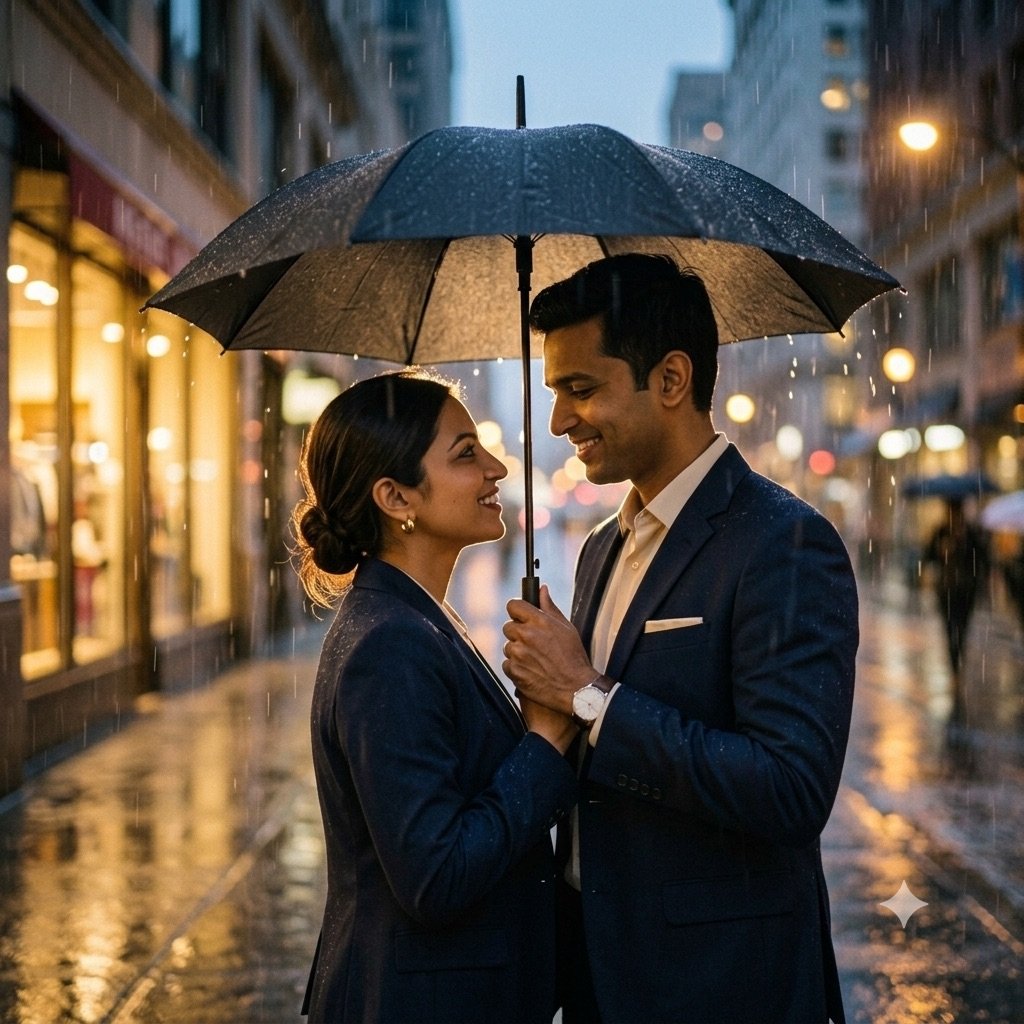
- It kept your old clothes. In the same comparison, Gemini kept the office blazers from the reference photos in a romantic rain edit. Start the prompt with “Replace our clothes with …” and describe both outfits.
- The outfits went to the wrong person. Name each person by something visible in the photo instead of “I” and “my partner”: “the person on the left wears …, the person in the blue shirt wears …”.
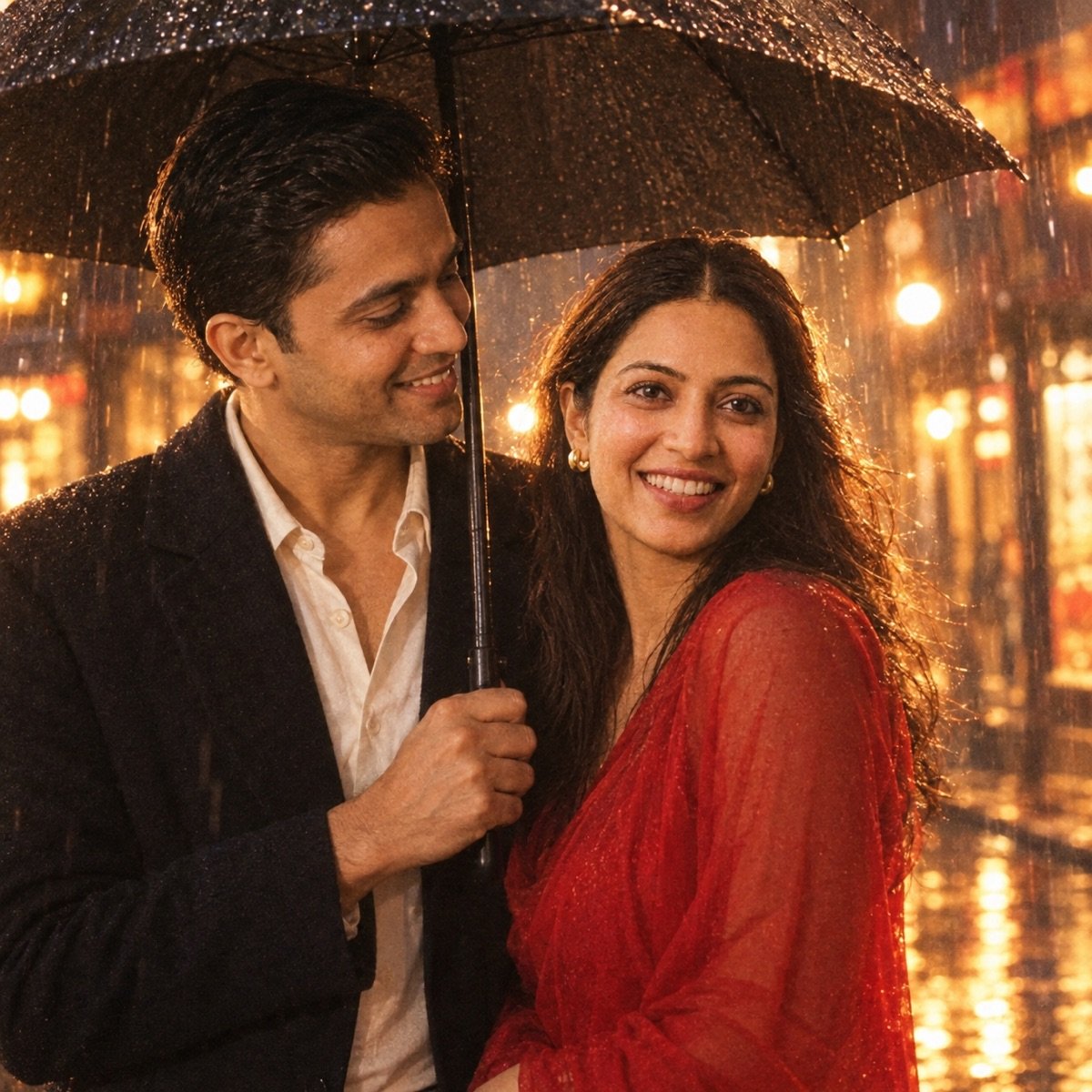
- It added things you did not ask for. ChatGPT put a red saree into that rain edit, and both apps added bindis nobody asked for. Say what you do not want: “no bindi”, “no jewellery”, “no logos or text”.
- Hands and arms are tangled. Simplify the pose to one point of contact: hand in hand, or a hug from behind, not both. Gemini’s model scored higher for hands in our benchmark, so try it there.
- You both look airbrushed. Add “natural skin texture, no retouching”. A plastic finish is the quickest giveaway of an AI edit.
Gemini or ChatGPT for couple photos?
Most couple prompt sites say “paste this in Gemini or ChatGPT” as if the two were the same. They run different image models — Gemini uses Google’s Nano Banana and ChatGPT uses OpenAI’s GPT Image — and on couples the difference shows. In our prompt seen test we ran thirteen trend edits through both apps with the same two reference photos, keeping the first output every time. Five of them were couple edits, and the question that matters for couples is simple: did both faces survive?
From our prompt seen test: did the faces survive?
| Both faces kept in couple edits (5) | Woman kept, all edits (10) | Man kept, all edits (8) | |
|---|---|---|---|
| Gemini | 4 of 5 | 9 of 10 | 7 of 8 |
| ChatGPT | 3 of 5 | 10 of 10 | 6 of 8 |
Both apps kept both faces in the scooter ride and the haveli wedding portrait. ChatGPT lost the man’s face in the rain edit and the beach edit; Gemini lost both faces in the dandiya edit. Here are the two edits where they split:
From our prompt seen test: a romantic rain couple edit, same prompt, first output
From our prompt seen test: a Navratri dandiya couple edit, same prompt, first output

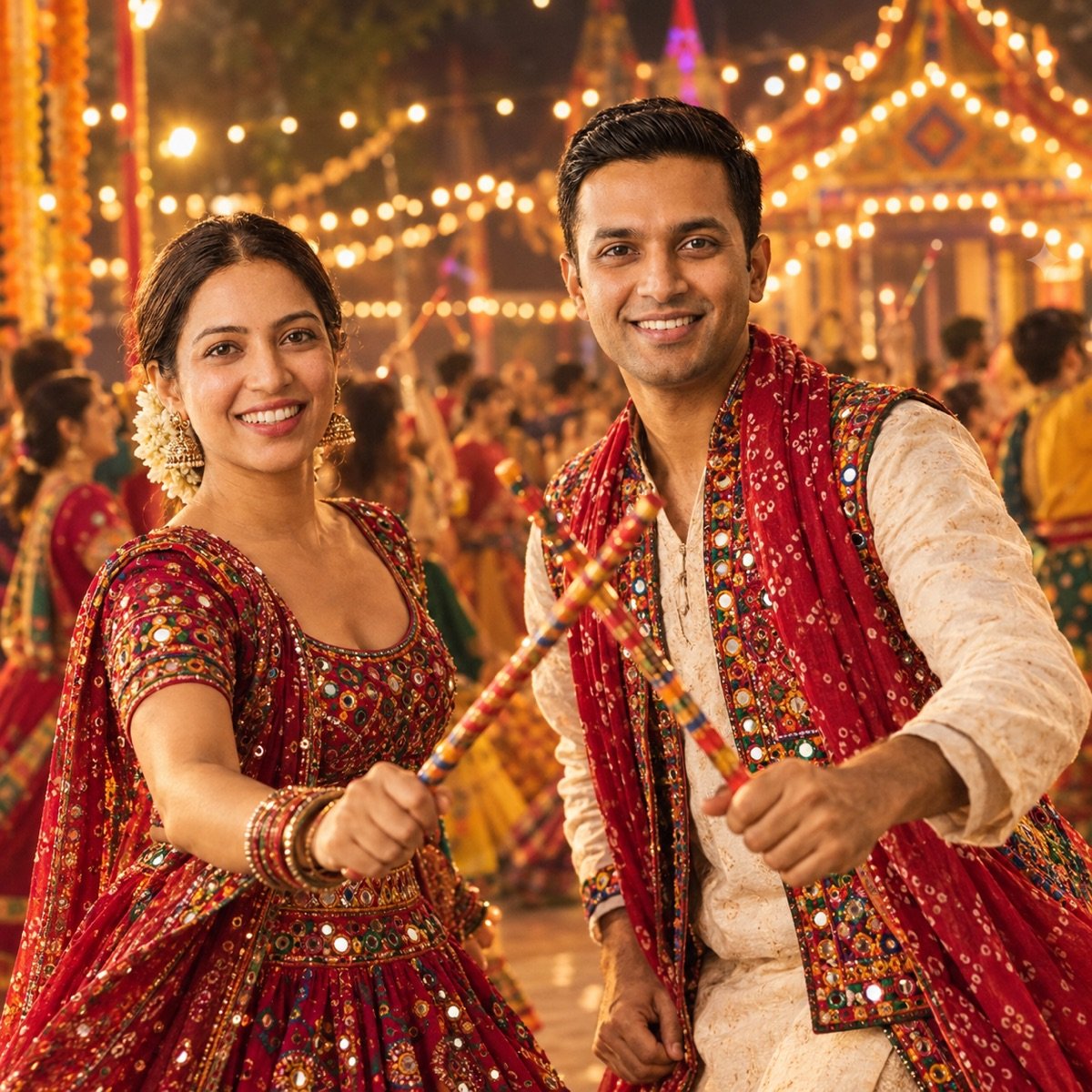
So for couple photos, try Gemini first: it kept both faces in four of five couple edits to ChatGPT’s three. It is only a narrow lead, and the dandiya edit shows Gemini can lose both faces at once, so if a face drifts, run the same prompt in ChatGPT before you start rewriting it. ChatGPT is also the better first try when the look depends on styling: in the same test it followed lighting and styling cues more closely, while Gemini caught movement better. For the film still, try ChatGPT; for the hug, try Gemini.
The two engines behind couple edits, from our 90-image benchmark
| What a couple edit needs | Nano Banana 2 (Gemini) | GPT Image 2 (ChatGPT) |
|---|---|---|
| Instruction-following (two outfits, a pose, a place) | 9.5 — best of 10 tools | 9.2 |
| Hands (hugs, garlands, holding hands) | 9.7 — best of 10 tools | 9.0 |
| Portrait realism (skin, light on two faces) | 9.2 | 9.5 — best of 10 tools |
| Overall average (9 prompts) | 9.4 | 9.4 |
The full ranking of all ten models is on the benchmark leaderboard.
Before you upload two faces
- Both of you should say yes. A couple edit uploads two people’s faces. Ask your partner before you upload their photo, and again before you post the result.
- Never pair yourself with someone who has not agreed. Putting yourself in a romantic photo with a crush, an ex, a colleague or a celebrity is exactly the misuse these tools get criticised for, and a convincing fake can do real harm to the other person.
- Use the official apps. Gemini and ChatGPT let you delete your uploads and opt out of model training. You do not need a “couple AI photo” website or app: the prompt is plain text and works in both.
- Post it as what it is. A realistic wedding or pre-wedding photo can be mistaken for a real one, in a family group or years later. Gemini images carry an invisible SynthID watermark; say it is AI in the caption anyway.
Frequently asked questions
What is a couple prompt?
A couple prompt is the text you paste into an AI image editor such as Gemini or ChatGPT, along with a photo of two people, to turn that photo into a new scene — a wedding portrait, a monsoon shot, a Diwali photo — with both faces kept. The prompt describes the pose, the outfits, the place and the light; your photo supplies the faces.
What is the best couple prompt for Gemini AI?
There is no single best one; it depends on the look you want. Start with prompt 1, the all-purpose couple portrait, which leaves the setting to the app. For something specific, the hug and rain prompts are the romantic ones, and the Indian couple prompts cover saree, pre-wedding, wedding and anniversary looks. Every prompt can be pasted into Gemini or ChatGPT unchanged.
How do I make a couple photo with ChatGPT?
Open a new chat in ChatGPT, attach one clear photo with both of you in it, paste a prompt from this page and send. Check both faces before you post; if one has changed, regenerate or run the same prompt in Gemini, which kept both faces in more of the couple edits in our prompt seen test.
Is Gemini or ChatGPT better for couple photos?
Gemini, narrowly. In our prompt seen test, with the same two reference photos and the first result kept, Gemini kept both faces in 4 of 5 couple edits and ChatGPT in 3 of 5. ChatGPT followed lighting and styling more closely, and each app kept faces the other lost, so if one misses, try the other.
Should I upload one photo of us together or two separate photos?
One photo with both of you in it, with both faces sharp and roughly the same size, is the better start. If you do not have one, attach a clear photo of each of you in the same message; that is how the couple edits in our prompt seen test were made.
Why does one of our faces change in the couple photo?
The app has two identities to keep and often lets one drift: in our prompt seen test, ChatGPT changed the man’s face in two of five couple edits, and Gemini changed both faces in one. Keep the line “Keep both of our faces exactly the same as the uploaded photo” at the end, use a sharper photo, regenerate, and switch apps if it keeps happening.
When are Karwa Chauth and Diwali in 2026?
Karwa Chauth is on Thursday, 29 October 2026, and Diwali (Lakshmi Puja) is on Sunday, 8 November 2026. Couple prompts for both are in the festival section above.
Are couple prompts free?
The prompts are free text; never pay a site to unlock one. ChatGPT’s free plan allows only a few images a day, a number OpenAI changes with demand, so pick your look before you spend one. The same prompts run in Gemini. What each free tool allows is in our free generators guide.
Couple AI photo kaise banaye?
Is page se koi bhi couple prompt copy karo, Gemini ya ChatGPT mein nayi chat kholo, aap dono ki ek saaf photo attach karo, prompt paste karke send karo. Prompt ke end wali line “keep both of our faces exactly the same” mat hatao, aur post karne se pehle dono chehre check karo. In English: copy a prompt, attach one clear photo of you both in a new chat, paste and send, keep the face-lock line and check both faces.
Can I make a couple photo with someone else’s picture?
Only with their permission. Putting yourself in a romantic photo with a crush, an ex, a colleague or a celebrity who has not agreed is exactly the misuse these tools are criticised for, and a convincing fake can hurt a real person. Use photos of you and a partner who has said yes.