Copy a prompt, open Gemini (ChatGPT works too), attach one clear, front-facing photo of yourself, paste and generate. A good girl prompt names five things — outfit, setting, light, colour and pose — and ends with a line telling the app to keep your face. Start with prompt 1, a pastel saree portrait that suits almost any photo. In our earlier prompt seen test on a woman’s photo, ChatGPT kept her face in all 10 edits and Gemini in 9, but Gemini added a bindi nobody asked for 4 times to ChatGPT’s 2, so add “no bindi” if you do not want one.
A girl prompt for Gemini is a text instruction that restyles a woman’s uploaded photo — into a saree, lehenga, birthday or horror-film portrait, for example — while keeping her face. You attach one clear photo in Gemini or ChatGPT, paste the prompt and generate. The prompts that work name the outfit, setting, light, colour and pose, and end with a line telling the app not to change the face.
Pipgen, with search data from Ahrefs (India, September 2026)What a girl prompt is, and what makes one work
Updated 25 September 2026. We add looks as new ones start trending.
A girl prompt is the text behind a solo AI portrait of a woman. You upload a photo of yourself to Gemini or ChatGPT, paste the prompt, and the app returns you in a new outfit, place and light, with your face kept. That is all “girls prompt”, “prompt for girls” and “editing prompt girl” mean, and Gemini’s name leads the searches: about 21,800 a month in India for “prompt for gemini ai girl” against about 3,800 for “chatgpt prompt girl”, according to Ahrefs (September 2026).
The sub-searches show what people actually want to make. “Prompt seen girl saree” gets about 14,800 searches a month, “prompt seen girl lehenga” 13,000, “prompt seen horror girl” 12,300, “prompt for traditional look for girl” 8,900 and “birthday prompt for girl” 7,200. This page is built around those five, plus the everyday Instagram looks — cafe, rain, college, travel, golden hour — that fill the rest.
“Girl” in these searches means a young woman, and every prompt here is written for an adult: modest outfits, adult settings, nothing that sexualises the person in the photo. Men’s looks are on our boy prompts page, and two-person edits on couple prompts.
Where these prompts come from
All 15 prompts are ours, written for this page — we are not republishing any creator’s or prompt site’s text. They are new, so there are no results under them yet. The advice on which app to use comes from our prompt seen test, where we ran 13 prompts through ChatGPT and Gemini with the same reference photos, and from our 90-image benchmark. Images from that test are further down, labelled as such.
How to use a girl prompt in Gemini or ChatGPT
From selfie to saree portrait in under a minute
- Pick a look below and tap Copy.
- Open Gemini or ChatGPT and start a new chat.
- Attach one photo of yourself: face clearly visible, front-facing, even light, no sunglasses, no beauty filter.
- Paste the prompt and send. You do not need to add anything; the outfit, setting and light are already in it.
- Check the face before anything else. If it is not you, regenerate or switch apps. Rewording the outfit will not bring a face back.
- New look, new chat. Chat apps carry details from one image into the next: in our prompt seen test, a red saree from one prompt turned up uninvited in the next.
Free plan limits: ChatGPT’s free plan allows only a few images a day, and OpenAI changes that number with demand rather than publishing it, so choose your look before you spend one. Every prompt here also runs in Gemini. What each free tool allows is in our free generators guide.
Saree, lehenga and traditional look prompts
The biggest branch of the trend, and the one where details decide everything. If you searched for a prompt for Gemini AI girl in saree, start here: each prompt names the fabric, the border, the drape and the jewellery, because “a beautiful saree” on its own tends to come back generic. Two more saree looks and a retro studio portrait — a 90s chiffon, a black saree at night and a 1970s jasmine-and-kajal look — are on our prompt seen page, with results from both apps.
1. Pastel organza saree in a palace garden
Turn the uploaded photo into a soft editorial portrait of me in a blush-pink organza saree with a thin silver zari border and an elbow-sleeve blouse, the pallu held lightly in one hand, standing in a Mughal-style garden with a marble fountain and clipped hedges, bright overcast light, gentle pastel colours, a relaxed smile, shallow depth of field, natural skin texture. Keep my face exactly the same as the uploaded photo — do not alter my facial features.
The quiet version of the saree trend, and the one to start with: nothing in it fights the light in your original photo. Swap blush pink for sage green or lilac to make it yours; the silver border is what stops it looking plain.
2. Kanjeevaram silk saree at a heritage doorway
Turn the uploaded photo into a traditional South Indian portrait of me: a deep bottle-green Kanjeevaram silk saree with a wide gold temple border, gold jhumkas and a simple gold necklace, hair in a low bun, standing in the carved teak doorway of an old courtyard house with a red-oxide floor, warm morning sun falling across one side of my face, rich jewel-toned colours, fine detail in the silk weave. Keep my face exactly the same as the uploaded photo — do not alter my facial features.
If the silk comes out flat, add “visible silk sheen and woven gold motifs in the border”. For a wedding-guest version, change the bun to “a long braid with a gold hair ornament”.
3. Mint lehenga in a mirror-work palace hall
Turn the uploaded photo into a festive portrait of me in a mint-green lehenga with silver gota-patti work and an elbow-length blouse, a sheer ivory dupatta draped over one shoulder, caught mid-twirl so the skirt flares out, inside a palace hall covered in tiny mirror tiles, soft afternoon light from tall arched windows, sparkling reflections on the walls, a pastel and silver palette, crisp embroidery detail. Keep my face exactly the same as the uploaded photo — do not alter my facial features.
“Prompt seen girl lehenga” is nearly as big a search as the saree version. The twirl gives the picture movement; if yours looks stiff, change “caught mid-twirl” to “holding the skirt out to one side”. For a bridal red lehenga with a partner, see our couple prompts.
4. Traditional look: silk anarkali on a courtyard swing
Turn the uploaded photo into a traditional Indian portrait of me: a deep maroon silk anarkali with fine gold zari work, a matching dupatta draped over my head, small gold jhumkas and glass bangles, sitting on a carved wooden jhoola in a sunlit courtyard with terracotta walls and brass pots, late-afternoon light through a jali screen casting patterned shadows, warm earthy tones, a calm, graceful expression. Keep my face exactly the same as the uploaded photo — do not alter my facial features.
This is the “prompt for traditional look for girl” that people also search with ChatGPT in the name, and it runs the same way there. Prefer a saree? Replace everything before “sitting” with the outfit from prompt 2. For a retro take on the traditional look, our 80s Bollywood heroine prompt does chiffon, gold and a painted studio backdrop.
5. Diwali evening: rangoli and diyas
Turn the uploaded photo into a Diwali evening portrait of me: a mustard-yellow silk saree with a magenta border and gold earrings, sitting on the floor of a veranda as I finish a colourful rangoli, clay diyas glowing around its edge, paper lanterns and marigold torans overhead, the deep blue of dusk outside and warm lamplight on my face, a gentle smile, rich festive colours, soft background bokeh. Keep my face exactly the same as the uploaded photo — do not alter my facial features.
Diwali falls on Sunday, 8 November 2026. If you want a Lakshmi or Ganesh idol in the scene, add “a small idol on a low table beside me — keep the idol unchanged”: edit yourself, never the deity, because an altered idol is the kind of edit that draws backlash when shared. A diya close-up and Navratri garba prompts are on our prompt seen page.
Birthday prompts for girls, for Gemini and ChatGPT
Birthday edits are searched all year, not just when a trend is running: “birthday prompt for girl” gets about 7,200 searches a month in India and “chatgpt birthday prompt for girl” another 4,100, according to Ahrefs. One daytime version, one night version.
6. Pastel balloon-wall birthday portrait
Turn the uploaded photo into a birthday portrait of me: a pastel lilac midi dress with puffed sleeves, holding a small two-tier cake with lit candles, standing in front of a wall of balloons in lilac, peach and white with a few gold ones, soft even studio light, a joyful laugh, clean bright colours, sharp focus on my face and the candle flames. Keep my face exactly the same as the uploaded photo — do not alter my facial features.
Match the balloon colours to your outfit, or add your age with “two gold number balloons reading 2 and 4”. Numbers are short text, the kind image models usually get right.
7. Birthday night under a neon sign
Turn the uploaded photo into a candid birthday-night photo of me: a deep emerald velvet dress with full sleeves, sitting at a table with a small cake topped by one sparkler candle, a pink neon sign on the brick wall behind me that reads 'HAPPY BIRTHDAY', fairy lights and a little confetti in the air, warm low light with a pink glow on my face, slight film grain, a surprised, happy smile. Keep my face exactly the same as the uploaded photo — do not alter my facial features.
Anything with lettering is where the app choice is easy: in our 90-image benchmark, GPT Image 2 (ChatGPT) scored 9.8 for text, the best of the ten tools, so this is the birthday prompt to run in ChatGPT. Add your name to the sign if you like, but keep it to three short words; longer lines are where spelling starts to slip. More in our text-in-images guide.
Trending girl photo prompts for Instagram
“New instagram trend prompt for girl” and “trending girl photo prompt” are searched thousands of times a month, but the specific trend changes every week or two. These six are the looks that keep coming back underneath the trends: soft window light, the cafe table, monsoon rain, college, travel and golden hour. For whatever is peaking this week, see our trending prompts.
8. Soft window-light aesthetic portrait
Turn the uploaded photo into a soft, aesthetic Instagram portrait of me: a cream cable-knit cardigan over a white cotton top, sitting on a window seat beside sheer white curtains, patches of morning sunlight across my face and hands, a cup of tea and an open book beside me, a muted beige and warm-white palette, the gentle grain of 35mm film, looking out of the window. Keep my face exactly the same as the uploaded photo — do not alter my facial features.
The look behind most “aesthetic” feeds: one soft light source, a narrow colour palette, no clutter. If the result looks too polished, add “natural skin texture, no retouching”.
9. Cafe window seat
Turn the uploaded photo into a candid cafe lifestyle photo of me: a beige trench coat over a striped shirt, sitting at a small marble table by a big cafe window with a cappuccino in a plain white cup and a croissant, the street softly blurred through the glass, warm pendant lights and wooden interiors, a relaxed half-smile as I look away from the camera, warm brown and cream tones, lifestyle-magazine framing. Keep my face exactly the same as the uploaded photo — do not alter my facial features.
“A plain white cup” is there on purpose. Image apps sometimes add logos nobody asked for: in our prompt seen test, Gemini printed a real camera brand’s logo on the drum heads in a festival scene. If one appears anyway, add “no logos or text anywhere”.
10. Monsoon rain with a clear umbrella
Turn the uploaded photo into a monsoon portrait of me: a mustard-yellow cotton kurta with white palazzo trousers, holding a clear transparent umbrella dotted with raindrops, standing on a rain-washed old street lined with stone arches, puddles reflecting soft lights, steady rain falling in streaks, cool grey-green daylight, a calm, happy expression as I look up at the rain, cinematic depth of field. Keep my face exactly the same as the uploaded photo — do not alter my facial features.
The clear umbrella does the work: it lets the rain show without hiding your face. The two-person rain edit, with one umbrella between you, is on our prompt seen page.
11. College campus steps
Turn the uploaded photo into a candid campus photo of me as a university student: a light-blue denim jacket over a white cotton kurti, a canvas tote bag and two notebooks, sitting on the wide stone steps of a red-brick university building, trees with autumn leaves around the entrance, late-afternoon sun, a relaxed laugh, natural colours with a slight film look. Keep my face exactly the same as the uploaded photo — do not alter my facial features.
Works for a convocation post too: replace the jacket and tote with “a black graduation gown and cap, holding a rolled certificate”.
12. Hill-station travel viewpoint
Turn the uploaded photo into a travel photo of me at a hill-station viewpoint: a rust-orange wool shawl over a cream turtleneck sweater and jeans, standing at a wooden railing with pine-covered mountains and a winding road below, drifting morning mist, cool soft light with the sun just breaking through the clouds, looking back over my shoulder at the camera, crisp travel-magazine colours. Keep my face exactly the same as the uploaded photo — do not alter my facial features.
Change the backdrop to where you actually went — a houseboat on a lake, a desert fort, a beach at low tide — and it stops looking like a stock photo.
13. Golden-hour close-up by the sea
Turn the uploaded photo into a golden-hour close-up portrait of me: a soft peach cotton kurta with small mirror buttons, sitting on a seaside promenade wall with the low sun behind me, warm light rimming my hair and shoulders, a soft lens flare in one corner, the sea blurred into gold behind me, framed from the shoulders up, honey and amber tones, natural skin texture, soft film grain. Keep my face exactly the same as the uploaded photo — do not alter my facial features.
Golden hour is the most flattering light there is and the easiest to overdo. If your skin comes back orange, add “natural skin tone, warm but not orange”.
Prompt seen horror girl: eerie, cinematic, no gore
“Prompt seen horror girl” gets about 12,300 searches a month in India, according to Ahrefs. The version worth posting is a film still, not a monster: you stay recognisably you, calm and a little uneasy, and the fear lives in the setting — an empty corridor, fog, one weak light. Both prompts say “no blood or gore”, and neither turns your face into a ghost’s.
14. Abandoned haveli corridor at night
Turn the uploaded photo into a still from an Indian horror film: me in a plain ivory cotton saree, standing at the end of a long, dusty haveli corridor, holding an old brass lantern with a flickering flame, cold blue moonlight through broken wooden shutters, dust drifting in the air, long shadows stretching toward the camera, a desaturated teal palette, a calm but uneasy expression, no blood or gore. Keep my face exactly the same as the uploaded photo — do not alter my facial features.
The single light and the empty corridor do the scaring. If the result feels flat, add “a faint, blurred silhouette at the far end of the corridor”, which is scarier than anything you could show clearly.
15. Foggy banyan tree, 90s VHS horror still
Turn the uploaded photo into a frame from a 1990s horror movie on VHS: me in a dark maroon salwar kurta with a shawl around my shoulders, standing under a huge banyan tree with hanging roots at midnight, thick fog at ground level, a single street lamp behind me, crows on the branches, green-grey colours, VHS tape noise and scan lines, glancing sideways at something off-frame, eerie and quiet, no blood or gore. Keep my face exactly the same as the uploaded photo — do not alter my facial features.
For a poster instead of a still, add “as a vintage horror movie poster with the title 'RAAT' in bold letters at the top”, and run it in ChatGPT for the lettering.
Build your own girl prompt: the five-part formula
People search for a “beautiful girl prompt generator” about 3,300 times a month, according to Ahrefs. You do not need one. Every prompt above is the same five parts in the same order, and once you see them you can write your own for any outfit, place or occasion.
What a girl prompt needs to say
| Part | What to write | Why it matters |
|---|---|---|
| Outfit | the garment, colour, fabric and one detail: “a bottle-green Kanjeevaram silk saree with a gold temple border” | “A nice saree” gets a generic one; fabric and border make it yours |
| Setting | one specific place: a haveli corridor, a cafe window, a hill-station railing | A named place gives the app a background it can commit to |
| Light | where it comes from and what colour it is: overcast daylight, dusk and lamplight, low sun behind you | Light decides the mood more than anything else in the prompt |
| Colour and texture | a palette and a finish: pastel, jewel tones, teal; film grain, natural skin texture | Helps avoid the waxy, over-smoothed look |
| Pose and expression | mid-twirl, holding a cake, looking out of the window; a calm smile, a laugh | Leave it out and you leave the pose to chance |
Fill in the brackets and keep the last line exactly as it is:
Turn the uploaded photo into a [TYPE OF PHOTO] of me: [OUTFIT, WITH COLOUR AND FABRIC], [SETTING], [LIGHT], [COLOUR AND TEXTURE], [POSE AND EXPRESSION]. Keep my face exactly the same as the uploaded photo — do not alter my facial features.
Pick one idea per prompt. A lehenga, a birthday cake, rain and a horror corridor in the same image reads as a costume party, not a photograph.
The face-lock line: “Keep my face exactly the same as the uploaded photo — do not alter my facial features.” Every prompt on this page ends with it, because a changed face is the most common way these edits fail. It improves the odds; no app guarantees it.
When your girl photo edit goes wrong
- It does not look like you. Use a sharper, front-facing photo, keep the face-lock line and regenerate. If three tries miss, run the same prompt in the other app.
- It added a bindi, or jewellery, you did not ask for. In our prompt seen test, Gemini added a bindi to the woman’s face in 4 of her 10 edits and ChatGPT in 2, with no prompt asking for one. Add “no bindi” — or, if you want one, ask for it so you get the size and colour you like.
- It made you slimmer. In the same test, one Gemini saree result kept the face but slimmed it slightly. Add “keep my face shape and body proportions as in the photo”.
- Something from your last edit came back. Start a new chat for every look; the app is reading the earlier images in the conversation.
- The saree looks like a costume. Name the drape and the fabric: “draped in the classic Nivi style with the pallu over the left shoulder, soft silk that falls naturally”.
- Your skin looks plastic. Add “natural skin texture, no retouching, no beauty filter”.
Gemini or ChatGPT for girl prompts?
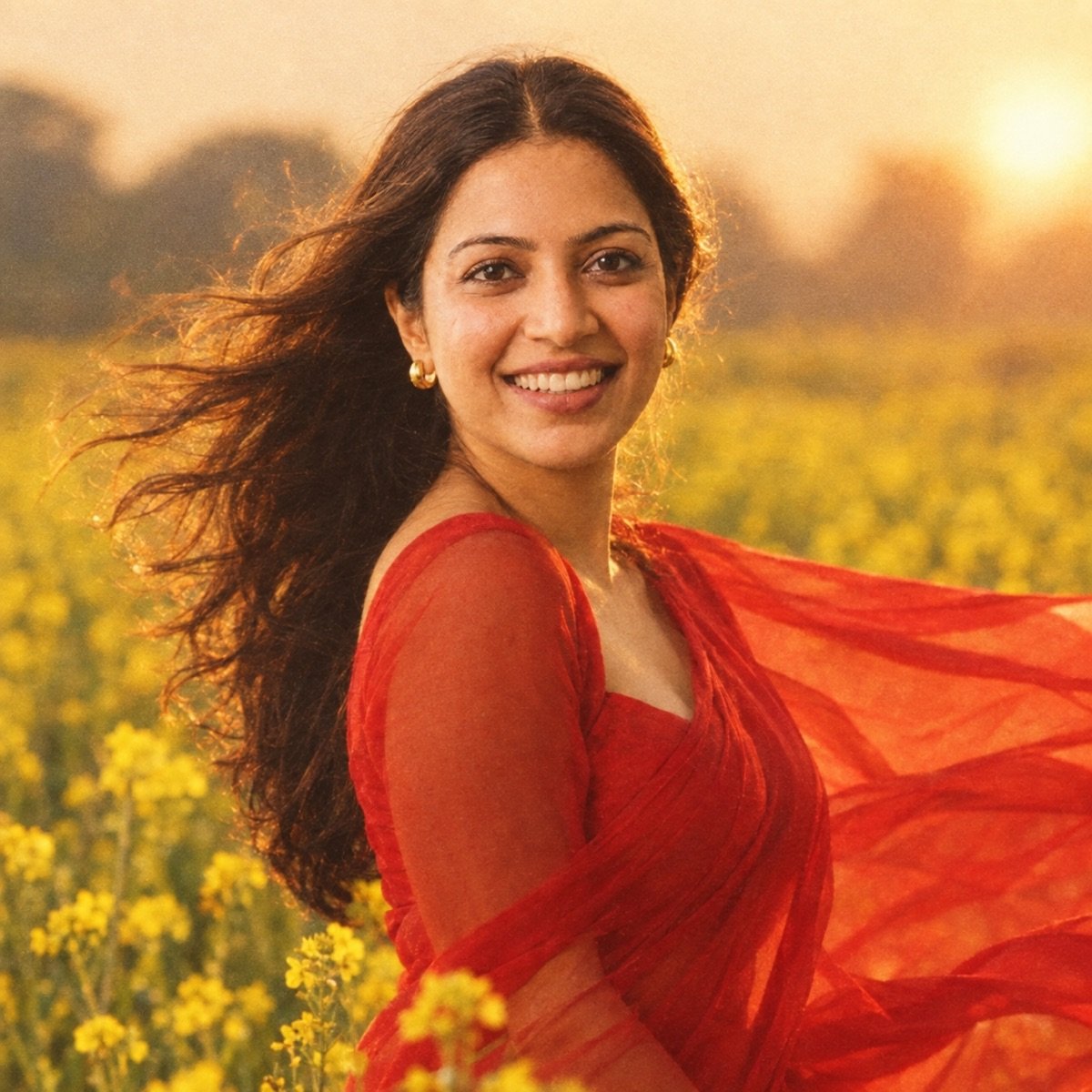
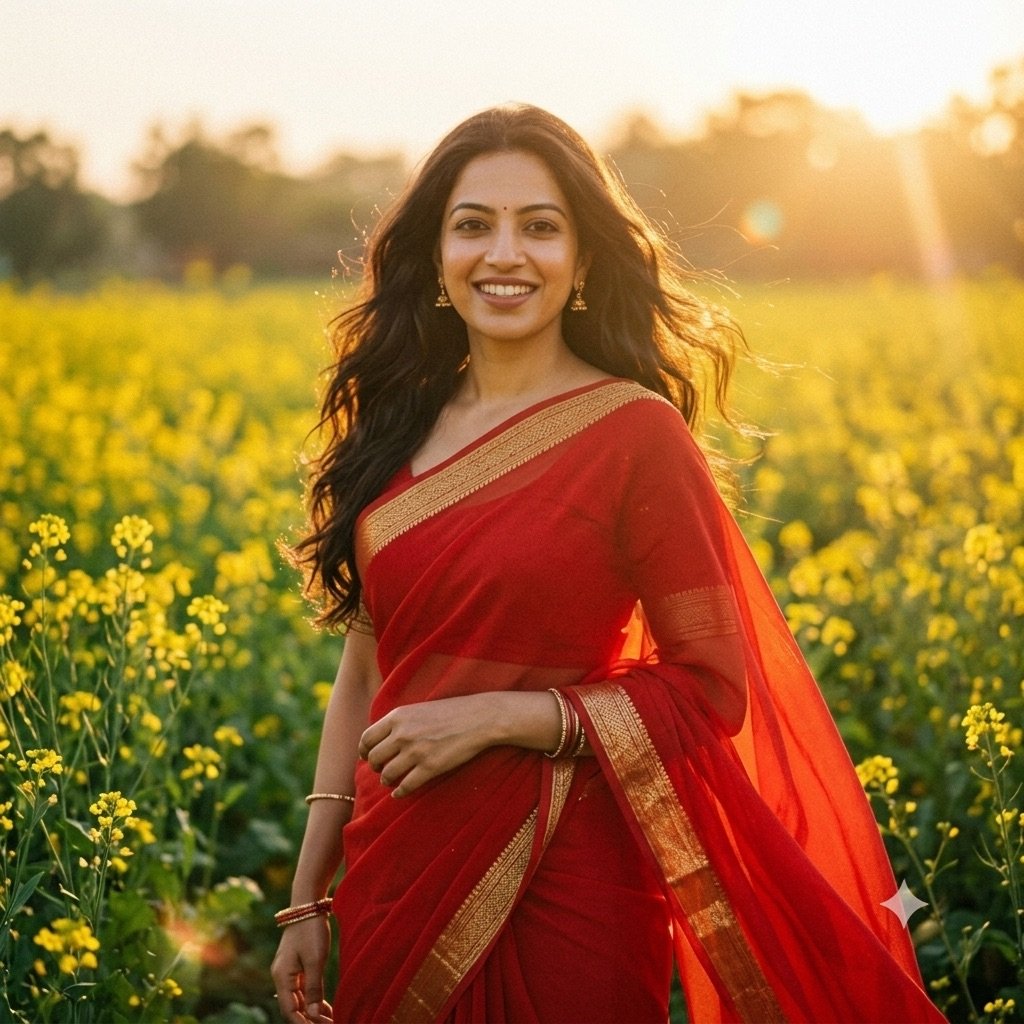
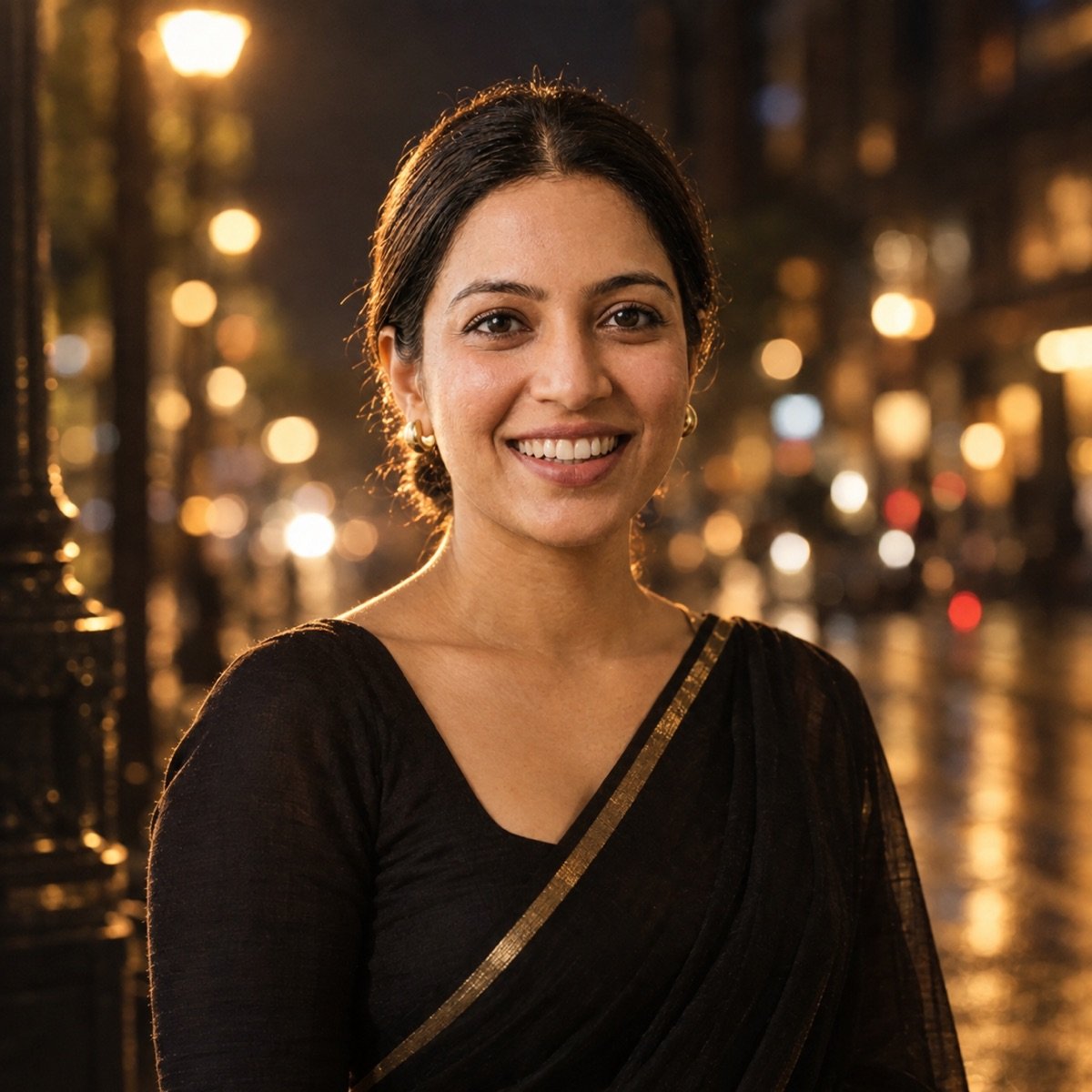
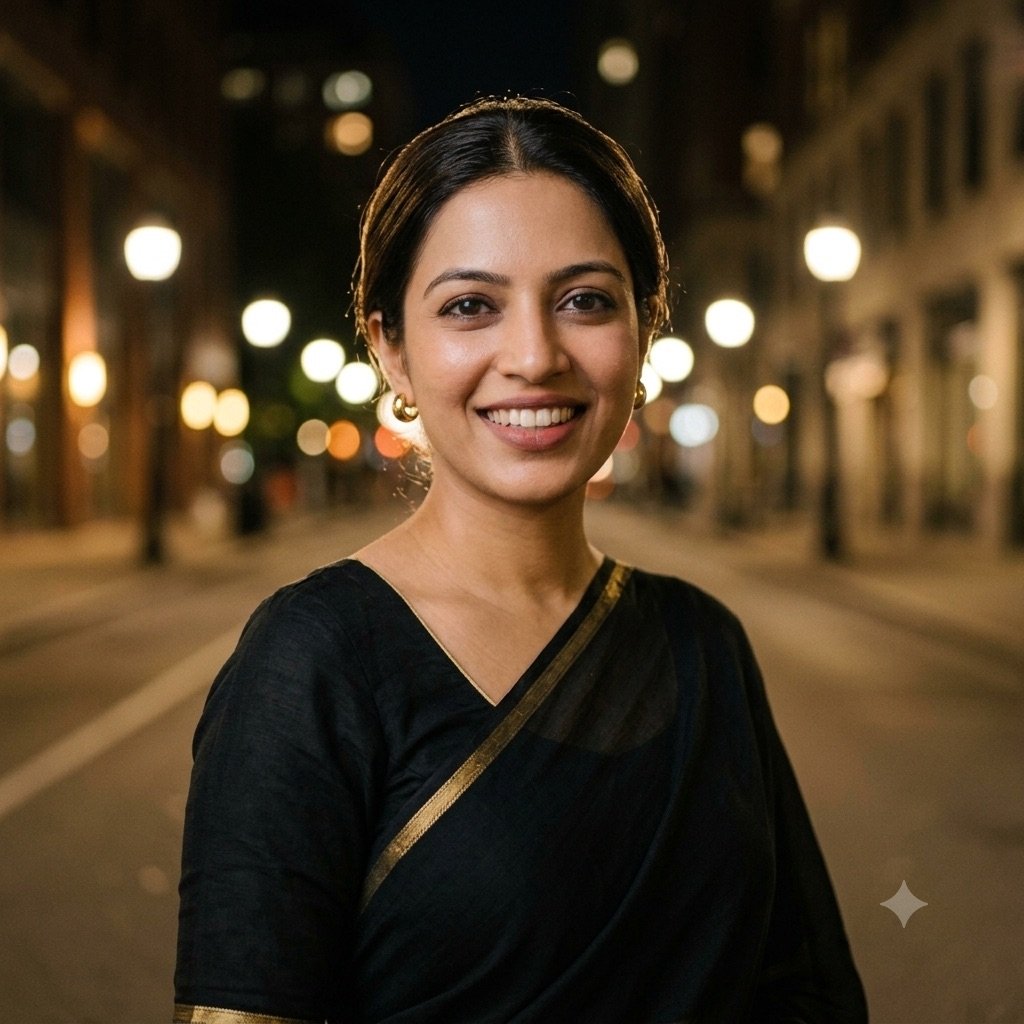
Most people search with Gemini’s name, and Gemini is a fine place to start. But the two apps run different image models — Gemini uses Google’s Nano Banana, ChatGPT uses OpenAI’s GPT Image — and they are good at different things. The closest evidence we have for these prompts is our prompt seen test, where we ran 13 prompts through both apps with the same reference photos and kept the first output — ten of them featuring the same woman, alone or with a partner. Two of those saree edits are below; the prompts that made them are on the prompt seen page, not this one.
From our prompt seen test: a 90s chiffon saree portrait, same prompt, first output
From our prompt seen test: a black saree night portrait, same prompt, first output
The woman’s edits in our prompt seen test
| Face kept (10 edits) | Added a bindi nobody asked for | |
|---|---|---|
| ChatGPT | 10 of 10 | 2 edits |
| Gemini | 9 of 10 | 4 edits |
So both apps kept her face almost every time, and the difference is in the details. For solo portraits where the styling matters — the drape, the light, the grain — try ChatGPT first: it kept the woman’s face in all ten edits and followed lighting and styling cues more closely. For movement, like the lehenga twirl in prompt 3, Gemini did better in the same test, catching the garba swirl mid-movement. For lettering — the birthday neon sign, the horror poster title — use ChatGPT. If one app misses, run the same prompt in the other.
The two engines, from our 90-image benchmark
| What a girl prompt needs | Nano Banana 2 (Gemini) | GPT Image 2 (ChatGPT) |
|---|---|---|
| Instruction-following (outfit, place, light and pose in one prompt) | 9.5 — best of 10 tools | 9.2 |
| Portrait realism (skin, light on a face) | 9.2 | 9.5 — best of 10 tools |
| Hands (holding a cake, an umbrella, a lantern) | 9.7 — best of 10 tools | 9.0 |
| Text (a neon birthday sign, a poster title) | 9.0 | 9.8 — best of 10 tools |
| Overall average (9 prompts) | 9.4 | 9.4 |
A tie overall, split by skill. The full ranking of all ten models is on the benchmark leaderboard.
Before you upload your photo
- Use the official apps. Plenty of “girl prompt” websites have appeared with the trend. The prompt is plain text, so you never need to pay for one, install anything or upload your photo to a site’s own “generator”. In ChatGPT you can stop your chats being used for training (Settings → Data Controls → “Improve the model for everyone”) and delete chats; in Gemini you can turn off Keep Activity and delete your activity.
- Only edit yourself, or people who said yes. Restyling a friend’s or a stranger’s photo without asking is exactly the misuse these tools get criticised for.
- These prompts are for adults. Do not run them on photos of children or teenagers; once uploaded, you have little control over where a child’s face ends up.
- Say it is AI. Images made or edited in Gemini carry an invisible SynthID watermark, but a saree portrait that looks real can still be mistaken for a real photo. Say it is an AI edit in the caption.
Frequently asked questions
What is the best prompt for Gemini AI girl photos?
There is no single best one; it depends on the look. For a first try, use prompt 1, a pastel saree portrait that suits almost any photo. For a traditional look, use prompt 4; for a birthday, prompt 6; for horror, prompt 14. Each ends with a line telling Gemini to keep your face.
How do I use a girl prompt in Gemini?
Open a new chat in Gemini, attach one clear, front-facing photo of yourself, paste the prompt and send. Check that the face still looks like you before you post; if it does not, regenerate or run the same prompt in ChatGPT. Start a new chat for every look.
Do these girl prompts work in ChatGPT?
Yes, every prompt here runs in ChatGPT unchanged. ChatGPT’s free plan allows only a few images a day, a number OpenAI changes with demand. It is the better choice for prompts with lettering, like the birthday neon sign: in our 90-image benchmark, its image model scored 9.8 for text, the best of ten tools.
What is the prompt seen girl saree trend?
It is the saree branch of the “prompt seen” trend: prompts that restyle a woman’s photo into a saree portrait, shared on Instagram so others can copy them. This page has a pastel organza, a Kanjeevaram silk and a Diwali saree look; two more saree portraits and a retro studio look, with results from both apps, are on our prompt seen page.
How do I make a horror girl photo with AI?
Use prompt 14 or 15. Keep the fear in the setting — an empty corridor, fog, one weak light, a cold colour grade — and keep yourself looking like you, calm and a little uneasy. Say “no blood or gore”; a horror film still is more striking than a monster.
Is there a free beautiful girl prompt generator?
You do not need one. A good prompt is five parts in order — outfit, setting, light, colour and texture, pose — followed by the face-lock line. The template on this page lets you fill them in for any look, free.
Why does my AI photo not look like me?
Identity drift is the most common failure in AI photo edits. Use a sharp, front-facing photo without filters, keep “Keep my face exactly the same as the uploaded photo” at the end of the prompt, and regenerate. If it keeps missing, switch between Gemini and ChatGPT.
Why did Gemini add a bindi to my photo?
Both apps sometimes add a bindi to Indian-styled portraits without being asked. In our prompt seen test, Gemini did it in 4 of the woman’s 10 edits and ChatGPT in 2. Add “no bindi” to the prompt, or ask for one if you want it.
Gemini AI girl photo prompt kaise banaye?
Prompt copy karo, Gemini ya ChatGPT mein nayi chat kholo, apni ek saaf front-facing photo attach karo, prompt paste karke send karo. Prompt ke end wali line “keep my face exactly the same” mat hatao, warna chehra badal sakta hai. In English: copy a prompt, attach one clear photo in a new chat, paste and send, and keep the face-lock line.
Is it safe to upload my photo to Gemini or ChatGPT?
Stick to the official apps, where you can delete your chats and stop them being used for training. Avoid prompt sites that ask you to upload a photo to their own generator: the prompt works in Gemini and ChatGPT directly, so there is no reason to hand your face to a middleman.